
Google Earth's Flight Simulator Is Now Available Directly in the Web Browser
Google has ported its popular 3D flight simulator from its desktop application to the web, allowing users to fly over global satellite imagery without installing any software.
By Factlen Editorial Team
- Casual Explorers
- Value the accessibility and ease of use for virtual sightseeing.
- Web Platform Advocates
- View the release as a technical milestone for browser capabilities.
- Aviation Purists
- Note the simplified physics and lack of true simulation features.
What's not represented
- · Educators who might use the tool for geography lessons
- · Developers of competing standalone flight simulation software
Why this matters
By moving a data-heavy 3D simulation into the browser, Google is democratizing access to virtual exploration while proving that modern web platforms can handle complex, streaming graphical environments that once required dedicated gaming PCs.
Key points
- Google Earth's flight simulator is now available globally in standard web browsers.
- The feature requires no software installation or downloads.
- Users can fly anywhere on Earth using dynamically loaded 3D satellite imagery.
- The simulator features simplified physics and does not include takeoffs or landings.
- The update is part of Google's push to bring pro-level desktop features to the web.
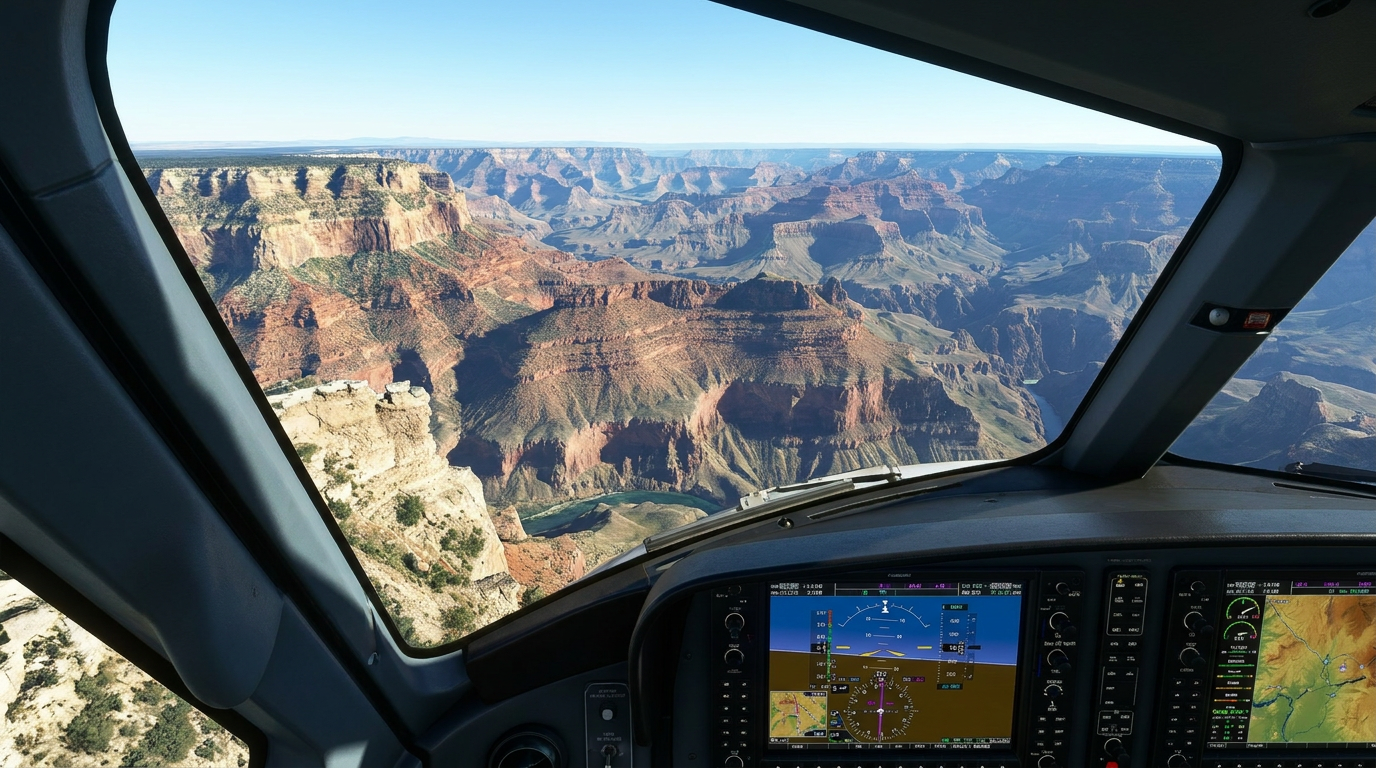
The joy of virtual flight just became universally accessible as Google officially launches its beloved Google Earth flight simulator directly into the web browser, untethering the feature from its desktop software origins. The update, rolled out globally this week, transforms any modern web browser into a virtual cockpit. Users can now soar over the Grand Canyon, buzz the Eiffel Tower, or do barrel rolls over their own neighborhoods without downloading a single megabyte of dedicated software. Originally introduced as a hidden Easter egg in the Google Earth desktop application back in 2007, the flight simulator has long been a favorite tool for geography enthusiasts and virtual explorers who wanted to experience the planet from a completely new vantage point. By bringing it to the web, Google has democratized access to one of its most entertaining hidden features.[1][2][3][4]
For years, accessing this immersive aerial experience required installing the heavy Google Earth Pro desktop client, a step that often deterred casual users from ever discovering the feature. Now, the experience lives just a browser tab away, sitting alongside email and standard web searches, making it instantly available to anyone with a stable internet connection. Accessing the new feature is remarkably straightforward and requires no technical expertise. Users simply navigate to the Google Earth website, click the 'Explore Earth' button at the top of the interface, open the 'Tools' menu, and select 'Flight Simulator.' This frictionless entry point is a significant shift from the days of downloading large executable files, reflecting a broader industry trend toward cloud-based application delivery.[1][5][6]

Once engaged, the simulator places the user directly in the sky, ready to fly without the need to navigate complex runway procedures. The controls are intuitively mapped to the standard keyboard and mouse, ensuring that anyone can pilot the virtual aircraft regardless of their gaming experience. Arrow keys manage the aircraft's pitch and roll, allowing users to dive toward the ground or bank sharply around skyscrapers, while the Page Up and Page Down keys control the engine's thrust. While the interface does not display a full dashboard of instruments on the screen, the simplicity of the control scheme allows users to focus entirely on the breathtaking views unfolding beneath them as they navigate the digital globe.[3][4]
Google explicitly notes in its developer documentation that the tool is designed for 'casual exploration rather than high-fidelity aerodynamic training.' Unlike heavyweight, dedicated titles such as Microsoft Flight Simulator, users cannot perform complex takeoffs or landings, and there are no intricate avionics panels or weather systems to manage. The physics are intentionally simplified to prioritize immediate fun and accessibility over strict realism. If a pilot pushes the aircraft too hard, attempts an impossible maneuver, or simply loses control and crashes into the terrain, the simulation simply ends the run and resets. This forgiving design allows users to try again immediately without any penalty, encouraging them to experiment with extreme flights and low-altitude passes over famous landmarks.[2][3][6]
The physics are intentionally simplified to prioritize immediate fun and accessibility over strict realism.
The real magic of the browser-based experience lies in the environment itself and the technology powering it. The simulator leverages Google Earth's massive, globally comprehensive database of satellite imagery and 3D terrain, streaming the data dynamically as the user flies over the digital globe. By default, the simulator uses an abstract basemap to ensure smooth performance across a variety of devices, but switching the view to 'Satellite' overlays high-resolution, photorealistic textures onto the 3D geometry of cities, valleys, and mountain ranges. This dynamic loading is a technical marvel for a web application, pulling gigabytes of geospatial data from Google's servers and rendering it in real-time as the virtual aircraft speeds across the landscape.[1][4][6]

Despite the impressive optimization, streaming a 3D planet into a web browser does come with certain hardware and network caveats. Google warns that flying at extreme speeds or using a low-bandwidth internet connection might result in temporary loading delays or visual glitches as the browser struggles to render the massive influx of incoming geospatial data. Users on older machines or sluggish Wi-Fi networks may notice buildings popping into view or textures appearing blurry until they catch up with the aircraft's position. However, for users with modern computers and standard broadband connections, the experience remains remarkably fluid, proving that the web has matured enough to handle graphical workloads that would have melted a browser just a few years ago.[5][6]
The release of the web-based flight simulator is not an isolated novelty; it is part of a broader, ongoing strategy by Google to migrate professional-grade geospatial tools from its legacy desktop software directly to the web interface. Over the past year, Google has steadily added advanced features like elevation profiles, new import types, and complex data layers to the browser version of Earth. By moving the flight simulator—a feature that requires intense graphical processing—to the web, Google is signaling that the desktop application is no longer strictly necessary for either professional analysis or casual entertainment. This transition highlights the company's commitment to making its most powerful tools universally accessible without the friction of local software installation.[2][3][4]

Ultimately, by moving the flight simulator to the browser, Google isn't necessarily trying to compete with hardcore aviation simulators that demand dedicated gaming rigs and expensive peripherals. Instead, the company is proving a point about platform gravity and the rapidly evolving power of modern web applications. It serves as a vivid demonstration that the browser is now a highly credible runtime environment for complex, data-heavy 3D experiences. The update breathes new life into a classic digital toy, offering millions of users a frictionless, entertaining way to experience the scale and beauty of the planet from their laptops, while simultaneously showcasing the incredible technical infrastructure that makes such an experience possible.[1][2]
How we got here
2007
Google introduces the flight simulator as a hidden Easter egg in the Google Earth desktop app.
2024
Google Earth adds historical recreations and time-travel features to its web interface.
June 2026
The flight simulator officially launches globally for the web browser version of Google Earth.
Viewpoints in depth
Casual Explorers
Users who value the accessibility and sheer joy of virtual flight without technical barriers.
For the casual user, the browser-based simulator is a frictionless gateway to global exploration. Without the need to download gigabytes of data or own a high-end gaming PC, anyone can instantly experience the thrill of buzzing over their childhood home or soaring through the Alps. The simplified physics are seen as a feature, not a bug, allowing users to focus on the scenery rather than complex aerodynamic controls.
Web Platform Advocates
Technologists who view the release as a milestone for browser capabilities.
From a technical perspective, rendering a dynamically loading, 3D-mapped globe at flight speeds entirely within a web browser is a significant achievement. Platform advocates point to this release as proof that the era of heavy, installed desktop applications is waning. By successfully streaming complex geospatial data and physics calculations through a standard web tab, Google is demonstrating that the browser can serve as a robust runtime for intensive applications.
Aviation Purists
Simulation enthusiasts who note the tool's limitations compared to dedicated software.
Hardcore simulation fans acknowledge the fun of Google's tool but are quick to highlight its limitations. Because the simulator lacks takeoff and landing mechanics, realistic weather modeling, and authentic avionics, it cannot serve as a true training tool. For these purists, the Google Earth simulator remains an entertaining toy rather than a competitor to heavyweight titles like Microsoft Flight Simulator, which prioritize high-fidelity aerodynamic realism.
What we don't know
- Whether Google plans to add more complex mechanics, like takeoffs and landings, to the web version in the future.
- If additional aircraft models will be introduced to the browser-based simulator.
Key terms
- Flight Simulator
- Software that artificially recreates aircraft flight and the environment in which it flies, used for training or recreation.
- Dynamic Loading
- A computing process where data, such as 3D buildings and maps, is downloaded and rendered on the fly as the user moves through a virtual environment.
- Basemap
- The foundational layer of map data onto which other information, textures, or 3D models are overlaid.
- Pitch and Roll
- Aviation terms describing the movement of an aircraft; pitch refers to the nose moving up or down, while roll refers to the wings tilting left or right.
Frequently asked
Do I need to download anything to play?
No, the flight simulator runs entirely within your web browser on the Google Earth website.
Can I take off and land the plane?
No, the browser version places you directly in the air and is designed for casual exploration rather than realistic aerodynamic training.
How do I control the aircraft?
You can use your mouse or keyboard arrow keys to control the pitch and roll, and the Page Up and Page Down keys to adjust thrust.
Does it work on mobile devices?
Currently, the experimental flight simulator is only available on the web version of Google Earth for desktop browsers.
Sources
Source coverage
6 outlets
3 viewpoints surfaced






[1]ExtremeTechWeb Platform Advocates
Google Earth's Free Flight Simulator Lets You Zip Around the World Without a High-End PC
Read on ExtremeTech →[2]EngadgetCasual Explorers
Google Earth's flight simulator mode is now available in your browser
Read on Engadget →[3]CNETCasual Explorers
Google Earth's Flight Simulator Is Now on Browsers: Here's How to Play
Read on CNET →[4]TechEBlogWeb Platform Advocates
Google Earth's Flight Simulator Arrives on the Web for Quick Aerial Adventures
Read on TechEBlog →[5]LifehackerCasual Explorers
Google Earth Has a Hidden Flight Simulator
Read on Lifehacker →[6]Google for DevelopersAviation Purists
Fly around the world (Experimental) | Google Earth
Read on Google for Developers →

Every angle. Every day.
Get technology stories with full source coverage and perspective breakdowns delivered to your inbox.