
The Rise of Local AI: How to Run Powerful LLMs on Your Own Laptop
Advances in model compression and user-friendly software have made it possible to run frontier-level artificial intelligence entirely offline. This shift empowers users with unparalleled privacy, zero subscription fees, and complete control over their data.
By Factlen Editorial Team
- Privacy & Enterprise IT
- Argues that local AI is the only compliant way to use generative models in regulated industries.
- Open-Source Developers
- Values the freedom to tinker, fine-tune, and run uncensored models without corporate oversight.
- Hardware Enthusiasts
- Focuses on the technical challenge of optimizing VRAM and generation speeds on consumer GPUs.
What's not represented
- · Hardware Manufacturers
- · Environmental Analysts
Why this matters
Sending proprietary code, sensitive patient data, or confidential business strategies to cloud providers introduces significant privacy risks. Running AI locally ensures that every prompt and response stays strictly on your machine, fundamentally changing how professionals interact with generative AI.
Key points
- Local AI allows users to run Large Language Models entirely offline, ensuring absolute data privacy.
- Quantization techniques compress massive neural networks by up to 75%, allowing them to fit in standard laptop RAM.
- Tools like Ollama and LM Studio have eliminated the need for coding knowledge to set up a local model.
- Apple Silicon's unified memory architecture provides a significant advantage for running large models without a dedicated GPU.
- While local models excel at privacy and cost savings, they still lag behind massive cloud models in complex, multi-step reasoning.
For the past few years, interacting with artificial intelligence meant opening a web browser and renting computing power from a massive data center. Every prompt, every question, and every line of code was sent over the internet to servers owned by tech giants. But in 2026, a quiet revolution is taking place on the desks of developers, researchers, and everyday users. Advances in model compression and user-friendly software have made it entirely possible to run highly capable Large Language Models (LLMs) directly on consumer laptops. This shift from the cloud to the local machine is fundamentally changing the relationship between humans and AI, turning a rented service into a privately owned utility.[7]
The momentum behind local AI is not just driven by hobbyists; it is a direct response to the growing capabilities of open-weights models. Tech giants and open-source communities alike are releasing highly optimized models that punch far above their weight class. Instead of requiring a server rack of specialized hardware, these streamlined neural networks are designed to operate within the constraints of a standard computer. This democratization of AI means that anyone with a modern laptop can now possess a digital assistant that reads, writes, and codes without ever pinging an external server.[1][2]
The primary catalyst for this migration away from the cloud is privacy. When users interact with a cloud-based LLM, their input—whether it is a casual question or a proprietary business strategy—is transmitted over the internet. Depending on the provider's terms of service, this data might be stored, analyzed, or even used to train future iterations of the model. For general queries, this is rarely an issue. However, for professionals handling sensitive information, the risks are severe. High-profile incidents of corporate data leaks have made organizations acutely aware of the dangers of pasting internal documents into public chatbots.[4][5]
In heavily regulated industries like healthcare, finance, and defense, data residency is not just a preference; it is a legal requirement. Hospitals analyzing patient records or law firms summarizing confidential case files simply cannot afford the liability of sending that data to a third-party cloud provider. Local LLMs solve this problem elegantly. Because the model lives entirely on the user's hard drive, the data never leaves the machine. This air-gapped approach allows professionals to leverage cutting-edge generative AI while maintaining strict compliance with privacy regulations like HIPAA and corporate non-disclosure agreements.[4][5]

Beyond privacy, the financial mechanics of local AI are highly attractive to heavy users. Cloud-based AI services typically operate on a subscription basis or a pay-per-token API model. While a $20 monthly fee or a fraction of a cent per token might seem negligible at first, these costs compound rapidly for developers building applications or enterprises processing thousands of documents daily. Running an AI locally flips this dynamic. While there is an upfront cost for capable hardware, the marginal cost of generating a response drops to zero. Users can run massive batch processes or chat all day without watching a meter tick upward.[5][8]
Offline availability is another massive advantage that cloud models inherently lack. Cloud AI requires a constant, stable internet connection to function. If you are on a flight, working in a remote location, or dealing with a network outage, your cloud-based assistant is useless. Local models, once downloaded, are entirely self-contained. They provide a reliable, always-on intelligence layer that works regardless of your connectivity status. For researchers in the field or developers working in secure, internet-restricted environments, this offline capability is a game-changer.[4][5]
So, how is it technically possible to fit a model that cost millions of dollars to train onto a standard laptop? The answer lies in a mathematical compression technique known as quantization. In their raw form, frontier AI models use high-precision numbers (typically 16-bit floats) to store the billions of "weights" or parameters that make up their neural network. This requires massive amounts of memory—often upwards of 30 to 40 gigabytes for a mid-sized model, which far exceeds the capacity of a normal computer.[2][7]
Quantization solves this by reducing the precision of these numbers, effectively rounding them down to 8-bit or even 4-bit formats. While this sounds like it would severely damage the AI's intelligence, researchers have found that neural networks are incredibly resilient. By using optimized formats like GGUF, a massive 30GB model can be compressed down to a highly manageable 5GB file. This 60 to 75 percent reduction in size results in only a negligible drop in response quality, allowing these powerful models to fit comfortably within the RAM of a standard consumer laptop.[1][3]

While quantization solved the hardware problem, the software layer used to be a massive barrier to entry. Just a few years ago, running a local model required navigating complex Python environments, installing specific dependencies, and troubleshooting obscure command-line errors. Today, the ecosystem has matured dramatically. A new generation of software tools has abstracted away the complexity, making the installation of a local LLM as simple as downloading a web browser or a chat application.[1][6]
While quantization solved the hardware problem, the software layer used to be a massive barrier to entry.
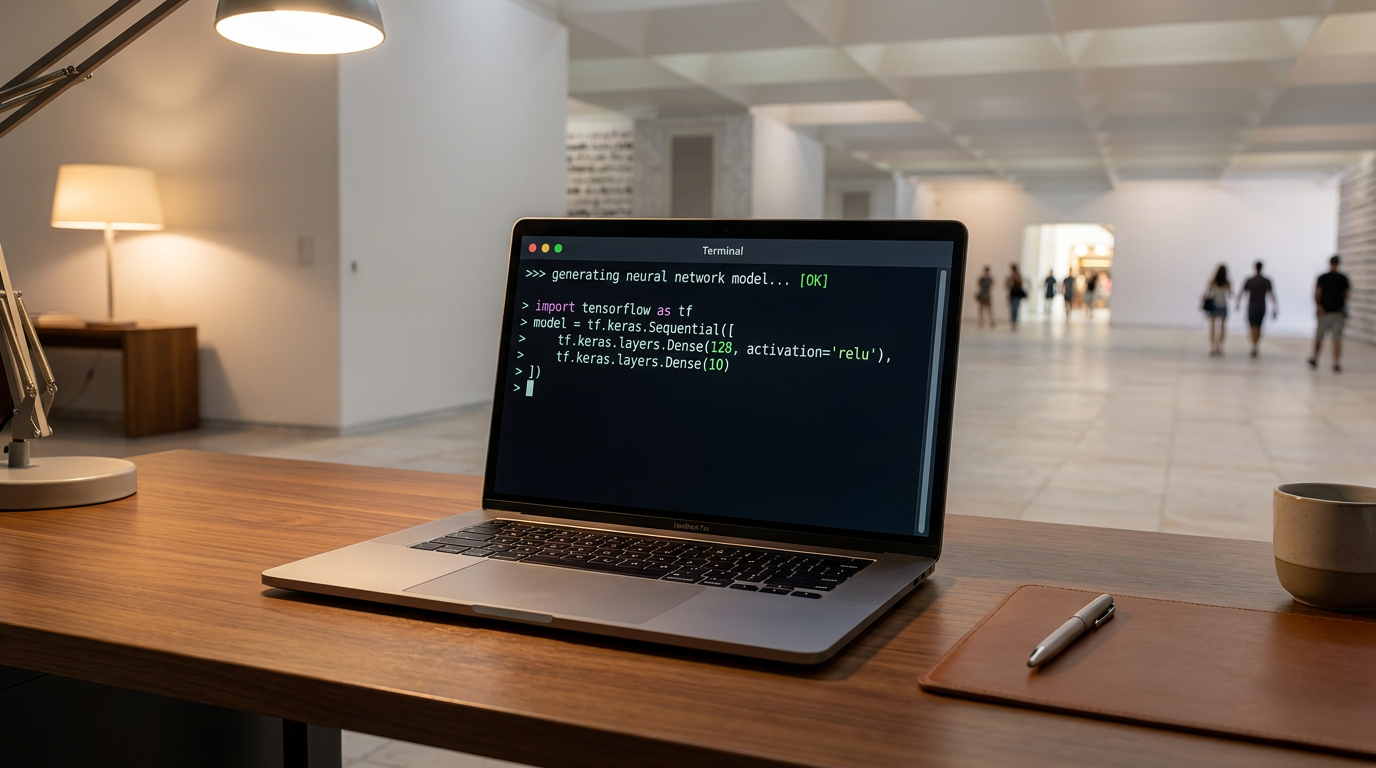
For users who prefer a streamlined, terminal-based experience, Ollama has emerged as the industry standard. Ollama operates as a lightweight command-line tool that handles all the heavy lifting behind the scenes. With a single command—like `ollama run llama3.1`—the software automatically downloads the correct quantized model, configures the hardware settings, and launches a chat interface right in the terminal. It also spins up a local API server, allowing developers to easily plug the local AI into their own custom applications.[1][6]
For those who want a more visual, user-friendly experience, tools like LM Studio and Jan provide polished graphical interfaces. LM Studio looks and feels much like the popular cloud chatbots users are already familiar with. It features a built-in search engine to discover and download new models, a clean chat window, and visual sliders to adjust the AI's behavior. These applications automatically detect whether the user has a dedicated GPU or Apple Silicon, optimizing the model's performance without requiring any manual configuration.[1][6][9]
The models themselves have also seen a massive leap in efficiency in 2026. Meta's Llama 4 family and Google's Gemma 4 series are currently dominating the local landscape. These open-weights models are trained on vast amounts of data and offer reasoning capabilities that rival the best closed-source models from just a year or two ago. The 8-billion parameter versions of these models are considered the "sweet spot" for local use, offering a perfect balance of speed, intelligence, and low memory requirements.[1][2]
Beyond general-purpose chat, the local ecosystem is rich with specialized models tailored for specific tasks. Microsoft's Phi-4-mini is an engineering marvel designed specifically for ultra-low-resource machines, capable of running smoothly on laptops with just 4GB of RAM. On the other end of the spectrum, models like Alibaba's Qwen 3.6 and DeepSeek R1 are heavily optimized for coding and complex mathematical reasoning. Developers can swap between these models in seconds, using a coding specialist for programming tasks and a generalist for writing emails.[1][2]
Despite these software and compression advancements, hardware still dictates the local AI experience. The most critical specification is no longer raw processing power, but memory. To run a capable 7-billion or 8-billion parameter model in 2026, 8GB of RAM is the absolute minimum baseline. At this tier, the model will load and generate text, but it will consume most of the system's resources, leaving little room for heavy multitasking.[1][3]

For a truly seamless experience, 16GB of RAM is the recommended sweet spot. This is where Apple's M-series chips (M1 through M4) have a distinct architectural advantage. Unlike traditional PCs that separate system RAM from graphics memory, Apple Silicon uses "unified memory." This allows the built-in GPU to access the entire pool of system RAM directly. As a result, a standard MacBook Pro can effortlessly load and run large AI models that would otherwise require an expensive, dedicated graphics card on a Windows machine.[3][6]
For Windows and Linux users, having a dedicated graphics card with ample Video RAM (VRAM) is the key to fast generation speeds. While tools like `llama.cpp` allow models to run entirely on the CPU, the text generation speed will be noticeably slower—often around 3 to 8 words per second. By offloading the computation to an NVIDIA RTX 50-series or 40-series GPU, the generation speed skyrockets, often producing text faster than a human can read. Cards with 12GB to 16GB of VRAM, such as the RTX 5060 Ti, are highly sought after for this exact purpose.[3][6]
Of course, running AI locally is not without its trade-offs. The most immediate impact is on battery life and thermals. Generating text with a neural network is a mathematically intense process that maxes out the processor or GPU. Running a local LLM on a laptop will cause the cooling fans to spin up and will drain the battery significantly faster than normal web browsing. Furthermore, users are entirely responsible for their own security updates and model maintenance, taking on the role of their own IT administrator.[4][6]
There is also an undeniable intelligence gap at the absolute high end. While a local 8-billion parameter model is incredibly smart, it cannot match the encyclopedic knowledge, nuanced reasoning, or advanced multimodal capabilities of a massive trillion-parameter cloud model like GPT-4.5. If a task requires deep, multi-step logical deduction or the ability to browse the live internet for real-time information, cloud models still hold a significant advantage. Local models are best viewed as highly capable daily drivers, rather than omniscient oracles.[2][7]

Security is another double-edged sword. While local models protect your data from corporate cloud providers, they also require you to be vigilant about what you download. The open-source AI community moves incredibly fast, and downloading unverified model files from untrusted sources can introduce malware or vulnerabilities into your system. Sticking to reputable platforms and using established tools like Ollama or LM Studio mitigates this risk, but it requires a level of digital hygiene that cloud users don't have to think about.[4][6]
Ultimately, the rise of local LLMs represents a fundamental shift in how we view artificial intelligence. AI is transitioning from a centralized, rented service into a decentralized, personal utility. Just as the calculator, the spell-checker, and the search engine became standard, offline tools built into our operating systems, generative AI is following the exact same trajectory. By putting the power of neural networks directly into the hands of users, local AI ensures that the future of computing remains private, accessible, and entirely under our control.[7]
How we got here
2023
The release of LLaMA by Meta sparks the open-source AI movement, though running it requires complex programming knowledge.
Early 2024
The GGUF quantization format is widely adopted, allowing massive models to be compressed and run on standard CPUs.
Late 2024
Tools like Ollama and LM Studio launch, providing simple, one-click graphical interfaces for local AI.
2026
Highly capable 8-billion parameter models like Llama 4 and Gemma 4 make local AI a viable daily driver for coding and writing.
Viewpoints in depth
Privacy Advocates & Enterprise IT
Argues that local AI is the only compliant way to use generative models in regulated industries.
For hospitals, law firms, and defense contractors, cloud AI is often a non-starter due to HIPAA, NDAs, and strict data residency laws. This camp views local LLMs not as a cost-saving measure, but as a mandatory security protocol. They emphasize that once data leaves the corporate firewall, it is inherently compromised, making offline models the only viable path forward for enterprise adoption.
Open-Source Developers
Values the freedom to tinker, fine-tune, and run uncensored models without corporate oversight.
This community champions local AI as a democratization of technology. They argue that relying on a handful of mega-corporations for AI access creates a dangerous bottleneck. By running open-weights models locally, developers can strip away restrictive guardrails, fine-tune the AI on highly specific niche data, and build autonomous agents that don't break when a cloud provider changes its API pricing or terms of service.
Cloud AI Providers
Maintains that the most advanced reasoning and multimodal capabilities will always require massive data centers.
Proponents of cloud-based AI point out that while local models are impressive, they cannot compete with the sheer parameter count and real-time internet access of frontier models like GPT-4.5 or Claude 3.5. They argue that for complex, multi-step reasoning, massive parallel processing in server farms is required. In their view, local AI is a useful auxiliary tool, but the heavy lifting will permanently reside in the cloud.
What we don't know
- Whether Apple or Microsoft will eventually bake these open-weights models directly into their operating systems by default.
- How future regulations around AI safety might impact the public distribution of uncensored, open-weights models.
- Whether the hardware requirements for local AI will continue to drop, or if the increasing size of frontier models will outpace consumer RAM growth.
Key terms
- Local LLM
- A Large Language Model that runs entirely on your own computer's hardware rather than on a remote cloud server.
- Quantization
- A compression technique that reduces the precision of an AI model's weights, drastically shrinking its file size and memory requirements with minimal loss in intelligence.
- GGUF
- A popular file format optimized for running quantized AI models efficiently on standard consumer hardware, particularly CPUs and Apple Silicon.
- Open-weights
- AI models where the core neural network data (the weights) is publicly available to download and run, even if the training data or code isn't fully open-source.
- VRAM
- Video RAM is the dedicated memory on a graphics card, which is crucial for loading and running large AI models quickly.
Frequently asked
Do I need an internet connection to use a local LLM?
No. Once you download the model file and the software, the AI runs entirely offline. You can use it on an airplane or in a secure facility with no Wi-Fi.
Is it completely free to run AI locally?
Yes, there are no subscription fees or per-token API costs. The only cost is the initial hardware investment and the electricity required to run your computer.
Can a local model code as well as ChatGPT?
While local models are highly capable, a 7-billion parameter model running on a laptop won't match the complex reasoning of a massive cloud model. However, specialized local models like Qwen 3.6 or DeepSeek R1 are excellent for everyday coding tasks.
Do I need a massive gaming GPU?
No. While a dedicated GPU speeds up response times, modern tools can run quantized models entirely on a standard CPU, provided you have at least 8GB of RAM.
Sources
Source coverage
9 outlets
3 viewpoints surfaced









[1]AIThinkerLabOpen-Source Developers
How to Run AI Models Locally in 2026 (8 Tested Offline Tools)
Read on AIThinkerLab →[2]AIML InsightsOpen-Source Developers
Best Open Source LLMs for Local Use in 2026 Compared
Read on AIML Insights →[3]HostrunwayHardware Enthusiasts
Best GPU for Local LLMs 2026 | Ollama & LM Studio Guide
Read on Hostrunway →[4]IGNESAPrivacy & Enterprise IT
The Truth About Local LLMs: When You Actually Need Them
Read on IGNESA →[5]ApX Machine LearningPrivacy & Enterprise IT
Benefits of Running LLMs Locally
Read on ApX Machine Learning →[6]Sesame DiskHardware Enthusiasts
How to Run AI Models Locally in 2026: Hardware, Tools & Setup
Read on Sesame Disk →[7]Factlen Editorial TeamOpen-Source Developers
Synthesis by Factlen editorial team
Read on Factlen Editorial Team →[8]MediumPrivacy & Enterprise IT
Costs and benefits of your own LLM
Read on Medium →[9]VellumOpen-Source Developers
10 Best Local AI Assistants in 2026
Read on Vellum →

More in ai
See all 6 stories →Open Source AI
Open-Source AI Reaches Frontier Parity as MiniMax M3 and Local Agents Break the Cloud Monopoly
0 sources
Materials Science
How AI is Compressing Decades of Battery Research into Days
0 sources

AI in Medicine
UK Launches World's First AI Regulatory Sandbox to Transform Medicines Safety and Drug Development
0 sources

On-Device AI
How On-Device AI and Small Language Models Are Reshaping Tech
0 sources

Every angle. Every day.
Get ai stories with full source coverage and perspective breakdowns delivered to your inbox.