
Best E-Ink Tablets of 2026: Trade-Offs Between reMarkable, Kindle Scribe, and BOOX
As the E-Ink market matures, buyers must choose between distraction-free writing, seamless reading ecosystems, and versatile Android hybrids.
By Factlen Editorial Team
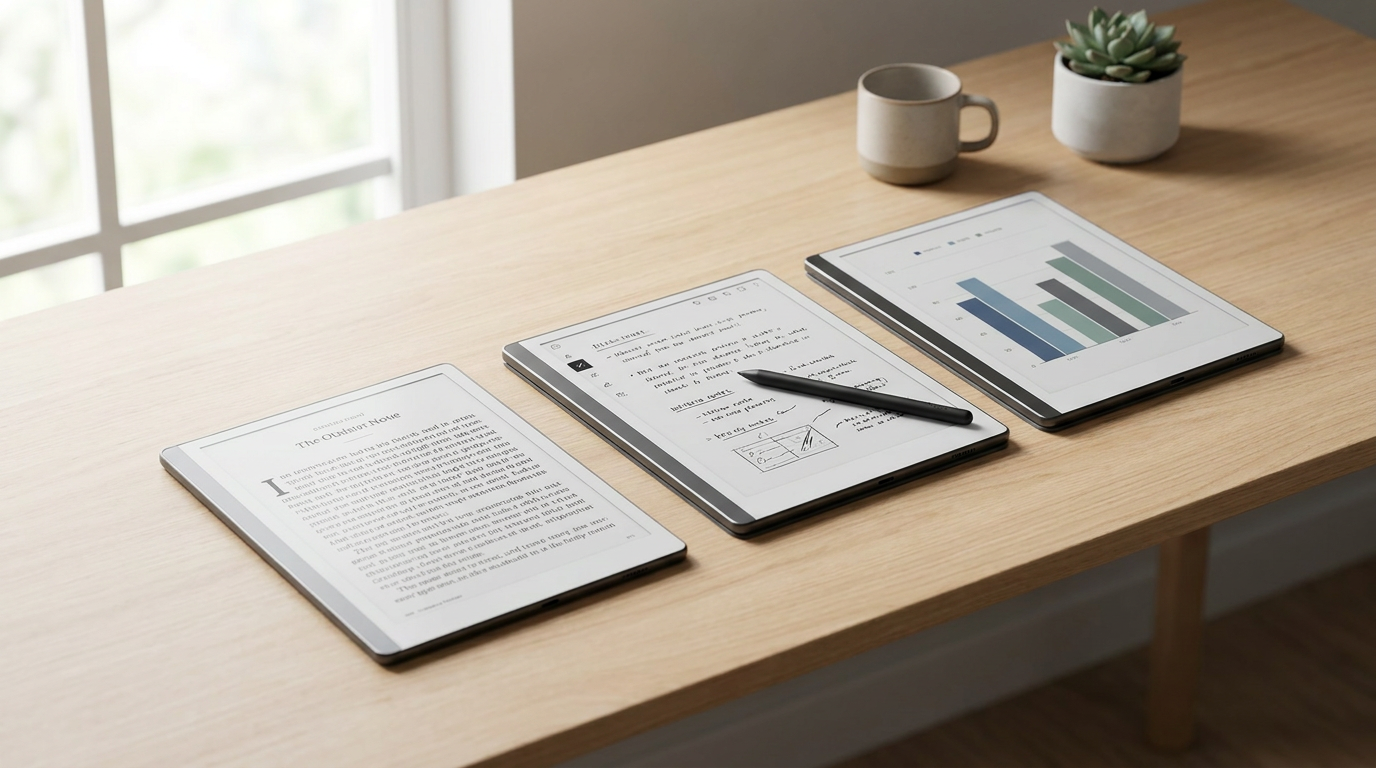
- Digital Minimalists
- Value focus and distraction-free environments, championing devices with intentional software limitations.
- Hybrid Power Users
- Demand flexibility, color displays, and enterprise app integration, accepting shorter battery life as a trade-off.
- Ecosystem Readers
- Prioritize text clarity, massive battery life, and seamless access to digital bookstores over advanced writing tools.
What's not represented
- · Digital artists requiring high-refresh-rate color accuracy
- · Budget-conscious students seeking sub-$100 note-taking solutions
Why this matters
As screen time and digital fatigue reach all-time highs, E-Ink tablets offer a rare refuge for focused work and eye comfort. Choosing the right device dictates whether you successfully replace your paper notebooks or end up with an expensive, frustrating paperweight.
Key points
- The E-Ink tablet market has split into three distinct categories: purist notebooks, connected e-readers, and hybrid Android devices.
- Devices like the reMarkable prioritize a distraction-free environment and ultra-low latency writing over app connectivity.
- The Kindle Scribe offers unmatched battery life and seamless bookstore integration, but lacks advanced note-taking tools.
- Hybrid tablets like the BOOX Note Air provide full Android versatility and color screens, but sacrifice battery life and simplicity.
The digital notepad market has matured significantly by 2026, transitioning from niche gadgets to essential productivity tools. Large-format E-Ink tablets now offer a compelling alternative to traditional liquid crystal displays, promising the tactile satisfaction of paper combined with digital convenience. As the technology has evolved, manufacturers have diverged into three distinct design philosophies, forcing buyers to choose between distraction-free minimalism, seamless retail ecosystems, and full-featured hybrid operating systems. Navigating these options requires a clear understanding of personal workflows and the specific trade-offs each platform demands.[3][5]
The core technological trade-off across all these devices pits visual fluidity against eye comfort and battery longevity. While conventional liquid crystal and OLED tablets offer blazing 120-hertz refresh rates and vibrant, saturated colors, they emit harsh backlights that contribute significantly to digital eye strain and fatigue over long sessions. E-Ink screens, by contrast, utilize microscopic, electrically charged particles to physically reflect ambient light, virtually eliminating eye strain and perfectly mimicking the optical properties of paper. However, this physical movement of particles inherently limits refresh speeds, meaning video playback, rapid scrolling, and interface animations remain fundamentally compromised across the entire product category.[2][4][5]
The argument for the purist approach, championed by the reMarkable 2 and the newer Paper Pro, centers entirely on perfecting the tactile writing experience. Advocates highlight the device's custom-textured glass surface and astonishingly low 15-millisecond stylus latency, which together create a physical friction profile nearly indistinguishable from a high-quality ballpoint pen dragging across premium paper. By aggressively stripping away web browsers, email clients, and notification banners, the device enforces a state of deep, uninterrupted work that modern, hyper-connected operating systems actively disrupt by design.[1][5][6]

The argument against the reMarkable ecosystem focuses heavily on its intentional software limitations and historical pricing structures. Critics point out that the device stubbornly refuses to run standard third-party applications, forcing users to rely entirely on the company's proprietary cloud synchronization to move files on and off the tablet. Furthermore, accessing the full suite of these cloud features, including handwriting-to-text conversion and screen sharing, has historically required an ongoing subscription, adding a frustrating recurring cost to an already premium piece of specialized hardware.[1][3]
Evidence from long-term user testing consistently validates the reMarkable's core mission of cognitive isolation. Reviewers and productivity experts report significantly higher knowledge retention and longer periods of unbroken concentration when using the device compared to a standard iPad. However, this same empirical evidence highlights acute user frustration when attempting to integrate the tablet into complex corporate workflows; the lack of native enterprise applications creates immense friction when professionals need to quickly share annotated PDFs or sync meeting notes directly to company servers.[1][4]
The argument for the connected library approach, epitomized by the Amazon Kindle Scribe, relies on absolute display supremacy and frictionless content acquisition. The Scribe boasts a pristine 300-pixel-per-inch micro-etched display that renders typography with laser-like sharpness, outclassing the resolution of many competitors. Because the hardware is deeply integrated into the world's largest digital bookstore, users can instantly download, read, and annotate millions of titles, documents, and audiobooks without ever needing to connect the device to a secondary computer or navigate clunky web portals.[3][5][6]

The argument against the Kindle Scribe targets its relatively rudimentary approach to handwriting and digital organization. While it excels as a premium e-reader, its digital notebook capabilities lack the advanced layer management, custom page templates, and sophisticated lasso tools found in dedicated writing tablets. Users are largely restricted to attaching basic digital sticky notes when annotating DRM-protected books, rather than writing directly in the margins of the text, which breaks the illusion of interacting with a physical textbook for many students and researchers.[1][6]
The argument against the Kindle Scribe targets its relatively rudimentary approach to handwriting and digital organization.
Evidence supporting the Scribe's dominance in the reading category is firmly anchored by its remarkable power efficiency. Standardized battery tests routinely show the device lasting up to 42 days on a single charge, vastly outperforming its Android-based competitors that measure battery life in hours or days. For users whose primary goal is consuming long-form text with occasional marginalia, the empirical data suggests the Scribe offers the most reliable, low-maintenance, and visually crisp experience currently available on the consumer market.[3][5]
The argument for the hybrid Android approach, led by flagship devices like the BOOX Note Air 5C, is rooted in absolute software versatility. By running a full, uncompromised version of Android 14, these tablets allow users to access the Google Play Store and install familiar productivity applications like Microsoft OneNote, Evernote, and Chrome directly onto an E-Ink screen. The inclusion of Kaleido 3 color technology further expands their utility, allowing professionals to review color-coded financial charts, highlighted academic PDFs, and graphic novels with unprecedented clarity.[3][4][5]

The argument against the BOOX and similar hybrid devices focuses squarely on battery drain and interface complexity. Running background Android processes, Wi-Fi radios, and unoptimized third-party applications slashes the legendary E-Ink battery life from several weeks down to just a few days of active use. Additionally, because most standard Android apps are not designed for the slow refresh rates of electronic paper, the user experience can often feel clunky, requiring users to constantly tweak manual screen refresh settings to clear away ghosted images.[3][5]
Evidence from professional environments indicates that the hybrid approach is highly effective for specific, demanding corporate use cases. Analysts and academic researchers frequently cite the ability to sync directly with enterprise cloud storage and view 4,096 distinct colors as a massive workflow upgrade that justifies the learning curve. Yet, benchmark tests and user surveys confirm that this immense versatility comes at the direct cost of the seamless, plug-and-play simplicity that makes more focused devices so appealing to the general public.[2][4]
Ultimately, synthesizing these distinct trade-offs reveals that choosing the ideal E-Ink tablet is determined entirely by what a user is actively trying to escape. If the primary goal is to escape the physical weight of heavy textbooks while retaining instant access to a massive, synchronized library, the ecosystem-driven approach easily wins. If the goal is to escape digital distractions and notification fatigue, the purist notebook is unmatched. If the goal is to escape the eye strain of LCD screens without sacrificing app connectivity, the hybrid model is the only viable path.[1][3][6]

The reMarkable and its purist siblings fit exceptionally well when a user's primary objective is deep, focused writing, sketching, or journaling in an environment completely devoid of digital interruptions. The hardware acts as a sanctuary for thought, rewarding patience with unparalleled tactile feedback. Conversely, it does not fit when a user needs to quickly reference external websites, read DRM-protected library books, or seamlessly integrate their daily notes with dynamic Microsoft Office or Google Workspace ecosystems without relying on cumbersome manual exports.[2][5]
The Kindle Scribe fits perfectly when the user is already heavily invested in the Amazon ecosystem and primarily wants a luxurious, large-format reading experience supplemented by basic note-taking capabilities. It is the ultimate companion for the voracious reader who occasionally jots down thoughts. However, it does not fit when complex note organization, advanced drawing tools, custom templates, and cross-platform document synchronization are critical to a user's daily workflow, as the software remains fundamentally tethered to its core identity as an e-reader.[1][6]
The BOOX Note Air and similar Android hybrids fit incredibly well when professionals require a single, eye-friendly device to check email, review colorful PDF reports, and utilize standard productivity applications without staring at a glowing LCD. It bridges the gap between a laptop and a notebook. It does not fit, however, when users desire a simple, intuitive interface straight out of the box, or when they require the reliable, month-long battery life that has traditionally defined the electronic ink experience.[3][4]
How we got here
2020
reMarkable 2 launches, proving the mainstream viability of premium, distraction-free digital notebooks.
2022
Amazon releases the Kindle Scribe, bringing large-format note-taking to the traditional e-reader market.
2024
Color E-Ink technology reaches maturity with Kaleido 3, enabling versatile hybrid devices.
2026
The market fully segments into specialized purist, hybrid, and ecosystem categories.
Viewpoints in depth
The Minimalist view
Advocates for intentional friction and cognitive isolation.
Digital minimalists argue that a tablet's ability to do everything makes it terrible for doing one thing well. From this perspective, the lack of a web browser or email client on a device like the reMarkable isn't a missing feature—it is the primary selling point. They view the hardware as a physical boundary against the notification fatigue of modern operating systems, prioritizing deep, unbroken concentration over the convenience of cloud-synced enterprise apps.
The Power User view
Demands flexibility, color displays, and seamless integration with existing workflows.
Power users argue that a digital notebook is ultimately useless if it cannot communicate with the rest of their digital life. They champion hybrid devices like the BOOX series because modern workflows require syncing with Notion, Obsidian, and corporate email servers. For this camp, sacrificing the legendary month-long battery life of traditional E-Ink is a necessary and acceptable trade-off to gain the versatility of the Google Play Store and Kaleido 3 color displays.
The Reader view
Prioritizes text clarity, massive battery life, and frictionless access to books.
Avid readers argue that the primary utility of an E-Ink screen will always be consuming long-form text, making note-taking a secondary feature. They lean heavily toward the Kindle Scribe, valuing its 300-pixel-per-inch display and 42-day battery life above all else. For this group, the convenience of instantly downloading millions of titles from a massive retail ecosystem far outweighs the need for advanced stylus tools or custom page templates.
What we don't know
- Whether future software updates will bring advanced layer management and custom templates to the Kindle Scribe ecosystem.
- How quickly Kaleido color E-Ink technology will improve its refresh rates to better support standard Android video and animation.
Key terms
- E-Ink Carta
- The standard black-and-white electronic ink display technology known for high contrast and crisp text rendering.
- Kaleido 3
- The latest generation of color E-Ink technology, capable of displaying thousands of muted colors alongside sharp black text.
- Wacom EMR
- Electromagnetic resonance technology used in styluses, allowing them to write accurately without needing batteries or charging.
- Ghosting
- A visual artifact in E-Ink displays where a faint trace of the previous image remains on the screen after a page turn.
- Latency
- The slight delay between the physical movement of the stylus and the digital ink appearing on the screen.
Frequently asked
Can I read Kindle books on a reMarkable tablet?
No. The reMarkable does not support third-party applications like the Kindle app. You must use DRM-free EPUB or PDF files.
Do color E-Ink screens look as vibrant as an iPad?
No. Color E-Ink uses Kaleido 3 technology, which produces muted, pastel-like colors designed for charts and highlights, not high-definition video.
Do I need to replace the stylus tips on these tablets?
Yes. The textured glass that makes writing feel like real paper creates friction, which gradually wears down the plastic stylus nibs over time.
Can I browse the web on an E-Ink device?
It depends on the device. Hybrid tablets like the BOOX run full Android and support Chrome, while purist devices like the reMarkable completely omit web browsers.
Sources
Source coverage
6 outlets
3 viewpoints surfaced






[1]EngadgetDigital Minimalists
Best E Ink tablets for 2026
Read on Engadget →[2]IGNEcosystem Readers
The Best E-Ink Tablets (2026)
Read on IGN →[3]GagadgetHybrid Power Users
Choosing Your Ideal E-Ink Note-Taking Tablet
Read on Gagadget →[4]eReader ForumHybrid Power Users
Top E-Paper Devices in 2026
Read on eReader Forum →[5]RoipadEcosystem Readers
Comprehensive expert analysis of the top 8 E-Ink tablets
Read on Roipad →[6]The IndependentDigital Minimalists
ReMarkable 2 vs Kindle scribe: Which is best?
Read on The Independent →

More in shopping
See all 80 stories →Wearable Tech
The Evidence-Based Guide to Sleep Trackers: Do They Actually Work?
6 sources

Retail Strategy
Major Retailers Move Summer Sales to June, Slashing Prices to Combat Consumer Fatigue
9 sources

Workspace Tech
Ultrawide vs. Dual Monitors: Which Setup Actually Boosts Your Productivity?
7 sources
AI Hardware
The 2026 AI PC Buying Guide: How to Choose the Right Hardware for Your Workflow
8 sources
Every angle. Every day.
Get shopping stories with full source coverage and perspective breakdowns delivered to your inbox.