
Ultrawide vs. Dual Monitors: Which Setup Actually Boosts Your Productivity?
The debate between a single ultrawide monitor and a dual-screen setup comes down to how your brain processes tasks. While ultrawides offer seamless continuity for timelines and data, dual monitors provide strict physical boundaries that help compartmentalize complex workflows.
By Factlen Editorial Team
- Seamless Continuity Advocates
- Users who prioritize an unbroken visual canvas and minimalist desk aesthetics.
- Task Separation Traditionalists
- Professionals who rely on physical screen boundaries to organize distinct applications.
- Ergonomic Researchers
- Specialists focused on the biomechanical and visual impact of prolonged screen exposure.
What's not represented
- · Laptop-only remote workers
- · Corporate IT procurement managers
Why this matters
Upgrading your digital workspace is one of the highest-ROI investments you can make for your daily productivity. Choosing the right monitor configuration prevents long-term neck strain, reduces cognitive friction, and directly influences how efficiently you manage your daily tasks.
Key points
- Both ultrawide and dual-monitor setups can increase productivity by up to 42% compared to a single standard screen.
- Ultrawide monitors eliminate bezel gaps, making them ideal for timeline-based editing and massive spreadsheets.
- Dual monitors excel at task separation and allow for mixed orientations, such as one vertical screen for coding.
- Ergonomic studies show dual monitors increase neck strain due to twisting, while ultrawides require deeper desks to prevent eye fatigue.
- The best choice depends entirely on whether your workflow requires visual continuity or strict compartmentalization.
The modern professional's digital workspace has expanded far beyond the confines of a single standard screen. As hybrid work solidifies its place in the global economy, the demand for increased digital real estate has sparked a definitive hardware debate: the seamless expanse of an ultrawide monitor versus the modular flexibility of a dual-monitor setup. Both configurations represent a substantial upgrade over a traditional 16:9 display, but they cater to fundamentally different cognitive workflows and physical environments.[7]
The baseline metric for this hardware upgrade is undeniable. Transitioning from a single standard monitor to either an ultrawide or a dual-screen configuration can boost overall productivity by an average of 42 percent, according to industry data. This leap in efficiency stems from a drastic reduction in the time spent minimizing, maximizing, and searching for hidden application windows. However, how that extra space is deployed—either as one continuous canvas or two distinct zones—determines which setup will actually serve a specific profession.[2][6]
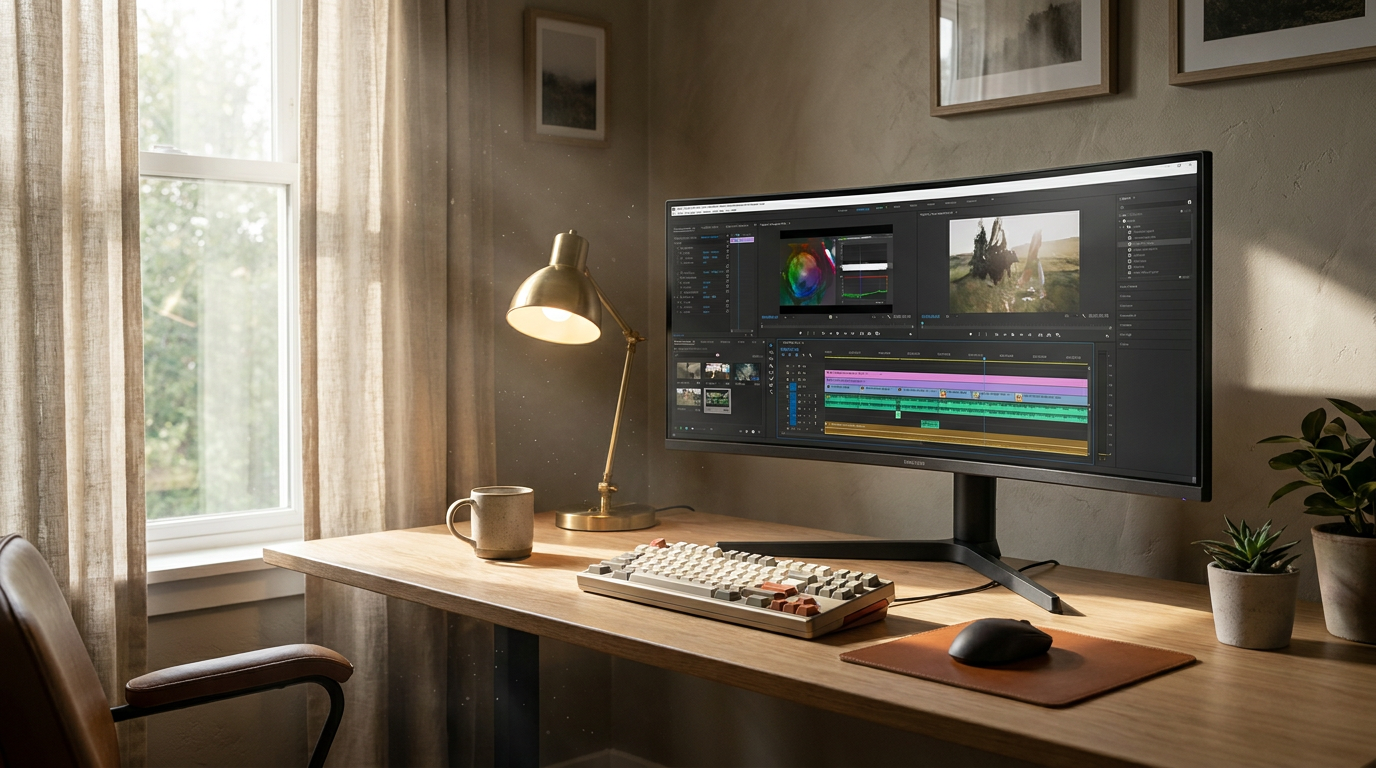
When evaluating the ultrawide configuration, the argument for the setup centers on seamless visual continuity. A single 34-inch or 49-inch panel, typically featuring a 21:9 or 32:9 aspect ratio, eliminates the central bezel gap entirely. This creates an uninterrupted field of view that allows application windows to be sized dynamically without being trapped by physical screen borders. Furthermore, a single monitor requires only one power cable and one display output, drastically reducing desk clutter and simplifying the management of display settings like brightness and color calibration.[2][4]

The argument against the ultrawide approach highlights the lack of physical compartmentalization. Because the screen is one massive digital zone, users must rely heavily on software-based window snapping to keep their workspace organized. Additionally, sharing a screen during video conferences can become a logistical hurdle; broadcasting a 32:9 display forces standard 16:9 viewers to look at a tiny, heavily letterboxed image unless the presenter uses third-party software to share only a specific region of the screen.[2][7]
The evidence supporting ultrawide adoption is strongest in timeline-based workflows and data-heavy analysis. Video editors, audio engineers, and financial analysts report significant workflow improvements when they can view sprawling timelines or massive spreadsheets without horizontal scrolling. The seamless nature of the panel prevents critical data or interface tools from being split across a plastic bezel, ensuring that visual information remains cohesive.[2][3][4]
Conversely, the argument for a dual-monitor setup focuses on modularity and strict task separation. Two distinct displays, often 24-inch or 27-inch 16:9 panels, create a physical boundary that helps the brain compartmentalize different tasks. A user can dedicate one screen entirely to active, deep-focus work while relegating the secondary screen to peripheral monitoring, such as email, team chat, or reference documentation.[1][7]
The argument against dual monitors points to ergonomic strain and visual inconsistency. The physical bezel forces a break in concentration and creates a blind spot right in the center of the desk, requiring the user to angle the monitors and constantly turn their head. Furthermore, even when purchasing two identical monitors, slight manufacturing variances can result in mismatched color temperatures and brightness levels, which can be highly distracting for design professionals.[2][4]
The argument against dual monitors points to ergonomic strain and visual inconsistency.
The evidence favoring dual monitors is overwhelmingly concentrated in programming, writing, and communication-heavy roles. Developers frequently utilize the modularity of dual setups by mounting one monitor vertically—a configuration impossible with an ultrawide—to read long blocks of code, while keeping the second monitor horizontal for software previews. This mixed-orientation capability remains the strongest functional advantage of the dual-screen approach.[1][6]
The ergonomic debate between the two setups has recently been quantified by biomechanical research. A 2024 study conducted by the University of Arkansas found that dual-monitor configurations impose higher biomechanical strain on the user due to sustained cervical spine rotation. The constant twisting required to look past the central bezels increases the risk of long-term musculoskeletal injury. In contrast, a curved ultrawide monitor mimics the natural human field of view, allowing the eyes to scan the screen with minimal neck movement.[5]

However, desk depth plays a critical role in this ergonomic equation. Large curved ultrawide monitors require substantial physical depth; placing a 49-inch curved screen on a shallow desk (under 30 inches deep) forces the user to sit uncomfortably close, leading to severe eye fatigue. In these cramped environments, dual monitors are often the more ergonomic choice, as they can be pushed further back or angled sharply to maintain a safe viewing distance.[1][7]
Financial and hardware considerations also divide the two camps. Dual monitors offer a budget-friendly, incremental upgrade path, allowing users to purchase one screen now and add a second later. Ultrawide monitors require a significant upfront investment and demand more graphical processing power, particularly for users who intend to use the massive resolution for immersive gaming after work hours.[1][2][3]
Synthesizing these trade-offs reveals clear operational guidelines. An ultrawide monitor fits well when a user has a desk deeper than 30 inches, relies heavily on timeline-based software or massive datasets, and prioritizes a minimalist aesthetic with a single cable. It is the definitive choice for professionals whose primary applications benefit from an unbroken horizontal plane.[4][7]
Conversely, an ultrawide setup does not fit when a user frequently shares their full screen on corporate video calls, requires a vertical display orientation for reading code or documents, or works in a highly constrained physical space where the monitor's aggressive curve would dominate the desk.[7]

A dual-monitor configuration fits well when a professional needs to strictly isolate reference materials from active work, requires mixed display orientations, or is building a high-productivity setup on a strict, incremental budget. The physical separation acts as a natural organizational tool for those juggling multiple unrelated applications.[1][2][6]
Finally, a dual-monitor setup does not fit when the primary workload involves wide spreadsheets, immersive gaming, or color-critical design work where panel-to-panel color drift would compromise the final product. It is also suboptimal for users who already suffer from neck strain, as the required cervical rotation will only exacerbate existing musculoskeletal issues.[4][5]
How we got here
Early 2000s
Dual monitor setups become the gold standard for financial analysts and programmers needing more digital space.
2014
The first consumer 21:9 ultrawide monitors enter the market, initially targeting gamers and cinema enthusiasts.
2019
Super-ultrawide 32:9 monitors launch, offering the exact pixel equivalent of two 27-inch displays without a central bezel.
2024
Ergonomic studies highlight the biomechanical trade-offs of neck rotation in dual setups versus eye strain on shallow desks with ultrawides.
2026
Built-in KVM switches and advanced window-management software make both setups highly customizable for hybrid work environments.
Viewpoints in depth
Seamless Continuity Advocates
Professionals who prioritize an unbroken visual canvas and minimalist desk aesthetics.
This camp, largely composed of video editors, financial analysts, and designers, argues that the physical bezel of a dual-monitor setup is an archaic interruption. They point to the cognitive ease of resizing windows dynamically across a 21:9 or 32:9 plane without losing interface elements in a plastic gap. For them, the premium cost of an ultrawide is justified by the reduction in cable clutter and the elimination of color-calibration drift between separate panels.
Task Separation Traditionalists
Users who rely on physical screen boundaries to organize distinct applications and workflows.
Programmers, writers, and remote-support workers champion the dual-monitor approach for its modularity. They argue that physical bezels act as necessary cognitive boundaries, keeping distracting communication apps quarantined on a secondary screen while the primary screen remains dedicated to deep work. Furthermore, they emphasize the functional superiority of being able to rotate one monitor vertically—a critical requirement for reading long codebases or legal documents that an ultrawide simply cannot accommodate.
Ergonomic & Health Researchers
Specialists focused on the biomechanical and visual impact of prolonged screen exposure.
Ergonomists view the monitor debate through the lens of musculoskeletal health. They note that while dual monitors increase productivity, they also force sustained cervical spine rotation, which can lead to chronic neck strain. However, they caution that ultrawide monitors are not a universal cure; if placed on a desk that is too shallow, the massive curved panels force the user's eyes too close to the screen, trading neck strain for severe visual fatigue.
What we don't know
- Whether augmented reality (AR) headsets will render physical multi-monitor setups obsolete in the next decade.
- The exact long-term vision impact of sitting close to 49-inch super-ultrawide curved panels over a 10-year period.
Key terms
- Aspect Ratio
- The proportional relationship between a display's width and height, such as 16:9 for standard widescreen or 21:9 for ultrawide.
- Bezel
- The physical plastic or metal frame that surrounds the display panel on a monitor.
- Window Snapping
- Software features that allow users to easily drag and lock application windows into specific zones or halves of a screen.
- Cervical Spine Rotation
- The biomechanical term for twisting the neck, which can lead to musculoskeletal strain when frequently looking between multiple monitors.
- Field of View (FOV)
- The extent of the observable world that is seen at any given moment; curved monitors are designed to match the natural human FOV.
Frequently asked
Does an ultrawide monitor replace the need for two screens?
For most workflows, yes. A 34-inch or 49-inch ultrawide can fully replace two monitors by using window-snapping software to divide the screen, though it lacks the physical separation of dual panels.
Which setup is better for programming?
Dual monitors are generally preferred by programmers because one screen can be rotated vertically for reading long blocks of code, while the other remains horizontal for previews.
Do dual monitors cause more neck strain?
Yes, ergonomic studies indicate that dual monitors require more frequent and sustained cervical spine rotation to look across the bezel, whereas a curved ultrawide keeps the edges within a natural field of view.
Can I share just half of an ultrawide screen on Zoom?
It requires specific software workarounds. By default, sharing an entire ultrawide screen on a video call will make your screen appear tiny and letterboxed to other participants.
Sources
Source coverage
7 outlets
3 viewpoints surfaced





[1]Display NinjaTask Separation Traditionalists
Best Dual Setup Monitors [2026 Buying Guide]
Read on Display Ninja →[2]Tech Gear Top 10Seamless Continuity Advocates
Ultrawide vs Dual Monitors: Which Setup Is Better in 2026?
Read on Tech Gear Top 10 →[3]BoxSeamless Continuity Advocates
Ultrawide vs Dual Monitors: Best Setup for Work & Play
Read on Box →[4]ViewSonic LibrarySeamless Continuity Advocates
Ultrawide vs. Dual Monitors: Which is the Best Overall Setup?
Read on ViewSonic Library →[5]University of ArkansasErgonomic Researchers
Biomechanical Strain in Multi-Monitor Workstations
Read on University of Arkansas →[6]Mobile PixelsTask Separation Traditionalists
Ultrawide Vs. Dual Monitor: Which Is Better For You?
Read on Mobile Pixels →[7]Factlen Editorial TeamErgonomic Researchers
Synthesis by Factlen editorial team
Read on Factlen Editorial Team →

More in shopping
See all 84 stories →Retail Strategy
Amazon, Walmart, and Target Announce Competing Summer Deal Events for Late June
8 sources

Sustainable Fabrics
Decoding Sustainable Fabrics: The Real Trade-Offs Behind Tencel, Recycled Polyester, and Organic Cotton
7 sources

Display Tech
The 2026 Guide to Premium Television Displays: OLED and Mini-LED Trade-Offs
8 sources

Premium TVs
OLED vs. Mini-LED in 2026: Which Premium TV Technology Wins?
7 sources
Every angle. Every day.
Get shopping stories with full source coverage and perspective breakdowns delivered to your inbox.