
How to Run Open-Source AI Locally: A 2026 Guide to Hardware, Tools, and Privacy
Running large language models on personal hardware offers complete data privacy and zero API costs. Here is exactly what you need to deploy local AI in 2026.
By Factlen Editorial Team
- Privacy & Security Advocates
- Argue that local AI is the only mathematically guaranteed way to ensure data sovereignty and regulatory compliance.
- Hardware Enthusiasts
- Focus on optimizing VRAM, quantization levels, and system architecture to maximize tokens-per-second performance.
- Open-Source Developers
- Value the autonomy of local deployment, championing offline capabilities and freedom from vendor lock-in.
What's not represented
- · Cloud AI Providers
- · Enterprise IT Administrators
Why this matters
By moving AI processing from the cloud to your own computer, you gain absolute control over your sensitive data, eliminate recurring subscription fees, and ensure your tools work perfectly even without an internet connection.
Key points
- Running AI locally ensures complete data privacy, as prompts and documents never leave the user's device.
- Local deployment eliminates recurring cloud API costs and functions entirely offline.
- GPU Video RAM (VRAM) is the most critical hardware bottleneck for running large language models.
- Apple Silicon's unified memory architecture allows Macs to run massive models that would otherwise require multi-GPU PC setups.
- Quantization compresses massive neural networks so they can fit efficiently onto consumer-grade hardware.
- Tools like Ollama and LM Studio have made installing and running local AI as simple as downloading a standard desktop app.
In 2026, the artificial intelligence landscape is undergoing a quiet but profound revolution. While massive cloud-based models from tech giants dominate the mainstream headlines, a rapidly growing movement of developers, businesses, and privacy advocates are pulling AI down from the cloud and running it directly on their own hardware. This shift represents a fundamental democratization of computing power, transitioning large language models from exclusive, multi-billion-dollar data centers to the desks of everyday users. By leveraging highly optimized open-source models and consumer-grade hardware, individuals can now deploy sophisticated AI assistants that rival the capabilities of premium cloud subscriptions, all without paying a single API fee or sacrificing their personal data to third-party servers.[8]
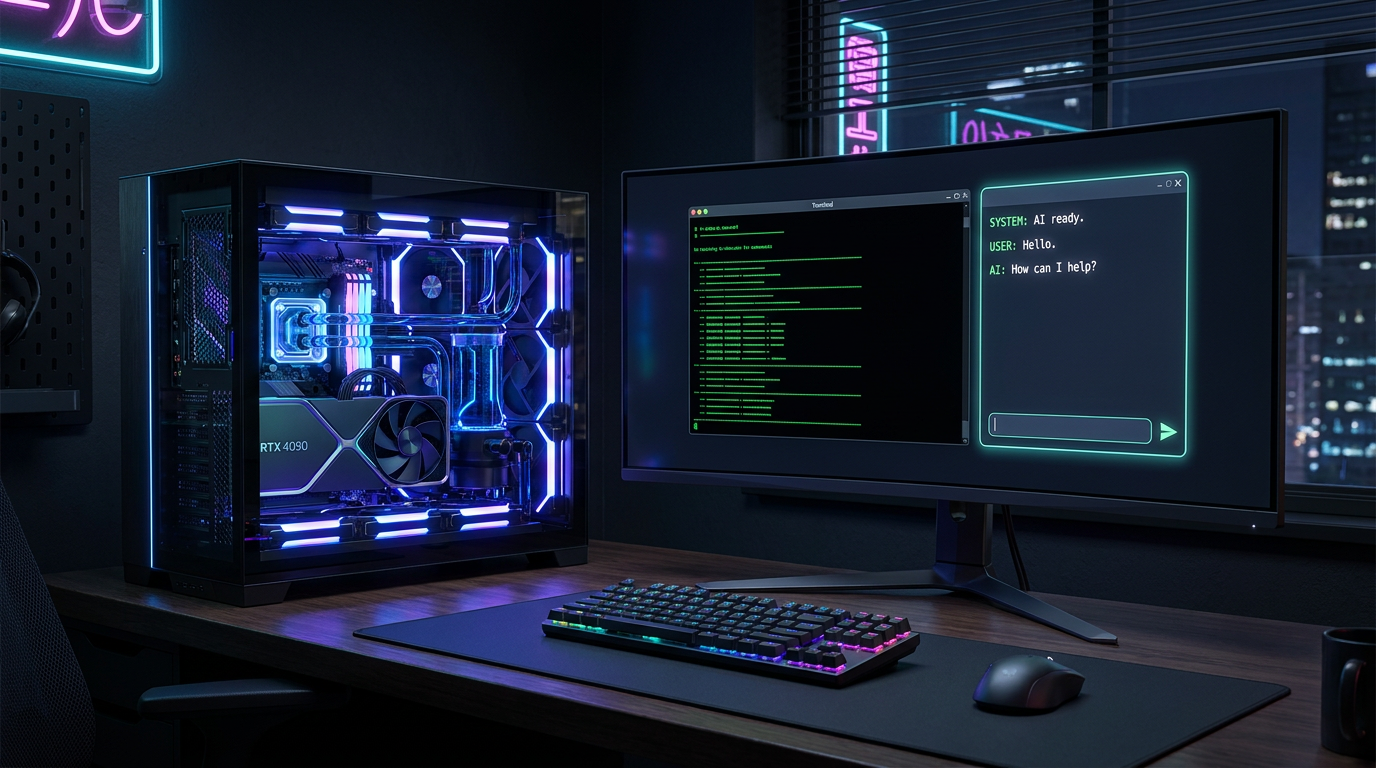
Running a "local LLM" means that the entire computational process of artificial intelligence happens entirely on your personal device. Instead of typing a prompt into a web browser and sending it over the internet to a remote server farm for processing, the model's underlying neural weights are downloaded directly to your local hard drive. When you ask a question or request a block of code, your computer's own processor and memory execute the complex matrix multiplications required to generate the response. Because the entire pipeline is self-contained, the system requires absolutely no internet connection to function once the initial files are downloaded, allowing for seamless operation in air-gapped environments, on airplanes, or during severe network outages.[1][3]
The primary driver accelerating this shift away from the cloud is the absolute guarantee of data sovereignty. When utilizing cloud-based AI services, sensitive inputs—whether they involve proprietary corporate source code, confidential patient medical records, or intimate personal journals—must be transmitted across the internet to infrastructure controlled by a third party. Local AI eliminates this vulnerability entirely. Because the data never physically leaves the user's machine, it cannot be intercepted, logged, or used to train future commercial models. This architectural guarantee makes local deployment the only inherently compliant solution for strict regulatory frameworks like HIPAA in healthcare or the GDPR in Europe, providing peace of mind that is mathematically impossible to achieve with cloud APIs.[1][2][4]
Beyond the strict imperatives of privacy and security, local deployment offers compelling economic and practical advantages that scale dramatically over time. Cloud AI providers typically charge users based on a per-token pricing model, meaning that every word generated incurs a microscopic fee that can quickly snowball into thousands of dollars for heavy enterprise users or automated workflows. Local AI flips this economic model on its head. While it requires a significant upfront investment in capable hardware, the marginal cost of every subsequent query drops to zero, save for the negligible cost of electricity. Furthermore, local users are entirely immune to sudden API price hikes, unexpected service deprecations, or restrictive rate limits imposed by cloud vendors.[1][3]

The primary barrier to entry for running local AI is hardware, specifically the capabilities of the Graphics Processing Unit (GPU). Unlike traditional desktop software, which relies heavily on the central processing unit (CPU) to execute sequential instructions, large language models require massive parallel processing power to generate text at readable speeds. A modern GPU contains thousands of specialized cores designed to handle the simultaneous mathematical operations that underpin neural networks. If a system attempts to run a large model using only a standard CPU, the generation speed often slows to a crawl, producing only one or two words per second, which is generally considered unusable for real-time conversational applications.[5][7]
When evaluating a GPU for local AI, the single most critical specification is Video RAM (VRAM)—the dedicated high-speed memory physically located on the graphics card. An AI model must be loaded entirely into this memory to run efficiently. If a model's file size exceeds the available VRAM, the system is forced to offload the excess data to the computer's slower system RAM. This offloading process creates a severe data bottleneck, drastically reducing the speed at which the model can generate tokens. Therefore, maximizing VRAM capacity is universally prioritized over raw processing speed when building or purchasing a machine dedicated to local inference.[5][7]
In 2026, hardware requirements are strictly tiered based on the parameter count of the model being run. Entry-level models with roughly 7 billion parameters, which are excellent for general coding and writing tasks, require at least 8 GB of VRAM, making them highly accessible on mid-range consumer cards like the NVIDIA RTX 3060 or 4060. Mid-size models in the 14-billion to 35-billion parameter range demand between 16 GB and 24 GB of VRAM, pushing users toward high-end consumer hardware like the RTX 4090 or the newer RTX 5090. Running massive, enterprise-grade 70-billion parameter models requires 40 GB of VRAM or more, typically necessitating complex multi-GPU workstation setups for PC users.[5][7]

In 2026, hardware requirements are strictly tiered based on the parameter count of the model being run.
However, Apple's M-series chips have emerged as a unique and highly disruptive loophole in the local AI hardware landscape. Unlike traditional Windows PCs, which physically separate system RAM from GPU VRAM, Apple Silicon utilizes a "unified memory" architecture. This design allows the integrated GPU to access the entirety of the system's RAM as if it were dedicated video memory. Consequently, an M3, M4, or M5 Max MacBook equipped with 64 GB or 128 GB of unified memory can effortlessly load and run massive 70-billion parameter models that would otherwise require thousands of dollars in dedicated NVIDIA hardware, making high-end Macs uniquely suited for heavy local AI workloads.[5][6]
Outside of the graphics processor, local AI also places significant demands on a system's general storage and memory capacities. A minimum of 16 GB of standard system RAM is strictly required just to keep the operating system and background applications running smoothly alongside the AI software, though 32 GB is strongly recommended for comfortable multitasking. Fast NVMe Solid State Drives (SSDs) are also considered mandatory rather than optional. Because high-quality AI model files frequently exceed 20 GB to 50 GB in size, attempting to load them from a traditional spinning hard drive would result in agonizingly long startup times every time a user switches between different models.[6]
The software ecosystem surrounding local AI has matured at a blistering pace, transforming what was once a highly technical, command-line ordeal into a seamless, consumer-friendly experience. The most popular and accessible entry point for newcomers is Ollama, a lightweight background application that abstracts away the complexities of hardware configuration. With a single, simple terminal command—such as `ollama run llama3`—the software automatically connects to a repository, downloads the requested model, optimizes it for the host system's specific hardware, and instantly opens a responsive chat interface, reducing the setup process from hours to mere minutes.[7]
For users who prefer a traditional graphical interface over typing commands into a terminal, LM Studio has established itself as the premier desktop standard. Operating much like a standard application, LM Studio offers a clean, intuitive window that perfectly mimics the familiar layout of cloud-based chatbots. More importantly, it features a built-in browser connected directly to the Hugging Face model repository. This allows users to search for new open-source models, automatically check if they will fit within their system's specific VRAM constraints, and download them with a single click, entirely removing the friction of manual file management.[7]

Underneath the polished interfaces of both Ollama and LM Studio lies `llama.cpp`, an incredibly efficient open-source inference engine written in C++. This foundational technology is the unsung hero of the local AI movement, responsible for making it mathematically possible to run massive neural networks on standard consumer hardware. The engine is relentlessly optimized by a global community of developers to squeeze every possible drop of performance out of both Apple Silicon and traditional PC architectures, ensuring that models run as fast as physically possible regardless of the underlying hardware configuration.[7][8]
The technical magic that allows these massive, multi-gigabyte models to actually fit onto consumer graphics cards is a mathematical compression technique known as quantization. A standard, uncompressed AI model utilizes 16-bit precision for its billions of neural weights, resulting in file sizes that are far too large for standard computers. Quantization systematically compresses these weights down to 8-bit or even 4-bit precision. While this aggressive compression does result in a microscopic reduction in the model's absolute reasoning accuracy, it drastically shrinks the memory footprint, allowing a model that would normally require 30 GB of VRAM to run comfortably on an 8 GB graphics card.[5][7]
These highly compressed, quantized models are universally distributed in a specialized file format known as GGUF. Designed specifically for the needs of the local AI community, GGUF files are entirely self-contained archives that bundle the model's architecture, its compressed weights, and its specific configuration settings into a single, easily manageable file. This means a user can download a GGUF file, back it up to an external hard drive, or share it directly with a colleague, and it will execute perfectly on any compatible inference engine without requiring complex installation scripts or fragile Python dependencies.[1][8]

Another major architectural breakthrough enabling the local AI boom is the widespread adoption of the Mixture of Experts (MoE) design. Instead of activating the entire neural network for every single word generated, an MoE model acts as a router, directing the user's prompt only to specialized "expert" sub-networks within the larger model. This highly efficient routing mechanism allows a massive 35-billion parameter model to run at blistering speeds on a modest 12 GB GPU, because the system is only actively computing a small fraction of its total parameters at any given moment, drastically reducing the immediate computational burden.[5][6]
To complete the local AI ecosystem and make it indistinguishable from premium cloud services, many power users deploy advanced front-end web interfaces like Open WebUI. This software connects seamlessly to a local Ollama instance but runs entirely within a standard web browser, providing a rich suite of features including persistent chat history, the ability to upload and analyze local documents, and tools for comparing responses across multiple models simultaneously. It delivers the exact user experience of a top-tier enterprise AI subscription, but operates entirely offline and under the complete control of the user.[8]
Ultimately, the rapid democratization of large language models represents a profound and permanent shift in the distribution of computing power. By combining highly optimized open-source models, aggressive quantization techniques, and increasingly powerful consumer hardware, the ability to run world-class artificial intelligence is no longer restricted to multi-billion-dollar tech conglomerates. It now sits quietly on the desks of developers, researchers, and everyday enthusiasts. As the tools continue to simplify and the hardware grows more capable, local AI is poised to become the default standard for anyone who values privacy, autonomy, and unrestricted access to the future of computing.[8]
How we got here
2023
Meta releases the LLaMA model weights, inadvertently sparking the open-source local AI movement.
Late 2023
The llama.cpp project is launched, allowing large models to run efficiently on standard consumer hardware.
2024
User-friendly tools like Ollama and LM Studio are released, replacing complex command-line setups with simple installers.
2025
The widespread adoption of the GGUF format standardizes how quantized models are shared and executed.
2026
Consumer hardware, including Apple's M5 chips and NVIDIA's RTX 50-series, makes running massive 70B parameter models viable at home.
Viewpoints in depth
Privacy & Security Advocates
Argue that any data sent to the cloud is inherently compromised.
This camp emphasizes that local AI is the only mathematically guaranteed way to ensure HIPAA and GDPR compliance, as the data pipeline physically ends at the user's local machine. They point out that even with strict enterprise agreements, cloud providers process data on infrastructure outside the user's control, leaving it vulnerable to subpoenas, internal leaks, or future policy changes. For these advocates, the hardware cost of local AI is simply the necessary price of true data sovereignty.
Hardware Enthusiasts
Focus on the technical challenge of fitting massive parameter counts into limited VRAM.
Hardware enthusiasts treat local AI as a complex optimization puzzle. They actively debate the merits of Apple's unified memory architecture against the raw parallel processing power of NVIDIA's RTX 50-series GPUs, constantly tweaking quantization levels and offloading layers to maximize tokens-per-second. For this group, the appeal lies in pushing consumer silicon to its absolute limits, proving that data-center-level performance can be achieved on a desktop budget through clever engineering.
Open-Source Developers
Value the autonomy and flexibility of local deployment over cloud dependency.
Developers champion the ability to swap models instantly, fine-tune specific behaviors without vendor restrictions, and build offline-first applications that are immune to cloud service outages or API price hikes. They view reliance on proprietary cloud APIs as a dangerous form of vendor lock-in that stifles innovation. By running models locally, they ensure that their software stacks remain resilient, customizable, and entirely under their own control, regardless of what commercial AI companies decide to do.
What we don't know
- How upcoming hardware generations will balance the increasing VRAM demands of next-generation open-source models.
- Whether future regulatory frameworks will attempt to restrict the distribution of highly capable, uncensored local AI weights.
- How quickly mobile processors will advance to allow large-scale local inference directly on smartphones without draining battery life.
Key terms
- VRAM (Video RAM)
- The dedicated high-speed memory on a graphics card, which is the most critical hardware specification for loading and running AI models.
- Quantization
- A mathematical compression technique that reduces the precision of an AI model's weights, allowing massive models to fit into consumer-grade hardware.
- Inference
- The computational process where an artificial intelligence model analyzes a prompt and generates a response.
- GGUF
- A specialized, self-contained file format designed to make downloading and running quantized AI models fast and easy on consumer hardware.
- Mixture of Experts (MoE)
- An AI architecture that saves memory and processing power by only activating specific sub-networks of the model for any given prompt.
Frequently asked
Can I run local AI without an internet connection?
Yes. Once the software and model files are downloaded to your machine, the entire inference process happens locally, allowing it to work perfectly in air-gapped or offline environments.
Is running local AI completely free?
The open-source models and software tools are entirely free to download and use. Your only costs are the upfront purchase of capable hardware and the electricity required to run it.
Can local models match the intelligence of ChatGPT?
Large 70-billion parameter open-source models rival the capabilities of GPT-4, while smaller 7-billion parameter models are highly capable for specific, focused tasks like coding or summarization.
Do I need a PC, or can I use a Mac?
Both work exceptionally well. PCs rely on dedicated NVIDIA GPUs for VRAM, while Apple Silicon Macs use unified memory, making M-series chips incredibly efficient for running massive models.
Sources
Source coverage
8 outlets
3 viewpoints surfaced








[1]Local LLM NetworkPrivacy & Security Advocates
Running AI locally provides complete data privacy
Read on Local LLM Network →[2]AI JournalPrivacy & Security Advocates
Benefits of Using Local AI Models for Data Privacy
Read on AI Journal →[3]Local AI MasterOpen-Source Developers
Why Run AI Locally? (Top 5 Reasons)
Read on Local AI Master →[4]MediumPrivacy & Security Advocates
Deploying open-source models as Private AI
Read on Medium →[5]Prompt QuorumHardware Enthusiasts
Local LLM hardware requirements by model
Read on Prompt Quorum →[6]Overchat AIHardware Enthusiasts
System RAM, CPU and Storage Requirements for a Local LLM
Read on Overchat AI →[7]Host RunwayHardware Enthusiasts
Best GPU for Running Local LLMs and Private AI in 2026
Read on Host Runway →[8]Factlen Editorial TeamOpen-Source Developers
Synthesis by Factlen editorial team
Read on Factlen Editorial Team →
More in guides
See all 39 stories →E-Ink Productivity
Top E-Ink Tablets of 2026: Comparing reMarkable, Boox, and Kindle Scribe
6 sources

Home Electrification
The 2026 Guide to Home Heat Pumps: Air-Source vs. Ground-Source vs. Dual-Fuel
6 sources

Digital Security
How to Transition to Passkeys and Eliminate Passwords
7 sources

Clean Energy
How Next-Generation Geothermal Energy is Unlocking 24/7 Clean Power
7 sources

Every angle. Every day.
Get guides stories with full source coverage and perspective breakdowns delivered to your inbox.