
How to Run AI Locally: The 2026 Guide to Offline Language Models
Running powerful AI models on personal laptops and desktops has transitioned from a developer experiment to a mainstream utility. Here is how new hardware and software are making local, private AI accessible to everyone.
By Factlen Editorial Team
- Privacy & Security Advocates
- Argue that local AI is essential for protecting sensitive data from corporate harvesting.
- Hardware & Open-Source Enthusiasts
- Value the democratization of AI and the ability to tinker, customize, and run models without API costs.
- Enterprise IT Leaders
- Focus on deploying secure, offline AI tools for internal document analysis without risking compliance breaches.
- Hybrid AI Pragmatists
- Maintain that while local AI is great for daily tasks, frontier reasoning will always require the massive compute of data centers.
What's not represented
- · Cloud API Providers
- · Independent AI Researchers
Why this matters
Relying on cloud AI means paying monthly subscriptions and sending private data to third-party servers. Learning to run open-weight models locally gives you absolute privacy, zero ongoing costs, and the ability to use powerful AI tools even when completely offline.
Key points
- Local AI allows users to run powerful language models entirely offline, ensuring absolute data privacy.
- Hardware advancements, specifically Neural Processing Units (NPUs), are making AI acceleration standard on new laptops.
- Quantization techniques compress massive models by up to 70%, allowing them to run on consumer-grade graphics cards.
- Tools like Ollama and LM Studio have eliminated the technical barriers, offering one-click downloads and ChatGPT-like interfaces.
- While local models handle daily tasks efficiently, complex agentic reasoning still relies on cloud data centers.
A few years ago, running a large language model on a personal computer was a weekend project reserved for developers willing to troubleshoot Python environments and compile code from scratch. In 2026, it is as simple as downloading an app. The artificial intelligence landscape has quietly bifurcated: while tech giants continue to build massive, cloud-bound frontier models, a parallel ecosystem of highly capable, open-weight models has been optimized to run entirely on consumer hardware. This shift from cloud-only AI to local inference means that users can now generate text, analyze documents, and write code without ever sending a single byte of data over the internet.[1][5]
The motivations driving this local AI revolution are highly practical. First and foremost is absolute data privacy. When an AI model runs locally, prompts, proprietary code, and sensitive documents never leave the machine, eliminating the risk of third-party data harvesting or accidental leaks. Second is the elimination of subscription fatigue and per-token API costs; once the hardware is purchased, generating a million words costs nothing but electricity. Finally, local models offer true offline functionality, allowing users to maintain full productivity on airplanes, in secure enterprise air-gaps, or during network outages.[1][7]
This transition has been heavily accelerated by a fundamental change in computer architecture. Processors are no longer just CPUs and GPUs; they now standardly include Neural Processing Units (NPUs) designed specifically for the matrix math that underpins machine learning. Apple’s M-series and A18 chips, Qualcomm’s Snapdragon X Elite, and Intel’s Core Ultra lines have made dedicated AI acceleration a baseline feature. Industry forecasts project that by the end of 2026, over 62% of all notebook shipments will feature built-in NPU hardware, up from just 29% in 2024.[5][6]
Despite the rise of NPUs, the primary bottleneck for running local AI remains memory—specifically, Video RAM (VRAM) or unified memory. Language models are massive mathematical matrices, and they must be loaded entirely into memory to function quickly. For most users in 2026, the "sweet spot" is an 8-billion parameter (8B) model. At standard precision, an 8B model would require too much memory for a standard laptop, but thanks to a mathematical compression technique called quantization, it can be squeezed into just 6 to 8 gigabytes of RAM, making it perfectly viable on a modern MacBook or a PC with an entry-level Nvidia RTX 4060 Ti.[3][4]

Quantization is the engine of the local AI boom. In simple terms, it reduces the precision of the numbers used within the model's neural network. Instead of using highly detailed 16-bit floating-point numbers, quantization rounds them down to 4-bit integers (often referred to as Q4). While this sounds like a recipe for a drastic drop in intelligence, researchers have found that 4-bit quantization preserves nearly all of the model's reasoning capabilities while slashing its memory footprint by up to 70%. A massive 70-billion parameter model, which normally requires 140GB of memory and data-center hardware, can be compressed to run on about 40GB of VRAM—attainable with two high-end consumer graphics cards or a Mac Studio.[3][4]
In simple terms, it reduces the precision of the numbers used within the model's neural network.
However, the model's weights are only part of the memory equation. As a user chats with a local AI or feeds it a long document, the model must remember the context of the conversation. It does this using a mechanism called the KV Cache (Key-Value Cache), which stores the attention states for every token processed. The longer the context window, the larger the KV Cache grows. Feeding a 32,000-token PDF into a local model might require an additional 2 to 3 gigabytes of memory just to hold the context. If the system runs out of VRAM, it is forced to offload data to the much slower system RAM, causing generation speeds to plummet from a snappy 30 words per second to a crawl.[4][7]
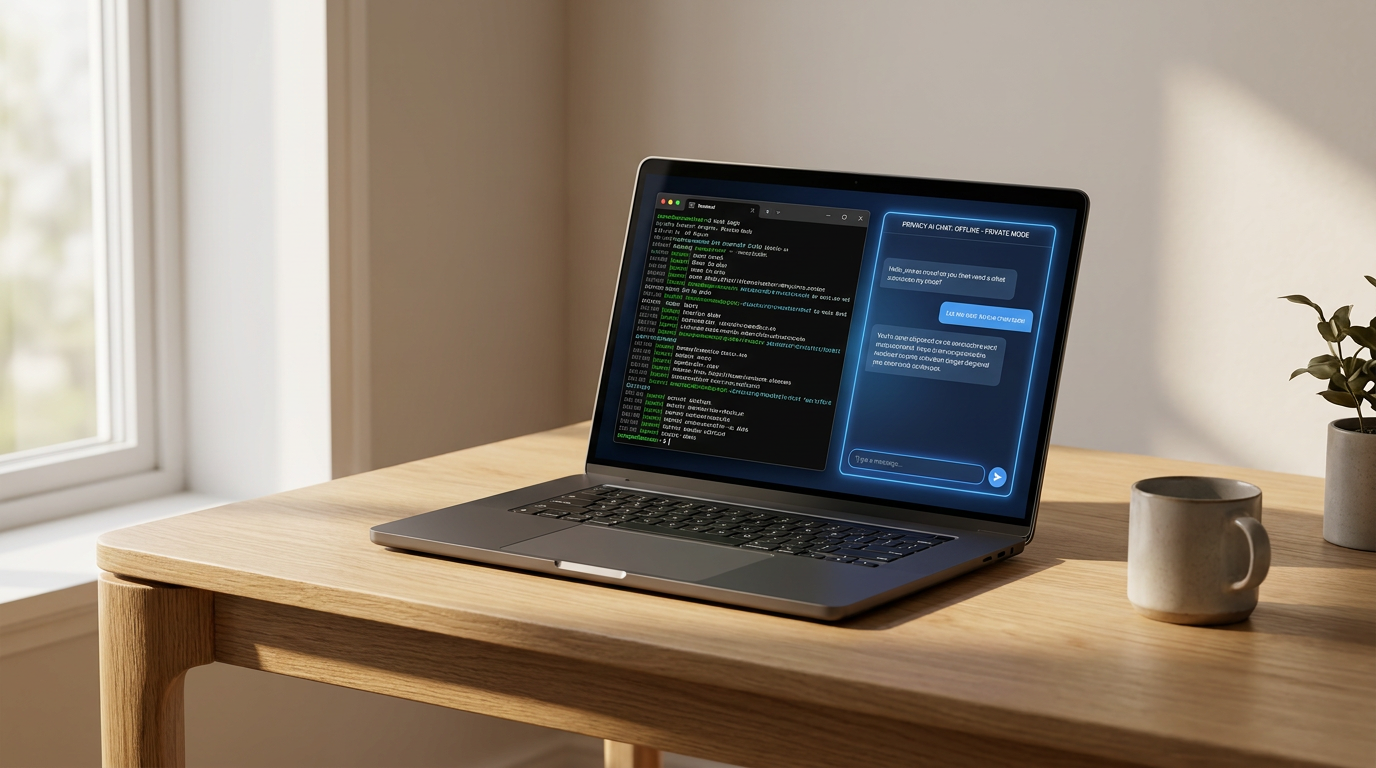
On the software side, the barrier to entry has been obliterated by tools that abstract away the complexity of model management. The undisputed leader in this space is Ollama, an open-source command-line tool that operates much like Docker for AI. With a single command, the software automatically downloads the correct model weights, applies the optimal quantization for the host machine, and spins up a local API server. It has become the foundational infrastructure for developers building local-first applications, boasting seamless integration with Apple's MLX framework to squeeze maximum performance out of Mac hardware.[1][2]
For users who prefer a graphical interface over a terminal, applications like LM Studio and GPT4All provide a polished, ChatGPT-like experience right on the desktop. LM Studio features a built-in model browser that allows users to search the Hugging Face repository, check if a model will fit in their system's RAM, and download it with a click. GPT4All goes a step further for enterprise and academic users by offering built-in local document analysis. This allows users to point the application at a folder of local PDFs or Word documents and chat with their files securely, all without any technical setup.[1][2]

The models themselves have evolved to rival the proprietary giants. Meta’s Llama 3.3 and Llama 4 families, Google’s Gemma 4, and Alibaba’s Qwen 3 series offer open-weight models that frequently match or beat the performance of early GPT-4 iterations. Google's Gemma 4, for instance, includes a highly efficient 12-billion parameter model that fits comfortably in 16GB of RAM while offering native audio processing. Meanwhile, specialized reasoning models like DeepSeek R1 have brought advanced "thinking" capabilities to local machines, allowing offline models to tackle complex coding and logic puzzles by generating internal chain-of-thought processes before answering.[1][3][4]
Major operating system vendors are leaning heavily into this local-first paradigm. Apple's "Apple Intelligence" architecture explicitly prioritizes on-device processing. By utilizing a modernized "Core AI" framework optimized for the unified memory of Apple Silicon, iOS and macOS attempt to route the vast majority of everyday AI requests—such as summarizing emails, proofreading text, and semantic photo searches—through the local NPU. Only when a request exceeds the local hardware's capabilities does the system seamlessly hand it off to Apple's Private Cloud Compute infrastructure.[5][7]
Microsoft has adopted a similar hybrid philosophy with its Copilot+ PC initiative. While early iterations of Windows AI features were tightly locked to specific NPU hardware, the ecosystem has broadened in 2026. Microsoft's strategy now acknowledges that local AI is a sliding scale: basic text generation and system automation can run on standard CPUs, while advanced local features like real-time video translation and semantic recall benefit from the dedicated 40+ TOPS (Trillions of Operations Per Second) provided by modern NPUs.[5][6]

Despite the rapid advancements, local AI is not a complete replacement for cloud-based frontier models. When it comes to highly complex agentic workflows—where an AI must autonomously browse the live internet, orchestrate multiple sub-agents, and synthesize massive datasets—the sheer compute power of a data center remains unmatched. The future of AI is not strictly local or strictly cloud, but a hybrid model. Users will rely on local models for privacy-sensitive, zero-latency daily tasks, reserving cloud APIs for heavy-duty reasoning, much like how a smartphone handles basic photo editing locally but relies on the cloud for massive video rendering.[5][7]
How we got here
2020
Apple introduces the Neural Engine in its M-series chips, laying the groundwork for efficient on-device AI.
2023
Meta releases the Llama 2 family of open-weight models, sparking a massive community effort to run AI locally.
2024
Microsoft launches the Copilot+ PC initiative, establishing hardware standards for local AI processing on Windows.
2026
Local AI becomes mainstream as tools like Ollama mature and hardware manufacturers make NPUs a standard feature.
Viewpoints in depth
Privacy & Security Advocates
Argue that local AI is essential for protecting sensitive data from corporate harvesting.
For privacy advocates, the cloud-based AI model is a fundamental security risk. Sending proprietary code, financial documents, or personal health queries to a third-party server exposes users to data breaches, unauthorized training ingestion, and surveillance. They view local AI not just as a cost-saving measure, but as a necessary return to data sovereignty, ensuring that the user's machine remains a secure, closed loop.
Hardware & Open-Source Enthusiasts
Value the democratization of AI and the ability to tinker, customize, and run models without API costs.
This community is driven by the challenge of optimizing massive models to run on consumer hardware. They actively develop quantization techniques, custom runtimes like llama.cpp, and specialized hardware configurations. For them, local AI represents freedom from corporate walled gardens, allowing developers to fine-tune models for specific niche tasks, experiment with raw weights, and build offline applications without worrying about rate limits or sudden API deprecations.
Enterprise IT Leaders
Focus on deploying secure, offline AI tools for internal document analysis without risking compliance breaches.
Corporate IT departments are caught between employees demanding AI tools and strict compliance regulations (like HIPAA or GDPR) that forbid uploading company data to public clouds. Local AI provides the perfect compromise. By deploying tools like AnythingLLM or local instances of Llama 3 on company-owned hardware, they can offer powerful document summarization and internal knowledge retrieval while guaranteeing that no proprietary data ever leaves the corporate firewall.
Hybrid AI Pragmatists
Maintain that while local AI is great for daily tasks, frontier reasoning will always require the massive compute of data centers.
Pragmatists, including major OS vendors, argue that the future is not an either/or scenario. They acknowledge that local models are incredibly efficient for zero-latency tasks like text prediction, basic summarization, and UI automation. However, they point out that true agentic workflows—where an AI must autonomously research, plan, and execute multi-step tasks across the internet—require the hundreds of gigabytes of VRAM only found in cloud data centers. They advocate for a seamless handoff system where the local NPU handles the basics and the cloud handles the heavy lifting.
What we don't know
- Whether future open-weight models will continue to fit within the VRAM constraints of consumer hardware.
- How quickly software developers will update legacy applications to take full advantage of new NPU hardware.
- If the open-source community can develop local agentic frameworks that rival the autonomy of cloud-based systems.
Key terms
- NPU (Neural Processing Unit)
- A specialized hardware chip designed specifically to accelerate the matrix math required for artificial intelligence tasks, reducing power consumption compared to standard CPUs.
- VRAM (Video RAM)
- The dedicated memory on a graphics card. For local AI, VRAM is crucial because the entire model must be loaded into memory to generate text quickly.
- Quantization
- A mathematical compression technique that reduces the precision of a model's internal numbers (e.g., from 16-bit to 4-bit), drastically shrinking its memory footprint with minimal loss in quality.
- KV Cache
- The memory space an AI model uses to remember the context of an ongoing conversation or the contents of an uploaded document.
- Open-weight model
- An AI model whose underlying architecture and trained parameters (weights) are made publicly available, allowing anyone to download and run it on their own hardware.
Frequently asked
Do I need an internet connection to use a local LLM?
No. Once you have downloaded the software and the model weights to your computer, the AI runs entirely offline. You can generate text, write code, and analyze documents without any internet access.
Is local AI as smart as ChatGPT?
It depends on the model and your hardware. Open-weight models like Llama 3.3 70B are highly competitive with early versions of GPT-4. However, the smaller 8B models that fit on standard laptops are better suited for basic summarization and writing assistance rather than complex reasoning.
What is the minimum hardware required?
To run a capable 8-billion parameter model, you generally need a modern processor, 16GB of system RAM, and a GPU with at least 6 to 8 gigabytes of VRAM. Apple Silicon Macs with unified memory are also highly efficient for this task.
Is it free to run AI locally?
Yes. The open-weight models and the software tools used to run them (like Ollama and LM Studio) are free to download and use. Your only cost is the electricity required to power your computer.
Sources
Source coverage
7 outlets
4 viewpoints surfaced







[1]Dev.toHardware & Open-Source Enthusiasts
Top 5 Local LLM Tools (2026)
Read on Dev.to →[2]Techsy.ioHardware & Open-Source Enthusiasts
8 Best Tools to Run LLMs Locally in 2026, Ranked
Read on Techsy.io →[3]PristrenEnterprise IT Leaders
Llama 3.3 Complete Guide: Meta's Best Open Source LLM
Read on Pristren →[4]LLM ConfiguratorHardware & Open-Source Enthusiasts
VRAM Requirements Guide 2026
Read on LLM Configurator →[5]FenxiPrivacy & Security Advocates
Local-first AI: what actually changes
Read on Fenxi →[6]Laptop OutletEnterprise IT Leaders
The age of the AI laptop
Read on Laptop Outlet →[7]Factlen Editorial TeamHybrid AI Pragmatists
Synthesis by Factlen editorial team
Read on Factlen Editorial Team →

More in ai
See all 6 stories →Agentic AI
The Rise of Personal AI Agents: How Everyday Users Are Automating Their Digital Lives
0 sources

Photonic Computing
Penn Physicists Create Light-Matter Particle to Power AI Computing
0 sources

On-Device AI
How Small Language Models Are Moving AI From the Cloud to Your Pocket
0 sources

EU AI Act
The EU AI Act's Enforcement Era Begins: What the August 2026 Deadline Means for Global Tech
0 sources

Every angle. Every day.
Get ai stories with full source coverage and perspective breakdowns delivered to your inbox.