
Google Earth's Classic Flight Simulator Is Now Available Directly in the Web Browser
Google has migrated its beloved flight simulator to the web version of Google Earth, allowing users to fly over 3D terrain without downloading any software.
By Factlen Editorial Team
- Casual Explorers
- Value the zero-install accessibility and the joy of buzzing their own neighborhoods.
- Tech Enthusiasts
- Appreciate the technical milestone of streaming 3D environments natively in a browser.
- Aviation Purists
- Acknowledge the fun factor but note the simplified physics compared to dedicated simulators.
What's not represented
- · Educators who might use the tool for geography lessons
- · Competitor simulation developers
Why this matters
By removing the need for a heavy desktop download, this update democratizes one of the internet's most beloved geographic tools, allowing anyone with a browser to instantly explore the planet from the sky.
Key points
- Google Earth's classic flight simulator is now available directly in the web browser.
- The feature requires no software downloads and is accessible via the 'Tools' menu.
- Users can fly either an F-16 fighter jet or a Cirrus SR22 propeller plane.
- The browser version dynamically streams 3D buildings and high-resolution satellite imagery.
- Originally launched as a hidden Easter egg in 2007, it was previously limited to the desktop app.
For nearly two decades, accessing one of the internet's most beloved Easter eggs required a hefty desktop software download and the knowledge of a secret keystroke. As of this week, Google has finally liberated its classic Google Earth flight simulator, making it seamlessly available to anyone with a modern web browser. The update fundamentally transforms the platform from a static globe you passively inspect into a dynamic 3D world you can actively inhabit, all without installing a single megabyte of dedicated software. By removing the friction of a desktop installation, Google has opened the virtual skies to a massive new audience of casual explorers.[2][5]
The global rollout, which officially went live on June 12, 2026, integrates the flight simulator directly into the standard Google Earth web application. Users no longer need to memorize the old 'Ctrl+Alt+A' command that originally unlocked the hidden feature in the late 2000s. Instead, the simulator is now proudly and permanently displayed under the 'Tools' menu in the web interface. This prominent placement invites casual users, students, and geography enthusiasts alike to take the controls and soar over their own neighborhoods, remote mountain ranges, or famous international landmarks with just a few clicks.[1][3]
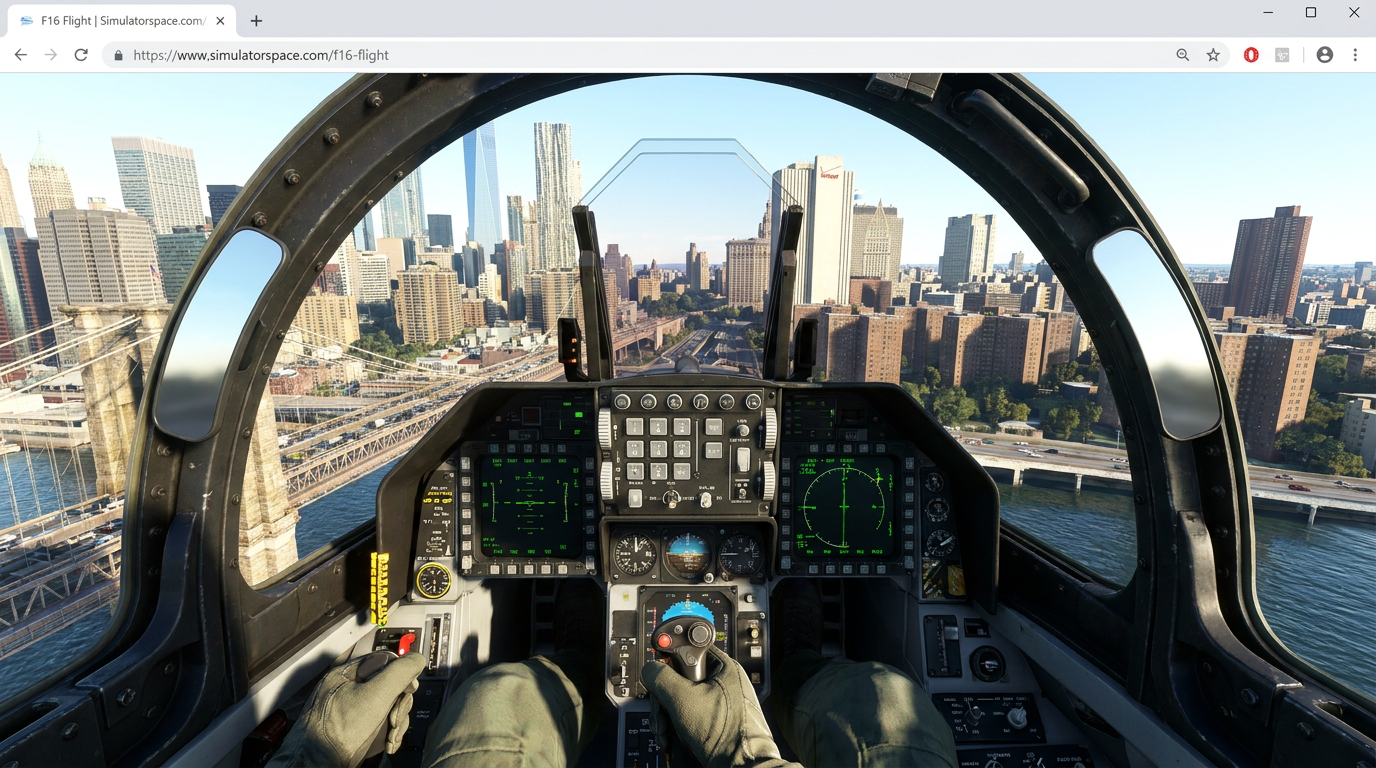
Once the simulator is activated, it instantly drops pilots directly into their current camera position above the virtual globe, seamlessly transitioning from map view to cockpit view. From there, users are prompted to choose between two distinct aircraft models that cater to different flying styles. They can select the nimble, supersonic F-16 Fighting Falcon, which is perfect for high-speed continent hopping and rapid altitude climbs. Alternatively, they can opt for the slower, propeller-driven Cirrus SR22, a forgiving aircraft that is ideal for low-altitude sightseeing, navigating tight valleys, and buzzing familiar suburban streets.[4][6]

The technical achievement underlying this web release is substantial and highlights the rapid evolution of browser capabilities. Rather than relying on a massive local installation—a hallmark of modern, hyper-realistic aviation games that require hundreds of gigabytes of storage—the browser-based simulator dynamically streams 3D buildings, complex terrain elevation data, and high-resolution satellite imagery on the fly. While this cloud-based approach requires a relatively stable internet connection to prevent textures from blurring, it entirely bypasses the need for expensive gaming hardware, dedicated graphics cards, or lengthy download times.[2][4]
Google has been remarkably clear that this iteration is an experimental feature tailored for casual exploration rather than rigorous aerodynamic training. The flight physics are intentionally simplified to ensure accessibility for those who have never touched a flight stick. While the aircraft respond accurately to pitch, roll, and yaw inputs via keyboard, mouse, or touch controls on tablets, the simulator forgives minor piloting errors that would typically cause a catastrophic aerodynamic stall in a professional, high-fidelity training environment. This forgiving nature ensures that the learning curve remains gentle, allowing users to focus on the scenery rather than complex instrument panels.[1][6]
Google has been remarkably clear that this iteration is an experimental feature tailored for casual exploration rather than rigorous aerodynamic training.
Still, the experience is not entirely without stakes, and gravity remains a factor. Pilots can and will crash if they misjudge their altitude, attempt overly ambitious maneuvers through the digital concrete canyons of Manhattan, or fail to pull up in time when diving toward the Grand Canyon. However, when a crash inevitably occurs, the system simply prompts the user to reset and try again instantly. There are no repair costs or lengthy loading screens, maintaining the low-friction, playful nature of the tool that encourages bold experimentation.[3][5]

The simulator's journey to the web represents a nostalgic milestone for long-time internet users who remember its quirky origins. It first appeared in August 2007 as a hidden feature in Google Earth 4.2, quietly slipped into the codebase by developers for their own amusement. It proved so immensely popular among the tech community that by 2008, Google promoted it to an official, visible menu option in the desktop application, where it remained a beloved staple for over fifteen years before finally making the leap to the browser.[2][4]
By moving the simulator to the browser, Google is leaning heavily into what Earth has always been at its core: a global-scale curiosity engine. While heavyweight titles like Microsoft Flight Simulator dominate the hardcore aviation market with their petabyte-scale cloud streaming, live air traffic, and exacting weather models, Google's offering serves a completely different purpose. It is the ultimate idle journey—a frictionless way to spend a lunch break flying from the Pyramids of Giza to a childhood home without worrying about pre-flight checklists or air traffic control.[2][3]

The update also highlights the growing feature parity between traditional desktop software and modern web applications. Over the past year, Google has steadily migrated its most powerful professional Earth features—including complex elevation profiles, measurement tools, and advanced file import capabilities—directly into the browser environment. The flight simulator was one of the last major holdouts, and its arrival strongly signals that the web version is now the definitive, fully-featured way to experience the platform. It proves that the browser is no longer a compromised, 'lite' version of the app, but the primary destination.[1][6]
For now, the feature remains entirely free and accessible globally across all major modern browsers, including Chrome, Safari, and Edge. As users flood the virtual skies to test their piloting skills and revisit their favorite global landmarks from a new vantage point, the release serves as a refreshing reminder of the internet's capacity for simple, unadulterated fun. It proves that sometimes, the best way to understand the scale and beauty of the world is to simply take off and fly over it.[4][5]
How we got here
August 2007
Google quietly adds a hidden flight simulator to Google Earth 4.2 as an Easter egg.
2008
Due to immense popularity, the simulator becomes an official, visible feature in the desktop app.
June 12, 2026
Google launches the simulator globally for the web browser version, removing the need for downloads.
Viewpoints in depth
Casual Explorers
For everyday users, the update is a nostalgic, low-friction way to explore the globe.
Without the barrier of a heavy software download, casual users are treating the simulator as a digital sandbox. They value the ability to instantly launch a flight over their own neighborhoods or famous landmarks using just a keyboard and a browser tab, embracing the tool as a playful extension of digital mapping rather than a serious game.
Tech Enthusiasts
Web developers and tech analysts view the release as a benchmark for browser capabilities.
For the tech community, the real story isn't the planes, but the platform. Streaming high-resolution 3D photogrammetry and satellite imagery dynamically into a browser without requiring a dedicated GPU or massive local installation highlights the immense progress in WebGL and cloud-streaming technologies. It proves that complex, interactive 3D environments can now live entirely on the web.
Aviation Purists
Dedicated flight simulation fans see it as a fun toy, though lacking in aerodynamic realism.
Hardcore virtual pilots are quick to point out the simplified physics and lack of realistic weather modeling compared to heavyweights like Microsoft Flight Simulator. However, even purists acknowledge its value as an accessible 'curiosity engine'—a way to quickly scout real-world topography or enjoy a casual VFR (Visual Flight Rules) flight without spending twenty minutes configuring a virtual cockpit.
What we don't know
- Whether Google plans to add multiplayer capabilities or live air traffic to the web simulator.
- If additional aircraft models or realistic weather conditions will be introduced in future updates.
- When or if the simulator will be fully optimized for mobile smartphone browsers beyond tablet touch support.
Key terms
- Easter Egg
- A hidden feature, joke, or message intentionally left by developers inside a piece of software.
- Cirrus SR22
- A popular single-engine composite airplane featured in the simulator, ideal for slower, low-altitude sightseeing.
- WebGL
- A web technology that allows browsers to render interactive 2D and 3D graphics without requiring additional plugins.
Frequently asked
Do I need to download any software to play?
No. The flight simulator now runs entirely within the Google Earth web application in your browser.
Which aircraft can I fly?
Users can choose between the high-speed F-16 Fighting Falcon and the slower, propeller-driven Cirrus SR22.
Does it cost money?
No, the Google Earth flight simulator is completely free to use.
Will it work on my tablet?
Yes, the web version includes touch controls, allowing it to run on devices like iPads alongside traditional keyboard and mouse setups.
Sources
Source coverage
6 outlets
3 viewpoints surfaced






[1]GoogleAviation Purists
Use keyboard shortcuts to explore the world in a flight simulator
Read on Google →[2]Windows ForumTech Enthusiasts
Google Earth Learns the Oldest Trick in the Simulator Book
Read on Windows Forum →[3]OSXDailyCasual Explorers
Try the Flight Simulator in Google Earth & Fly Around the World
Read on OSXDaily →[4]WinFutureTech Enthusiasts
Google Earth Flugsimulator im Browser: Ohne Download abheben
Read on WinFuture →[5]iPhone in CanadaCasual Explorers
Google Earth brings classic flight simulator to the web
Read on iPhone in Canada →[6]Stadt BremerhavenTech Enthusiasts
Google Earth: Flugsimulator landet direkt im Browser
Read on Stadt Bremerhaven →

More in technology
See all 6 stories →Open-Source Security
JPMorgan and Cyber Firms Deploy AI to Hunt Down Decades-Old Software Flaws
0 sources

Qi2 Standard
The End of the Wireless Charging Wars: How Qi2 is Unifying Apple and Android
0 sources

Green Computing
Researchers Are Wiring 2,000 Retired Smartphones Together to Build a Low-Carbon Data Center
0 sources

Youth Tech Policy
UK Unveils Sweeping Social Media Ban for Under-16s: The Evidence and the Uncertainty
0 sources

Every angle. Every day.
Get technology stories with full source coverage and perspective breakdowns delivered to your inbox.