
How 2026's Smartphone Updates Are Quietly Revolutionizing Accessibility
Powered by new on-device AI processors, the latest smartphone operating systems are baking advanced assistive tools—from real-time live captioning to secure screen readers—directly into their core.
By Factlen Editorial Team
- Accessibility Advocates
- Celebrate the integration of AI-driven assistive tools directly into the OS, noting it reduces reliance on expensive third-party software.
- Security Researchers
- Praise the lockdown of the Accessibility API, highlighting the critical balance between empowering vulnerable users and protecting them from malware.
- Hardware Analysts
- Focus on how the shift to AI-native NPU silicon makes these power-hungry, zero-latency features possible without draining battery life.
What's not represented
- · Visually impaired users beta testing the new features
- · Developers of third-party accessibility apps facing new API restrictions
Why this matters
For millions of users with visual, auditory, or motor impairments, these baked-in OS features transform the smartphone from a standard communication device into a highly personalized, secure assistive tool that operates in real time without needing a cloud connection.
Key points
- Android 17 and other 2026 updates are baking advanced accessibility tools directly into the core operating system.
- New AI-native processors allow features like Live Captioning to run entirely on-device with zero latency.
- Screen readers now use computer vision to describe unlabeled images and interface elements contextually.
- Android 17 restricts the Accessibility API to verified tools, closing a major loophole used by mobile malware.
- Large-screen resizing is now mandatory for developers, improving usability on foldables and tablets.
While massive batteries, folding screens, and iterative camera upgrades typically dominate the 2026 smartphone hardware cycle, the most profound and impactful shift is happening quietly within the software layer. Across the mobile industry, accessibility features are graduating from being buried in niche settings menus to serving as front-and-center pillars of the operating system. For years, users with visual, auditory, or motor impairments had to rely on a patchwork of third-party applications to make their devices fully usable. Today, the philosophy has fundamentally changed. Major tech companies are recognizing that assistive technology is not an edge case, but a core component of good design that benefits everyone. This shift is transforming the modern smartphone from a standard communication device into a highly personalized, secure, and universally adaptable assistive tool.[7]
The primary catalyst for this industry-wide shift is the rollout of Android 17 and its associated summer feature drops, which are setting a new standard for mobile inclusivity. Rather than relying on external developers to patch accessibility gaps, Google and major smartphone manufacturers are baking sophisticated assistive tools directly into the core user experience. This means that right out of the box, a new device is equipped to handle complex accessibility needs without requiring the user to hunt down specialized software or pay for expensive accessibility subscriptions. The June 2026 updates have introduced a suite of features that seamlessly integrate into the daily workflow, ensuring that accessibility is a foundational right of the operating system rather than an optional add-on.[1][2]
This monumental leap in software capability is made entirely possible by the widespread adoption of "AI-native" processors across flagship and mid-range devices. Next-generation silicon, such as Qualcomm's Snapdragon 8 Gen 5 and Google's Tensor G5, feature incredibly powerful Neural Processing Units (NPUs) that are designed specifically for edge computing. In previous years, running complex artificial intelligence tasks required sending data back and forth to cloud servers, which introduced frustrating latency and raised significant privacy concerns. Now, these advanced NPUs possess the raw computational horsepower to process heavy machine learning algorithms directly on the motherboard, fundamentally changing what a smartphone can achieve in real time.[4]

By running these complex algorithms natively on the device rather than relying on a continuous internet connection, these chips enable real-time, privacy-preserving assistive features with absolute zero latency. This edge-computing approach is a game-changer for accessibility tools, which require instantaneous feedback to be genuinely useful. A screen reader or a live captioning tool that lags by even a half-second can completely disrupt a user's ability to navigate a digital space or participate in a conversation. Furthermore, because the data never leaves the phone, users can confidently utilize these tools in sensitive environments—such as banking apps or private medical messages—without fearing that their personal information is being intercepted or stored on a remote server.[4][7]
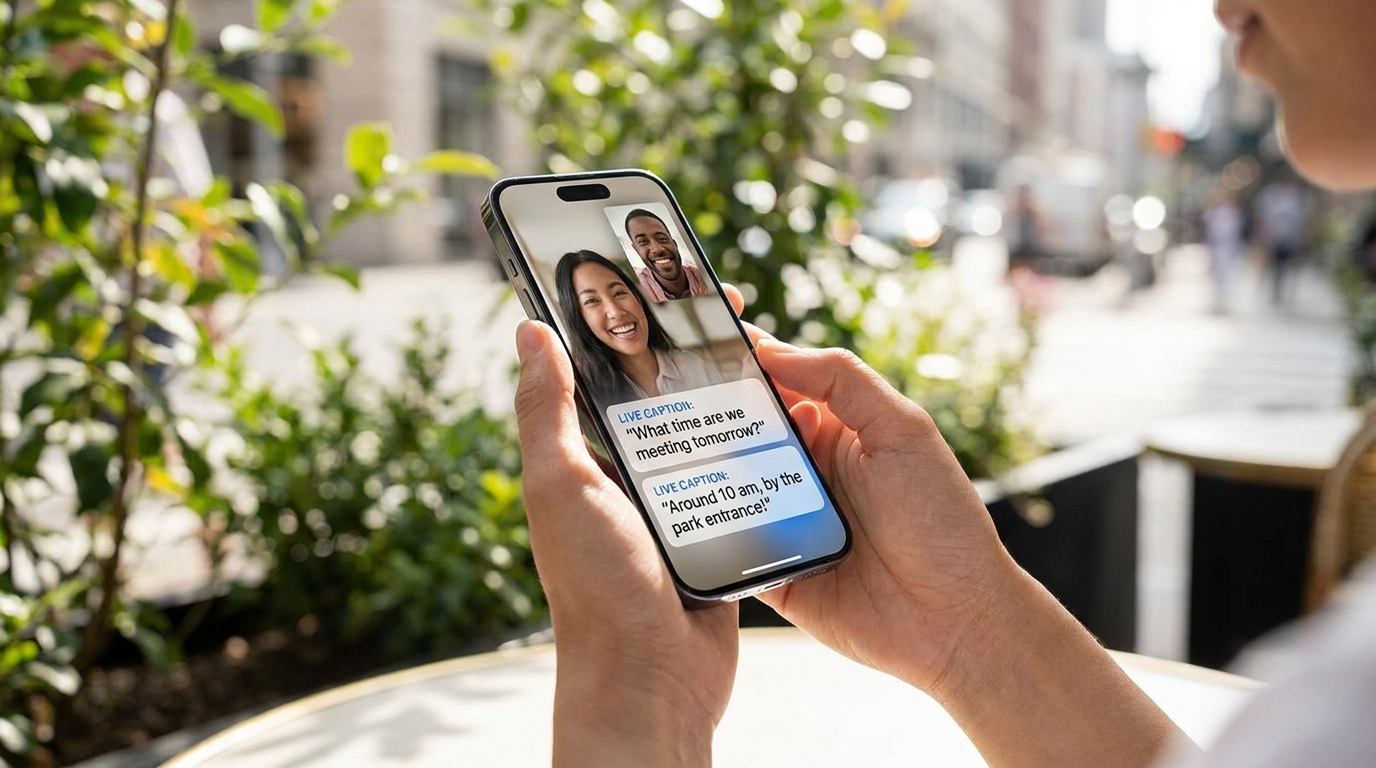
One of the most universally impactful results of this new hardware architecture is the implementation of system-wide Live Captioning. For users who are deaf or hard of hearing, modern smartphones can now instantly generate highly accurate, synchronized subtitles for absolutely any audio playing on the device. Whether a user is watching a viral video, listening to a niche podcast, or participating in a live phone call, the onboard AI listens and transcribes the speech in real time. Because this feature is baked into the operating system and powered by the NPU, it works flawlessly even when the device is in airplane mode or deep in a subway tunnel without cellular service.[3]
One of the most universally impactful results of this new hardware architecture is the implementation of system-wide Live Captioning.
Visual accessibility is also receiving a massive, long-overdue overhaul in the latest software generation. Android 17 introduces significantly enhanced support for complex physical keyboard typing and advanced screen reader feedback. This is particularly transformative for users typing in Chinese, Japanese, Korean, and Vietnamese (CJKV) languages, where character conversion and selection have historically been difficult for screen readers to interpret accurately. The new operating system APIs allow the software to precisely identify the nature of text modifications during composition, enabling screen readers to deliver highly accurate, context-aware spoken feedback that makes typing in complex languages vastly more intuitive for visually impaired users.[1]
Core navigation tools like TalkBack and Voice Access have been fundamentally upgraded to leverage this new on-device intelligence. As showcased during recent developer conferences, these screen readers no longer just read raw text; they use advanced computer vision to describe images, interface elements, and dynamic content with unprecedented contextual awareness. If an app developer forgets to label a button, the AI can visually analyze the icon and accurately guess its function, reading it aloud to the user. This bridges the gap in poorly optimized applications, ensuring that visually impaired users are not locked out of digital experiences simply because a third-party developer neglected basic accessibility standards.[6]
Motor accessibility is being addressed through clever, highly customizable hardware-software integration that rethinks how users physically interact with their devices. Features like "Quick Tap" on Android and "Back Tap" on iOS allow users to turn the entire physical rear panel of their phone into an invisible, programmable button. By utilizing the device's internal accelerometers and gyroscopes, the phone can detect a firm double or triple tap on its back, triggering essential actions like taking a screenshot, launching a specific app, or pulling down the notification shade. This makes it significantly easier for users with limited dexterity to operate large devices without requiring precise, difficult screen taps.[3]

Crucially, this unprecedented accessibility boom is being paired with strict, long-overdue security measures designed to protect the platform's most vulnerable users. Historically, the powerful Android Accessibility API was a double-edged sword. While it provided the deep system hooks necessary for screen readers and voice control apps to function, it was also occasionally exploited by sophisticated malware. Bad actors would trick users into granting accessibility permissions, allowing malicious apps to invisibly read screens, intercept two-factor authentication codes, or even hijack device controls to authorize fraudulent bank transfers in the background.[5]
Android 17 definitively solves this glaring vulnerability by introducing Advanced Protection Mode and restricting the Accessibility API exclusively to verified accessibility tools. Under the new framework, generic applications can no longer request these sweeping permissions unless they are officially classified and vetted as genuine assistive software. This critical lockdown ensures that users who rely on these essential features are not forced to compromise their device's fundamental security just to navigate their phones. It strikes a vital balance, preserving the open nature of Android's assistive ecosystem while slamming the door shut on one of the most common vectors for mobile malware.[5][6]

Furthermore, the new operating system makes large-screen behavior strictly mandatory for all developers. As foldable phones and tablets become increasingly mainstream, apps must now seamlessly resize and adapt to various aspect ratios, eliminating the frustrating experience of locked portrait orientations. This is a massive, often-overlooked win for accessibility, as it provides much-needed flexibility for users who require larger text, magnified interfaces, and bigger touch targets. By forcing developers to support dynamic resizing, the operating system ensures that users with visual or motor impairments can comfortably use larger devices without encountering broken or unusable app layouts.[1]
Together, these comprehensive updates represent a broader, highly encouraging philosophical shift within Silicon Valley. Assistive technology is no longer being treated as an afterthought, a niche requirement, or a mere compliance checkbox to avoid litigation. Instead, it is actively driving core engineering decisions, influencing everything from silicon architecture to fundamental API security. As these powerful, AI-driven updates roll out globally throughout the summer of 2026, they promise to make the digital world significantly more navigable, secure, and inclusive, empowering millions of people to interact with their technology on their own terms.[7]
How we got here
2024–2025
Early AI models are integrated into smartphones, but mostly rely on cloud processing, introducing latency for assistive tools.
January 2026
Next-generation AI-native processors begin shipping in flagship devices, enabling heavy on-device computing.
March 2026
Google introduces Advanced Protection Mode in Android 17 betas, locking down the Accessibility API to prevent malware abuse.
June 2026
Android 17 feature drops roll out globally, bringing system-wide Live Captioning and enhanced TalkBack to millions of users.
Viewpoints in depth
Accessibility Advocates
Celebrating the shift to native, OS-level assistive tools.
Advocates argue that baking features like Live Captioning and advanced TalkBack directly into the operating system is a massive leap for digital equity. By removing the need for expensive third-party subscriptions and ensuring these tools work offline via on-device AI, smartphones are becoming reliable, everyday lifelines rather than just communication devices.
Security Researchers
Focusing on the critical lockdown of the Accessibility API.
Cybersecurity experts emphasize that the Accessibility API has long been a double-edged sword, providing essential hooks for screen readers while offering a backdoor for malware to hijack devices. They view Android 17's decision to restrict this API exclusively to verified tools as a necessary maturation of the platform, protecting vulnerable users from exploitation.
Hardware Analysts
Highlighting the silicon advancements making this possible.
Industry analysts point out that software features are only half the story. The real breakthrough is the integration of Neural Processing Units (NPUs) in chips like the Snapdragon 8 Gen 5. These hardware components allow power-hungry AI tasks to run locally at zero latency, ensuring that always-on accessibility features do not decimate the device's battery life.
What we don't know
- How strictly Google will define 'verified accessibility tools' for third-party developers applying for API access.
- Whether older devices will struggle with battery drain when running these new AI-driven features without dedicated NPUs.
Key terms
- NPU (Neural Processing Unit)
- A specialized hardware component within a smartphone's processor designed specifically to run artificial intelligence tasks quickly and efficiently.
- Live Captioning
- An OS-level feature that automatically generates real-time text subtitles for any audio playing on the device.
- Accessibility API
- A set of software hooks that allows assistive apps (like screen readers) to view what is on the screen and interact with the interface on the user's behalf.
- Edge Computing
- Processing data locally on the device itself rather than sending it to a remote cloud server, ensuring privacy and zero latency.
Frequently asked
Do these new accessibility features require an internet connection?
No. Thanks to new AI-native processors, features like Live Captioning and advanced screen reading run entirely on the device without needing the cloud.
Will older phones get the Android 17 accessibility updates?
While older devices will receive the OS update, some of the most advanced zero-latency AI features require the newer NPU hardware found in 2025 and 2026 smartphones.
How does Android 17 protect the Accessibility API?
The update restricts API access exclusively to verified accessibility tools, preventing malicious apps from using the feature to read screens or steal data.
Sources
Source coverage
7 outlets
3 viewpoints surfaced







[1]Android DevelopersAccessibility Advocates
Android 17 Features and APIs
Read on Android Developers →[2]SlashGearHardware Analysts
Android 17 June Drop: The Best New Features
Read on SlashGear →[3]TalkMobileAccessibility Advocates
Smartphone features you didn't know existed in 2026
Read on TalkMobile →[4]Bernard Marr & Co.Hardware Analysts
8 Smartphone Trends That Will Shape 2026
Read on Bernard Marr & Co. →[5]The Hacker NewsSecurity Researchers
Android 17 Blocks Non-Accessibility Apps from Accessibility API to Prevent Malware Abuse
Read on The Hacker News →[6]Google BlogAccessibility Advocates
New security and privacy features in Android 17
Read on Google Blog →[7]Factlen Editorial TeamAccessibility Advocates
Synthesis by Factlen editorial team
Read on Factlen Editorial Team →
Every angle. Every day.
Get technology stories with full source coverage and perspective breakdowns delivered to your inbox.