
The Best E-Ink Note-Taking Tablets of 2026: reMarkable 2 vs. Kindle Scribe vs. Boox Note Air4 C
As e-ink tablets transition from niche gadgets to essential productivity tools, the market has fractured into three distinct philosophies. We compare the distraction-free reMarkable 2, the reading-focused Kindle Scribe, and the versatile Onyx Boox Note Air4 C to determine which device fits your workflow.
By Factlen Editorial Team
- Minimalist Productivity Advocates
- Argue that digital tools should do one thing perfectly to eliminate distractions and foster deep work.
- Ecosystem Readers
- Prioritize seamless access to massive book libraries and value note-taking as a secondary feature.
- Cross-Platform Power Users
- Demand full operating systems and app flexibility to integrate e-ink into complex existing workflows.
What's not represented
- · Digital Artists seeking high-refresh-rate drawing tools
- · Budget-conscious students looking for sub-$200 options
Why this matters
Choosing the right e-ink tablet is a $400 to $600 investment in your daily productivity. Picking the wrong ecosystem can lead to frustrating file-transfer bottlenecks, while the right device can significantly reduce screen fatigue and digital distraction.
Key points
- The reMarkable 2 offers the best pure writing experience but lacks a backlight and requires a subscription for cloud sync.
- Amazon's Kindle Scribe provides exceptional hardware value and reading integration, though its note-taking software remains basic.
- The Onyx Boox Note Air4 C delivers full Android versatility and color e-ink, at the cost of battery life and interface simplicity.
- Stylus feel varies significantly, with reMarkable mimicking pencil on paper, while the Scribe feels closer to a gel pen.
- Buyers must choose between closed, distraction-free ecosystems and open, app-heavy platforms based on their specific workflow needs.
In 2026, the tablet market is fracturing into two distinct philosophies: the do-everything glass rectangles like the iPad, and the do-one-thing-perfectly e-ink slates. For professionals, students, and writers overwhelmed by digital notifications, e-ink note-taking devices have transitioned from niche gadgets to essential productivity tools. These devices deliberately sacrifice video playback and high-refresh-rate scrolling in exchange for weeks of battery life, zero eye strain, and a distraction-free environment.[1][3]
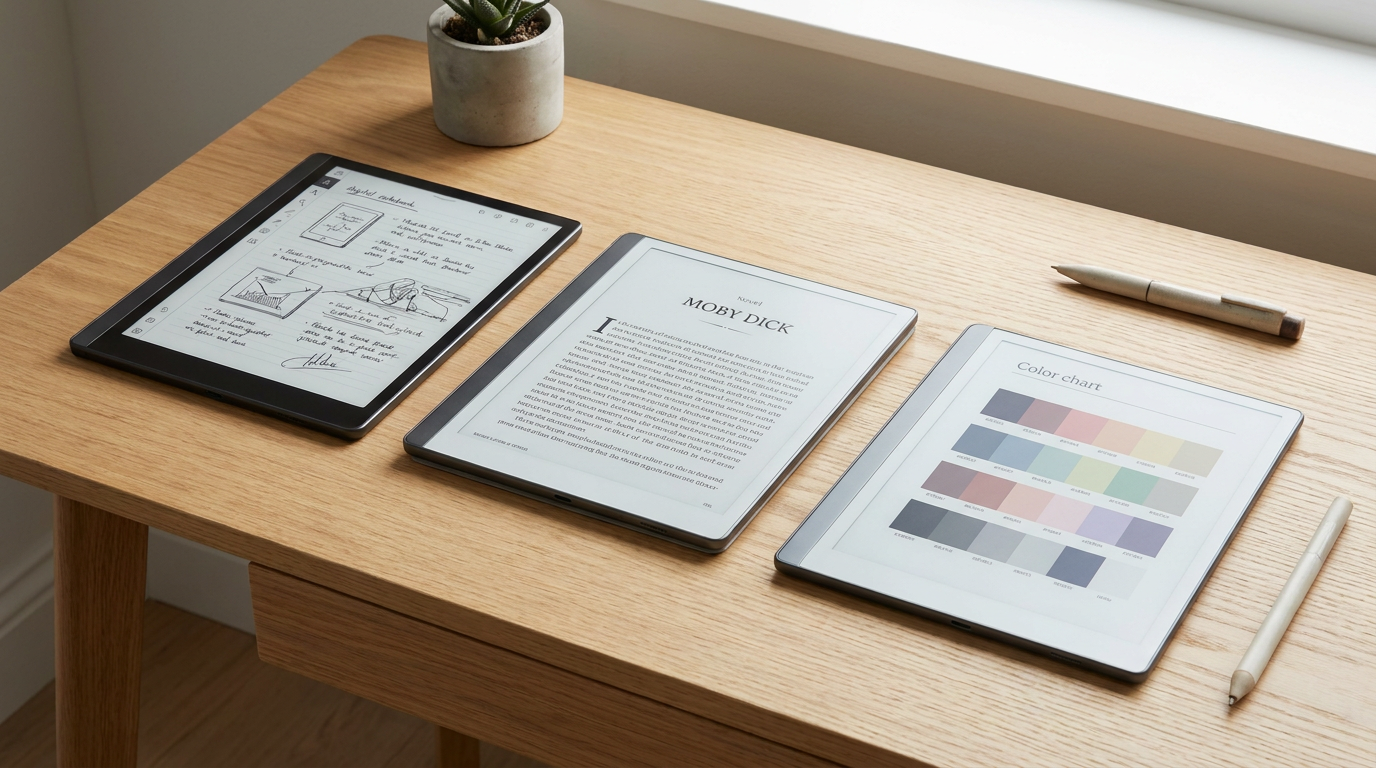
The market is currently dominated by three flagship devices, each representing a radically different approach to digital paper. The reMarkable 2 remains the purist’s choice, focusing entirely on replicating the feel of a physical notebook. The Amazon Kindle Scribe leverages the world’s largest e-book ecosystem, blending a premium e-reader with basic journaling. Finally, the Onyx Boox Note Air4 C caters to power users, offering a color e-ink display and a full Android operating system.[4][5]
The case for the reMarkable 2 centers entirely on its unparalleled writing experience and minimalist design. The argument against it focuses on its lack of a front light, its aging monochrome screen, and a controversial subscription model required for seamless cloud syncing. The evidence shows that at just 4.7 millimeters thick, with a textured glass surface and a custom Linux-based operating system, it still provides the most realistic pencil-on-paper friction available on the market.[1][5]
When examining the reMarkable 2's hardware, the 10.3-inch Carta display offers a 226-pixel-per-inch resolution. While this is lower than newer competitors, the device's near-zero latency makes the digital ink feel as though it is flowing directly from the Marker Plus stylus. The software is intentionally barren; there is no web browser, no email client, and no app store. Users can only read PDFs and EPUB files, or write in digital notebooks, ensuring that deep work remains uninterrupted by incoming alerts.[3][6]

However, the reMarkable 2 requires compromises. Without a backlight, users cannot read or write in bed without an external lamp. Furthermore, while the base device costs around $299, unlocking automatic cloud synchronization to Google Drive or Dropbox requires a Connect subscription, which costs between $2.99 and $7.99 per month. For buyers accustomed to free cloud saves on Apple or Google ecosystems, this recurring fee is a frequent point of friction.[1][2]
The case for the Amazon Kindle Scribe centers on its massive reading ecosystem and exceptional hardware value. The argument against it highlights its rudimentary note-taking software and closed ecosystem. The evidence shows that for $399, buyers receive a 10.2-inch display with a razor-sharp 300-pixel-per-inch resolution, a warm adjustable front light, and a Premium Pen that requires no charging.[2][3]
Amazon’s hardware execution on the Scribe is virtually flawless. The screen provides crisp text that rivals printed books, and the battery life is measured in weeks, even with the front light engaged. The writing feel is smoother than the reMarkable, utilizing a slightly slicker glass surface that mimics a gel pen on premium paper rather than a pencil on rough parchment. Because it is a Kindle, users have instant access to millions of books and audiobooks.[2][4]
Amazon’s hardware execution on the Scribe is virtually flawless.
Yet, the Kindle Scribe struggles as a dedicated productivity tool. The note-taking application lacks advanced features like layers, custom templates, or complex folder hierarchies. Annotating documents requires sending PDFs through Amazon's Send-to-Kindle service, and exporting those marked-up files back to a computer can be a clunky, multi-step process. It is fundamentally an e-reader that has learned how to take notes, rather than a dedicated digital notebook.[2][5]
The case for the Onyx Boox Note Air4 C centers on its unmatched versatility and color capabilities. The argument against it focuses on its steep learning curve, darker screen, and shorter battery life. The evidence shows that by running full Android 13 and featuring a Kaleido 3 color e-ink panel, it is the only device in this tier capable of fully replacing an LCD tablet for document-heavy workflows.[1][4]
The Boox Note Air4 C allows users to download the Google Play Store, meaning they can install Microsoft OneNote, Evernote, Notion, and even the Kindle app itself. The color layer, which renders at 150 pixels per inch while black text remains at 300 pixels per inch, allows professionals to highlight documents in yellow or red, and view charts as they were intended. It supports split-screen multitasking, enabling users to read a PDF on the left while taking notes on the right.[5][6]
This flexibility comes with significant trade-offs. The Kaleido 3 color filter inherently blocks some light, making the screen visibly darker and grayer than the reMarkable or Scribe when the front light is turned off. Because it runs a heavy Android operating system and frequently connects to Wi-Fi to sync third-party apps, the battery drains in days rather than weeks. Additionally, the interface is dense with settings, requiring users to tinker with refresh rates and contrast sliders to optimize each app.[4][6]

When evaluating the stylus experience across the three platforms, the physical hardware varies wildly. The reMarkable's Marker Plus features a physical eraser on the back and requires periodic tip replacements, reinforcing the analog illusion. Amazon's Premium Pen includes a dedicated shortcut button and an eraser, offering excellent value since it is often bundled with the device. Onyx Boox provides a highly responsive stylus with pressure sensitivity, but users frequently report that the stock pen feels cheaper than its competitors, prompting many to buy third-party Wacom-compatible styluses.[3][5]
Cloud integration is another major differentiator. The reMarkable 2 operates in a walled garden, relying on its proprietary desktop and mobile apps to move files, unless users pay for the Connect subscription to link external drives. The Kindle Scribe relies entirely on Amazon's cloud infrastructure, which is seamless for purchased books but restrictive for enterprise documents. The Boox Note Air4 C is completely open, allowing users to save files directly to local storage, Google Drive, OneDrive, or any other Android-supported cloud service.[5][6]

Ultimately, the reMarkable 2 fits well when the user is a novelist, an executive, or an easily distracted student who needs a pure, single-purpose thinking tool. It is the digital equivalent of a blank legal pad. It does not fit when the user needs to read in dark environments, requires access to a digital bookstore, or refuses to pay a monthly subscription for basic cloud functionality.[1][6]
The Amazon Kindle Scribe fits well when the user is an avid reader who wants a large canvas for books and desires a simple, reliable digital journal. It is the most cost-effective entry point into large-format e-ink. It does not fit when the user requires professional-grade note organization, complex PDF markups, or integration with third-party productivity software like Evernote.[2][3]
The Onyx Boox Note Air4 C fits well when the user is a cross-platform power user who needs color-coding, specific Android apps, and the ability to juggle multiple file formats simultaneously. It is a true tablet with an e-ink screen. It does not fit when buyers want a simple, distraction-free interface out of the box, or when they expect the month-long battery life traditionally associated with e-readers.[4][5]
How we got here
2020
reMarkable launches the reMarkable 2, setting a new standard for ultra-thin, distraction-free digital notebooks.
Late 2022
Amazon enters the large-format e-ink market with the Kindle Scribe, blending its e-reader dominance with stylus support.
Late 2023
Onyx Boox introduces the Note Air3 C, bringing full Android capabilities and Kaleido 3 color to the 10.3-inch form factor.
Late 2024
Amazon releases a refreshed Kindle Scribe with a white bezel and updated Premium Pen, while Boox updates to the Note Air4 C.
Viewpoints in depth
Distraction-Free Purists
Advocates for single-purpose devices that force focus.
This camp argues that the primary value of e-ink is not just eye comfort, but cognitive isolation. They believe that adding web browsers, email clients, and app stores to an e-ink tablet defeats the purpose of buying one. For these users, the friction of moving files manually and the lack of a backlight are acceptable trade-offs for a device that physically prevents them from doom-scrolling or checking notifications during deep work sessions.
Ecosystem Readers
Users who view note-taking as an extension of their reading habit.
This perspective prioritizes the library over the notebook. They argue that a digital notebook is useless if it cannot easily access the books, textbooks, and documents they already own. For this group, Amazon's seamless syncing, massive storefront, and long battery life make the Kindle Scribe the most practical choice, even if its drawing tools lack the sophistication of dedicated art or drafting tablets.
Cross-Platform Power Users
Professionals who demand full integration with their existing software stacks.
Power users argue that a tablet costing over $400 must be able to integrate with enterprise workflows. They champion Android-based e-ink devices because they refuse to be locked into proprietary cloud systems. For this camp, the ability to run Microsoft OneNote, sync directly to a corporate OneDrive account, and highlight PDFs in color outweighs the downsides of a steeper learning curve and a battery that needs charging every few days.
What we don't know
- Whether Amazon will ever open the Kindle Scribe to third-party cloud integrations like Google Drive.
- How quickly the next generation of color e-ink (beyond Kaleido 3) will close the brightness and saturation gap with LCD screens.
Key terms
- E-Ink Carta
- A specific type of electronic paper display technology known for high contrast and fast refresh rates, commonly used in modern e-readers.
- PPI (Pixels Per Inch)
- A measurement of screen resolution and sharpness; higher numbers indicate crisper text and images.
- Kaleido 3
- The latest generation of color e-ink technology, which layers a color filter over a standard black-and-white e-ink display.
- Front Light
- A lighting system used in e-ink devices that shines light down onto the screen from the edges, rather than shining it directly into the user's eyes like an LCD backlight.
Frequently asked
Can I read Kindle books on the reMarkable 2?
No. The reMarkable 2 does not support the Kindle app or DRM-protected Amazon books. It only supports DRM-free EPUB and PDF files.
Does the Kindle Scribe require a subscription to take notes?
No. Basic note-taking and cloud syncing to your Amazon account are included for free with the Kindle Scribe.
Is the color on the Boox Note Air4 C as bright as an iPad?
No. E-ink color technology uses a physical filter that makes colors look muted and pastel-like, rather than the vibrant, backlit colors of an OLED or LCD screen.
Do these tablets have a backlight for reading in the dark?
The Kindle Scribe and Boox Note Air4 C have adjustable front lights for night reading. The reMarkable 2 has no built-in light and requires an external lamp.
Sources
Source coverage
6 outlets
3 viewpoints surfaced






[1]EngadgetMinimalist Productivity Advocates
The best E Ink tablets for 2026
Read on Engadget →[2]PCMagEcosystem Readers
Amazon Kindle Scribe vs. ReMarkable 2: Which Ereader Is Better for Writing?
Read on PCMag →[3]Trusted ReviewsEcosystem Readers
Best E Ink tablets of 2026 for note-taking and reading
Read on Trusted Reviews →[4]GagadgetCross-Platform Power Users
5 Best E-Ink Tablets for Note-Taking in 2026
Read on Gagadget →[5]BorednBooklessCross-Platform Power Users
Remarkable Vs Boox Vs Kindle Scribe
Read on BorednBookless →[6]Branden BodendorferMinimalist Productivity Advocates
E Ink Devices 2026: Kindle vs. Onyx Boox vs. ReMarkable
Read on Branden Bodendorfer →

Every angle. Every day.
Get guides stories with full source coverage and perspective breakdowns delivered to your inbox.