
E-Ink Tablets vs. iPads: Which Digital Note-Taking Device is Right for You?
As e-ink technology matures with faster refresh rates and improved contrast, the choice between an iPad and a dedicated digital notebook comes down to a trade-off between hyper-versatility and distraction-free focus.
By Factlen Editorial Team
- Digital Minimalists
- Advocates for single-purpose devices that eliminate distractions and reduce cognitive load.
- Productivity Maximizers
- Users who prioritize versatility, ecosystem integration, and the ability to complete multiple tasks on a single device.
- Hybrid Workflow Advocates
- Professionals who utilize both technologies for different stages of their creative or academic process.
What's not represented
- · Digital Artists who require high-fidelity color and pressure sensitivity for illustration.
- · Visually impaired users who rely on the iPad's advanced accessibility and screen-reading features.
Why this matters
Choosing the right digital note-taking device fundamentally shapes your daily workflow and cognitive focus. Selecting a tool that aligns with your habits can mean the difference between deep, distraction-free productivity and constant digital fatigue.
Key points
- E-ink tablets offer up to 6 weeks of battery life and significantly reduce eye fatigue during long reading sessions.
- The iPad provides unmatched versatility, supporting thousands of apps, multimedia, and complex multitasking.
- Premium e-ink displays now feature 15ms latency and micro-etched surfaces that closely mimic the friction of real paper.
- Writing on an iPad's glass screen is slippery, often requiring matte protectors that can degrade display clarity.
- E-ink devices enforce a distraction-free environment, while the iPad excels as an all-in-one productivity and entertainment hub.
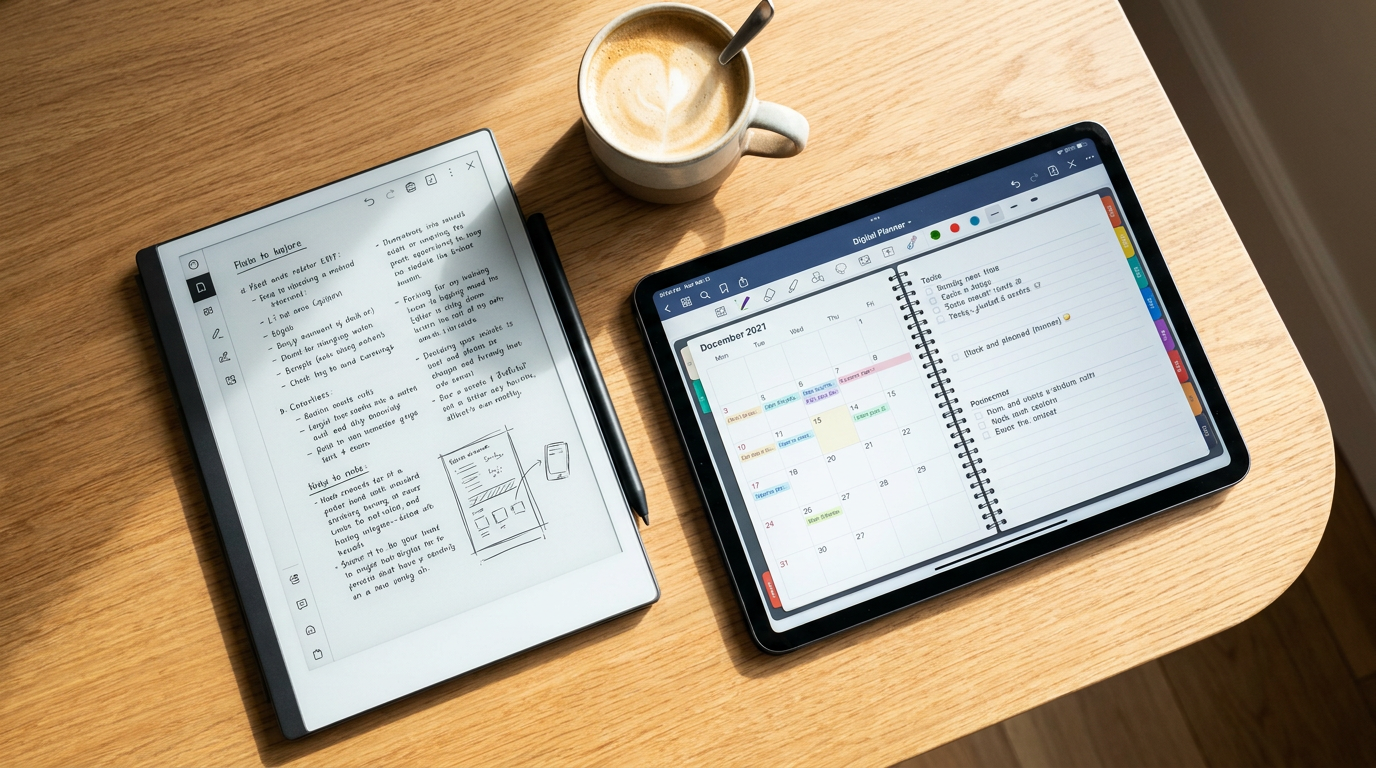
In 2026, the digital note-taking landscape has fractured into two distinct philosophies: the hyper-versatile glass slab and the hyper-focused digital paper. As e-ink technology matures with faster refresh rates and improved contrast, the choice between an iPad and a dedicated e-ink tablet is no longer just about features—it is about how you want your brain to work [2, 7].[2][7]
The hardware gap has narrowed significantly over the past year. Modern e-ink panels, such as the Carta 1300 displays found in 2026 flagship devices, now achieve 15-millisecond response times, effectively eliminating the ghosting and lag that plagued earlier generations [1]. Meanwhile, Apple's iPad lineup continues to offer unmatched processing power and fluid 120Hz displays, making the comparison a matter of competing trade-offs rather than a simple specification race [4, 6].[1][4][6]
**For E-Ink Tablets:** The primary advantage is cognitive fidelity and physiological comfort. **Against:** The limitation is a rigid lack of versatility and a constrained app ecosystem. **Evidence:** Clinical reading tests demonstrate a 73 percent reduction in reported eye fatigue when using e-ink compared to backlit screens [1]. Furthermore, devices like the reMarkable 3 and Boox Note Air 4 draw power only when refreshing the screen, yielding an average of three to six weeks of battery life per charge [1, 2].[1][2]
**For the iPad:** The case for Apple's tablet rests on its unmatched versatility and seamless ecosystem integration. **Against:** The primary drawback is screen fatigue and constant digital distraction. **Evidence:** The iPad's Liquid Retina display requires constant backlighting and GPU rendering, consuming five to eight times more power under equivalent use than an e-ink device [2]. Even with a matte screen protector, the battery rarely lasts beyond a single day of heavy note-taking [5].[2][5]

**For E-Ink Writing Feel:** The advantage is the physical sensation of friction and tactile feedback. **Against:** The screens lack the fluid, instantaneous scrolling of premium glass displays. **Evidence:** Premium e-ink tablets utilize micro-etched displays and styluses with up to 4,096 levels of pressure sensitivity to mimic the exact resistance of paper [1, 5]. Users report that the slight "give" of a plastic e-ink screen provides a deeply satisfying, analog-like writing experience that glass cannot replicate [6].[1][5][6]
**For iPad Writing Feel:** The advantage is pixel-perfect precision and zero-latency rendering. **Against:** Writing on glass is inherently slippery and requires aftermarket matte protectors that degrade display clarity. **Evidence:** The Apple Pencil Pro offers seamless integration with apps like GoodNotes and Notability, but the hard glass surface lacks the natural grip of paper [5, 8]. While matte protectors add friction, they also introduce a scratchy noise and reduce the vibrancy of the iPad's high-resolution screen [4, 6].[4][5][6][8]
**For iPad Writing Feel:** The advantage is pixel-perfect precision and zero-latency rendering.
**For E-Ink Focus:** The advantage is a distraction-free environment that promotes deep work. **Against:** The inability to easily research, cross-reference, or multitask. **Evidence:** E-ink tablets are often single-purpose devices by design, eliminating notifications, social media, and browser tabs to preserve the low-cognitive-load rhythm of analog journaling [2, 3]. This intentional limitation forces users to stay centered on the task of writing [7].[2][3][7]

**For iPad Productivity:** The advantage is the ability to research, edit, and publish from a single device. **Against:** The temptation of multimedia apps disrupts sustained concentration. **Evidence:** The iPad supports thousands of apps, split-screen multitasking, and audio recording, making it a universal machine for dynamic tasks [7, 8]. However, users frequently report that the presence of streaming apps and messaging notifications severely diminishes their ability to maintain focus during long study or writing sessions [3].[3][7][8]
**For E-Ink Value:** The advantage is a lower long-term cost for a specialized tool. **Against:** The price-to-performance ratio appears poor if evaluated purely on computing power. **Evidence:** A premium e-ink setup typically costs around $500 to $680, which is comparable to a mid-range iPad Air and Apple Pencil bundle [4]. However, because e-ink devices are not subjected to the same rapid obsolescence cycle of processor-heavy apps, they often boast a longer useful lifespan for their specific purpose [2, 4].[2][4]
**For iPad Value:** The advantage is getting a full-fledged computer for the price of a digital notebook. **Against:** The total cost of ownership increases when factoring in necessary accessories like keyboards, cases, and specialized screen protectors. **Evidence:** While an iPad Air setup costs roughly $728, it replaces the need for a secondary media consumption device, a casual gaming console, and sometimes even a laptop [4, 8].[4][8]

**Fits well when (E-Ink):** A dedicated e-ink tablet is the ideal choice if your primary use is sustained reading, deep-focus writing, or digital journaling [1, 2]. It is the evidence-backed option for users prioritizing eye comfort, distraction-free environments, and weeks of battery life over multimedia capabilities [3, 7].[1][2][3][7]
**Does not fit when (E-Ink):** E-ink devices fall short if your workflow requires rapid app switching, web research, video consumption, or complex document formatting [6, 8]. They are fundamentally incompatible with users who need a single device to handle both their creative writing and their daily computing tasks [3, 5].[3][5][6][8]

**Fits well when (iPad):** The iPad is the superior choice if you need a versatile, all-in-one device that occasionally serves as a notebook [5, 7]. It excels for students and professionals who rely on audio syncing, rich PDF markup, hyperlinked digital planners, and cloud-based ecosystem integration [5, 8].[5][7][8]
**Does not fit when (iPad):** Apple's tablet is a poor fit if you are easily distracted by notifications, suffer from screen fatigue during long reading sessions, or want a device that feels exactly like a physical notebook [2, 3]. If your goal is to disconnect from the digital noise while retaining the convenience of digital storage, the iPad will actively work against you [2, 6].[2][3][6]
How we got here
2010
Apple releases the first iPad, establishing the modern standard for versatile, backlit touchscreen tablets.
2017
reMarkable launches its first e-ink tablet, creating a new market category for dedicated digital paper devices.
2023
Color e-ink technology (Kaleido 3) becomes widely available, allowing for basic color highlighting and markup.
2026
E-ink panels achieve 15ms latency, closing the responsiveness gap with traditional glass tablets for handwriting.
Viewpoints in depth
Digital Minimalists
Advocates for single-purpose devices that eliminate distractions and reduce cognitive load.
This camp argues that the true value of an e-ink tablet lies in what it cannot do. By removing the temptation of browser tabs, social media, and email notifications, these devices force the user into a state of deep focus. They point to clinical data showing reduced eye strain and argue that the tactile friction of a micro-etched screen provides a cognitive anchor that glossy glass displays fundamentally lack.
Productivity Maximizers
Users who prioritize versatility, ecosystem integration, and the ability to complete multiple tasks on a single device.
For this group, a tablet must be a universal tool. They argue that the iPad's ability to seamlessly switch between a digital planner, a web browser for research, and a word processor makes it an indispensable productivity engine. While they acknowledge the risk of distraction, they believe that software-level focus modes and sheer processing power outweigh the benefits of a single-purpose e-ink device.
Hybrid Workflow Advocates
Professionals who utilize both technologies for different stages of their creative or academic process.
Rather than choosing a single winner, this camp views e-ink and backlit tablets as complementary tools. They use e-ink devices for initial brainstorming, long-form reading, and distraction-free drafting, then switch to an iPad or laptop for editing, formatting, and publishing. They argue that optimizing the tool for the specific cognitive phase of work yields the best overall results.
What we don't know
- Whether future iterations of color e-ink technology will ever reach the saturation and refresh rates necessary for fluid video playback.
- How Apple might adapt future iPad displays to better compete with the eye-comfort metrics of dedicated e-ink panels.
Key terms
- E-Ink (Electrophoretic Ink)
- A display technology that uses microcapsules of black and white pigments to mimic the appearance of ink on paper, drawing power only when the image changes.
- Carta 1300
- The latest generation of e-ink display panels, offering higher contrast, sharper text, and faster response times than previous versions.
- Latency
- The delay between the physical movement of the stylus and the digital ink appearing on the screen; lower latency feels more natural.
- Cognitive Fidelity
- The degree to which a digital tool replicates the low-distraction, focused mental state of using analog tools like pen and paper.
Frequently asked
Can I read Kindle books on an iPad?
Yes, the iPad supports the Kindle app, but reading on a backlit LCD or OLED screen can cause more eye fatigue over long sessions compared to an e-ink display.
Do e-ink tablets support color?
Some modern e-ink tablets use Kaleido 3 technology to display muted, pastel-like colors, but they cannot match the vibrant, high-resolution color reproduction of an iPad.
Can I use an Apple Pencil on an e-ink tablet?
No. E-ink tablets use different digitizer technologies (often Wacom EMR) and require their own specific styluses, which usually do not need to be charged.
Are e-ink tablets good for web browsing?
No. While some Android-based e-ink tablets have web browsers, the slow refresh rate of the screen makes scrolling and watching videos highly impractical.
Sources
Source coverage
8 outlets
3 viewpoints surfaced








[1]ROI PadDigital Minimalists
Comprehensive expert analysis of the top 8 E-Ink tablets revolutionizing digital note-taking and reading in 2026
Read on ROI Pad →[2]Alibaba Tech BlogDigital Minimalists
e Ink vs iPad Mini for Digital Journaling
Read on Alibaba Tech Blog →[3]MakeUseOfDigital Minimalists
Finally, a screen that doesn't punish you for using it: E-ink tablet vs iPad
Read on MakeUseOf →[4]9to5MacProductivity Maximizers
reMarkable Paper Pro vs iPad: Which is Best for You?
Read on 9to5Mac →[5]iFLYTEKProductivity Maximizers
iPad vs E-Ink Tablet, Which Is Best for Handwriting in 2025?
Read on iFLYTEK →[6]MediumHybrid Workflow Advocates
Comparing note-taking on the Supernote Manta, Viwoods AI Paper, and iPad Air M3
Read on Medium →[7]ChesonaDigital Minimalists
Core Differences Between Remarkable and iPad
Read on Chesona →[8]Key2SuccessProductivity Maximizers
reMarkable Paper Pro vs iPad: Which is Best for You?
Read on Key2Success →

Every angle. Every day.
Get shopping stories with full source coverage and perspective breakdowns delivered to your inbox.