
E-Ink Notebooks vs. Traditional Tablets: Which Digital Workspace Wins in 2026?
As digital note-taking hardware matures, the choice between an E-Ink tablet and a traditional iPad comes down to a fundamental trade-off: distraction-free focus versus versatile multitasking.
By Factlen Editorial Team
- E-Ink Advocates
- Users and researchers who prioritize distraction-free environments and eye health over multimedia capabilities.
- Versatility Maximizers
- Professionals who demand a single, powerful device capable of handling all aspects of their digital workflow.
- Ergonomics Researchers
- Scientists studying the physical impact of prolonged screen exposure on human biology.
What's not represented
- · Budget-conscious consumers who cannot afford secondary specialized devices
- · Digital artists requiring high color fidelity and advanced brush engines
Why this matters
Choosing the right digital note-taking device can drastically reduce daily screen fatigue and reclaim hours of lost focus, fundamentally changing how professionals manage their daily workflows.
Key points
- E-Ink tablets prioritize distraction-free focus and feature battery life measured in weeks rather than hours.
- Traditional tablets offer unmatched versatility, seamless app integration, and vibrant color displays for multimedia tasks.
- Harvard research indicates E-Ink displays cause significantly less retinal stress and eye fatigue compared to standard LCD screens.
- The choice between the two platforms depends entirely on whether a user values deep concentration or dynamic multitasking.
The modern professional's desk is increasingly crowded with screens, but the quest for the perfect digital notebook has split the market into two distinct philosophies. As digital note-taking hardware matures in 2026, consumers are no longer just choosing between brands; they are choosing between fundamentally different ways of working.[9]
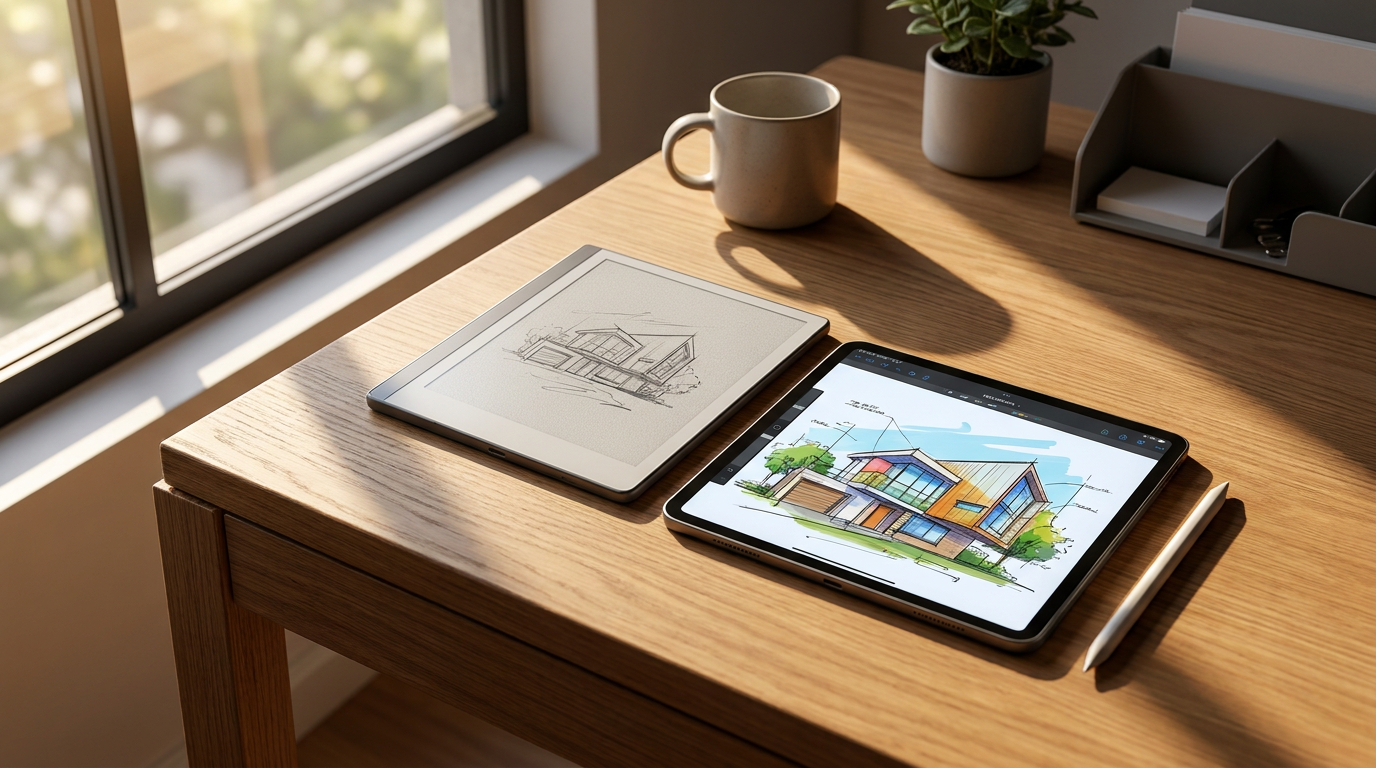
On one side sits the traditional tablet, championed by the Apple iPad and premium Android devices, offering a glowing window into an infinite ecosystem of applications. On the other side is the E-Ink tablet, led by devices like the reMarkable 2 and the Kindle Scribe, which intentionally strip away features to replicate the quiet, distraction-free focus of physical paper.[1][7]
This comparison is not about declaring a universal winner for all users. Instead, it is a trade-off analysis of how different hardware shapes human attention, daily productivity, and long-term eye health during the workday.[5][9]

When building the case for E-Ink, the primary argument centers on its ability to foster deep, uninterrupted focus. By removing web browsers, social media feeds, and push notifications, these devices force the user to concentrate solely on the document or notebook directly in front of them.[2][6]
The evidence for E-Ink's benefits is heavily grounded in ergonomic and health data. A peer-reviewed study commissioned by the Harvard School of Public Health found that E-Ink displays are up to three times less stressful on human retinal cells compared to standard liquid crystal displays (LCDs).[3]
Because E-Ink technology reflects ambient light rather than blasting high-energy blue light directly into the user's eyes, it drastically reduces digital eye strain. This passive lighting approach also prevents the disruption of circadian rhythms and melatonin production often caused by late-night screen use.[3][4]
Furthermore, the battery life of E-Ink devices operates on an entirely different scale. Because the screen only draws power when the image physically changes, devices in this category routinely last for three to six weeks on a single charge, completely eliminating the daily battery anxiety associated with traditional tablets.[2][6]

Furthermore, the battery life of E-Ink devices operates on an entirely different scale.
The case against E-Ink, however, is bound by the physical limitations of the hardware. These screens suffer from significantly slower refresh rates, making them entirely unsuitable for video playback, smooth web scrolling, or rapid multitasking between complex applications.[8]
While color E-Ink technology has advanced significantly by 2026, the colors remain muted and pastel-like compared to the vibrant, high-contrast output of an OLED display. If a workflow requires color-coded dashboards, high-fidelity image editing, or dynamic presentations, an E-Ink device will feel severely restrictive.[2][8]
Conversely, the case for traditional tablets like the iPad is rooted in absolute versatility. An iPad is not just a digital piece of paper; it is a portable communication hub, a research terminal, and a creative studio all housed within a single pane of glass.[1][7]
The evidence supporting traditional tablets lies in productivity benchmarks and the sheer power of their app ecosystems. Users can seamlessly drag and drop text from a web browser into a note, record audio during a meeting while handwriting, and instantly sync full-color, multimedia documents to cloud services.[7]

The writing experience on a premium traditional tablet offers near-zero latency. While it lacks the physical friction of real paper, the sheer speed and responsiveness of the glass screen allow for rapid, fluid note-taking that slower E-Ink devices sometimes struggle to match during fast-paced, dynamic meetings.[1][7]
Yet, the case against traditional tablets highlights that their greatest strength is also their greatest liability: distraction. The constant temptation to check an email, reply to a message, or open a new browser tab can fracture attention and derail deep, meaningful thinking work.[5][6]
Additionally, the emissive nature of LCD and OLED screens contributes to a lowered blinking rate, leading to dry eyes and cumulative fatigue over an eight-hour workday. Writing on a glowing screen simply does not offer the tactile, restful experience of reading a physical book.[4]

Ultimately, an E-Ink tablet fits well when your primary output is reading long-form documents, annotating PDFs, and engaging in focused, handwritten thought without the temptation of the internet. It does not fit when your job requires rapid app-switching, multimedia presentations, or vibrant color accuracy.[5][9]
Conversely, a traditional tablet fits well when you need a single, versatile device to handle emails, video calls, web research, and occasional note-taking. It does not fit when you struggle with screen fatigue, easily fall victim to digital distractions, or want a device that can survive a month away from a charger.[5][9]
How we got here
2010
Apple launches the first iPad, establishing the modern standard for versatile, backlit touchscreen tablets.
2020
The reMarkable 2 is released, proving a massive consumer appetite for premium, single-purpose E-Ink writing devices.
2023
A Harvard School of Public Health study confirms that E-Ink displays cause up to three times less retinal stress than standard LCDs.
2026
Color E-Ink technology matures with devices like the Kindle Scribe Colorsoft, bridging the gap between monochrome reading and color-coded productivity.
Viewpoints in depth
The Focus Purists
Advocates who prioritize distraction-free environments and tactile writing experiences over multimedia capabilities.
This camp, often comprising academics, writers, and deep-work professionals, argues that the modern tablet is fundamentally compromised by its connection to the broader internet. By stripping away notifications, web browsers, and color displays, they believe E-Ink devices force a level of sustained concentration that is impossible to achieve on an iPad. They point to the tactile friction of a stylus on a matte screen as a necessary psychological trigger for memory retention and thoughtful analysis.
The Ecosystem Multitaskers
Users who demand a single, versatile device that can handle everything from note-taking to video conferencing and document formatting.
For this group, the limitations of E-Ink are a dealbreaker. They argue that modern productivity requires fluid movement between different applications—dragging a chart from a web browser into a presentation, or recording a meeting's audio while simultaneously handwriting notes. They view the iPad not just as a digital piece of paper, but as a comprehensive mobile office. To them, the distraction of notifications is a software problem to be managed with 'Focus Modes,' rather than a hardware problem requiring a separate, single-purpose device.
What we don't know
- Whether upcoming generations of color E-Ink displays will eventually achieve the refresh rates necessary for fluid video playback.
- How long-term adoption of E-Ink devices in corporate environments affects overall employee productivity metrics compared to traditional tablet deployments.
Key terms
- E-Ink (Electrophoretic Ink)
- A display technology that mimics the appearance of ordinary ink on paper by physically moving microscopic charged particles to reflect ambient light.
- LCD / OLED
- Traditional screen technologies that emit light directly into the user's eyes, allowing for vibrant colors and fast refresh rates but contributing to digital eye strain.
- Ghosting
- A visual artifact in older E-Ink screens where faint traces of previous pages remain visible after the screen refreshes, largely solved in 2026 models.
- Latency
- The split-second delay between the physical movement of a stylus and the digital ink appearing on the screen.
Frequently asked
Can I read Kindle books on an iPad?
Yes, the iPad supports the Kindle app, allowing you to read any Amazon e-book. However, reading on the iPad's backlit LCD screen may cause more eye strain over long periods compared to a dedicated E-Ink device.
Do E-Ink tablets support color in 2026?
Yes, devices like the Kindle Scribe Colorsoft and Boox Note Air4 C use advanced color E-Ink panels. However, the colors appear more muted and pastel-like compared to the vibrant displays of traditional tablets.
Which device is better for annotating PDFs?
Both excel at this, but they serve different needs. E-Ink devices offer a glare-free, paper-like experience ideal for long reading sessions, while iPads allow for rapid, full-color highlighting and seamless cloud sharing across multiple apps.
Can E-Ink tablets convert handwriting to text?
Yes, modern E-Ink tablets like the reMarkable 2 feature highly accurate optical character recognition (OCR) that can convert handwritten notes into searchable, typed text.
Sources
Source coverage
9 outlets
3 viewpoints surfaced







[1]ForbesVersatility Maximizers
The 6 Best Writing Tablets, Tested With Hundreds Of Digital Pages
Read on Forbes →[2]RoipadE-Ink Advocates
Best E-Ink Tablets 2026: The Definitive Guide
Read on Roipad →[3]E Ink CorporationErgonomics Researchers
Harvard Study Finds E Ink Displays Up to Three Times Healthier for Eyes Than LCD Screens
Read on E Ink Corporation →[4]KoboE-Ink Advocates
LED screens vs E Ink screens: which is better for your eyes?
Read on Kobo →[5]Futurion Blog
E-ink vs iPad: The 2026 guide to protecting your attention
Read on Futurion Blog →[6]MakeUseOfE-Ink Advocates
Why an E-Ink Tablet is the Best Investment for Productivity
Read on MakeUseOf →[7]ZDNetVersatility Maximizers
Apple iPad vs. reMarkable 2: Which tablet is best for note-taking?
Read on ZDNet →[8]Trusted ReviewsVersatility Maximizers
Best E Ink tablets 2026
Read on Trusted Reviews →[9]Factlen Editorial TeamErgonomics Researchers
Synthesis by Factlen editorial team
Read on Factlen Editorial Team →

More in shopping
See all 5 stories →


Every angle. Every day.
Get shopping stories with full source coverage and perspective breakdowns delivered to your inbox.