
The Best E-Ink Tablets of 2026: Finding the Right Tool for Deep Work
The e-ink tablet market has matured into three distinct categories, forcing buyers to choose between pure distraction-free writing, seamless reading ecosystems, and full Android flexibility.
By Factlen Editorial Team
- Digital Minimalists
- Value distraction-free environments and prioritize a pure, paper-like writing feel above all else.
- Power Users
- Demand full Android flexibility, color displays, and the ability to integrate with enterprise productivity apps.
- Ecosystem Readers
- Prioritize seamless access to massive book libraries and simple, out-of-the-box annotation tools.
What's not represented
- · Budget-conscious consumers looking for sub-$200 digital note-taking options
- · Digital artists requiring high-refresh-rate drawing tablets for professional illustration
Why this matters
Choosing the right e-ink tablet can fundamentally change how you work, read, and think. By replacing a glowing, distraction-filled LCD screen with a purpose-built e-ink device, professionals can reclaim their attention span, reduce eye strain, and create a dedicated space for deep, focused work.
Key points
- The e-ink tablet market has segmented into three distinct philosophies: pure writing, reading-first, and full Android flexibility.
- The reMarkable 2 offers the best distraction-free, paper-like writing experience but strictly limits third-party app support.
- Amazon's Kindle Scribe provides the sharpest screen and seamless bookstore integration, making it ideal for avid readers.
- The Onyx Boox series runs a full Android OS, offering unparalleled flexibility and color displays at the cost of interface complexity.
- Choosing the right device requires deciding which type of friction—workflow, organizational, or interface—you are willing to accept.
The tablet market has fractured. While traditional LCD screens dominate media consumption and fast-paced multitasking, a growing class of professionals and creatives are actively seeking out devices that deliberately do less. In 2026, the e-ink productivity tablet has matured from a niche gadget into an essential tool for deep work, offering weeks of battery life and a refuge from the constant barrage of digital notifications.[7]
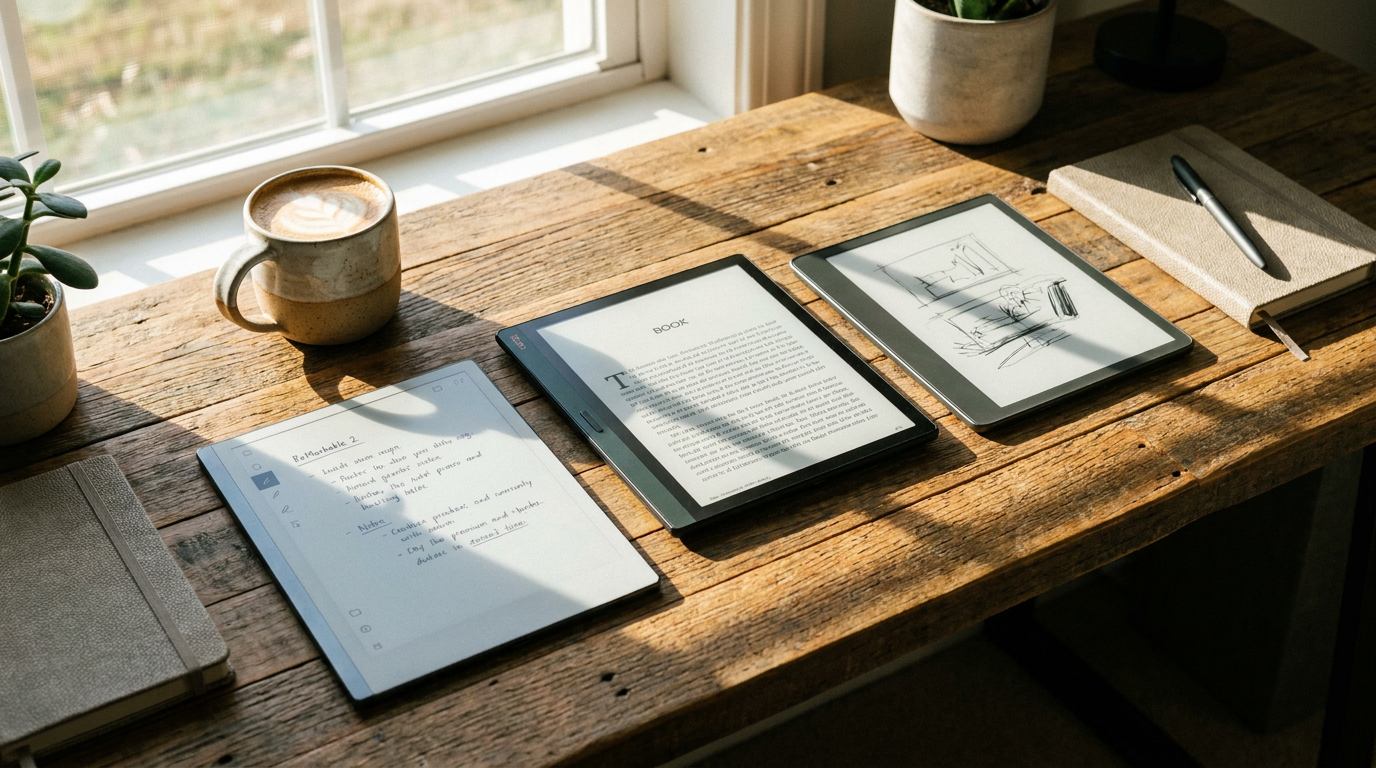
Three distinct philosophies now define the high-end e-ink landscape: the pure digital notebook, the reading-first hybrid, and the full-capability e-ink computer. The reMarkable 2, Amazon Kindle Scribe, and Onyx Boox Note Air series represent these three approaches, each demanding specific trade-offs from the user in exchange for their unique benefits.[2][7]
When evaluating the reMarkable 2, the primary argument for the device is its unparalleled, distraction-free writing experience. The hardware is meticulously engineered to replicate the friction of a pen on paper, utilizing proprietary Canvas display technology that provides a slight, satisfying physical resistance that glass screens simply cannot match.[1][5]
The argument against the reMarkable centers on its aggressively closed ecosystem and ongoing costs. Users cannot install third-party applications, there is no web browser, and unlocking seamless cloud synchronization requires a monthly Connect subscription. Furthermore, the base model lacks a front light, meaning it requires ambient room lighting just like a physical notebook.[2][4]

Evidence from extensive user testing confirms that the reMarkable 2 excels precisely because of these limitations. At just 403 grams, it forces singular focus. It fits perfectly when your highest-value output requires sustained deep thinking, long-form drafting, or distraction-free journaling. It does not fit when you need to reference web pages, use specific productivity apps, or read DRM-protected library books.[2][7]
The Amazon Kindle Scribe takes a fundamentally different approach, built around the world's largest digital bookstore. The core argument for the Scribe is its seamless integration with the Amazon ecosystem combined with a top-tier reading display, allowing users to effortlessly transition from reading a dense non-fiction bestseller to handwriting notes in the margins.[6]
The Amazon Kindle Scribe takes a fundamentally different approach, built around the world's largest digital bookstore.
The argument against the Kindle Scribe focuses on its rigid, rudimentary note-taking software. While the writing latency is excellent, the device struggles with complex hyperlinked PDF planners and offers a highly limited selection of pen types and organizational folders compared to its rivals. Users are largely locked into Amazon's way of organizing thoughts.[1][5]
Hardware evidence shows the Scribe boasts a remarkably crisp 300 PPI Carta 1200 screen and an exceptionally even front light, making text incredibly sharp. The Scribe fits well when your primary goal is reading and annotating books, or if you want a simple, out-of-the-box digital notepad without a learning curve. It does not fit when you need advanced document management, complex digital planning, or integration with enterprise cloud drives.[3][6]

For those who refuse to compromise on software capability, the Onyx Boox Note Air series represents the maximalist approach. The argument for the Boox ecosystem is absolute flexibility: it runs a full Android operating system, allowing users to download Microsoft OneNote, Google Drive, or any preferred PDF reader directly from the Google Play Store.[1][4]
The argument against the Boox platform highlights the inherent friction of running a fast operating system on a slow-refreshing screen. Users must constantly manage ghosting—faint remnants of previous screens—and navigate an interface that can feel overwhelmingly complex. Additionally, the inclusion of a Kaleido 3 color layer on newer models makes the screen noticeably darker than monochrome competitors without the front light turned up.[3][4]
Evidence from productivity benchmarks shows that while the Boox can handle complex workflows, its battery life drains significantly faster when running heavy Android applications. The Boox fits well when you require color-coded notes, rely on specific third-party apps, and want a single device to replace both a notebook and a traditional tablet. It does not fit when you are easily distracted by notifications or want a device that requires zero technical configuration.[2][4]

The choice ultimately comes down to which type of friction you are willing to accept. The reMarkable 2 asks you to accept workflow friction in exchange for perfect focus. The Kindle Scribe asks you to accept organizational friction in exchange for reading supremacy. The Onyx Boox asks you to accept interface friction in exchange for boundless capability.[7]
For digital minimalists seeking a pure replacement for a paper notebook, the reMarkable remains the definitive choice. For avid readers who occasionally need to sketch a diagram or annotate a margin, the Kindle Scribe offers the best value and screen clarity.[5][6]
However, for power users who want to build custom digital planners, sync across multiple enterprise apps, and utilize color for data visualization, the Onyx Boox stands alone in the e-ink market. By understanding these explicit trade-offs, professionals can select the exact tool needed to reclaim their attention in an increasingly noisy digital world.[1][7]
How we got here
2020
reMarkable 2 launches, setting the industry standard for low-latency, paper-like digital writing.
Late 2022
Amazon enters the e-ink productivity space with the Kindle Scribe, combining a premium e-reader with stylus support.
2024
Onyx Boox introduces the Note Air3 C, bringing viable color e-ink and full Android capabilities to the mainstream market.
2026
The market segments clearly into three distinct categories, offering specialized tools rather than one-size-fits-all devices.
Viewpoints in depth
Digital Minimalists
Focus on the cognitive benefits of single-purpose devices.
This camp argues that the true value of an e-ink tablet isn't what it can do, but what it prevents you from doing. By stripping away web browsers, app stores, and notifications, devices like the reMarkable 2 force the user into a state of deep work. Evidence cited by these users often points to increased writing output, better retention of handwritten notes, and significantly reduced screen fatigue at the end of the workday.
Ecosystem Readers
Focus on the convenience of unified digital libraries.
This perspective contends that a note-taking device is only as good as the reference material it can easily access. They favor the Kindle Scribe because it seamlessly integrates with existing Amazon libraries, allowing users to move fluidly between reading a dense non-fiction book and handwriting notes in the margins, without needing to manually sideload PDFs or manage complex file conversions.
Power Users
Focus on workflow flexibility and software integration.
Power users argue that a digital notebook is useless if it cannot sync directly with the tools they already use for work, such as Microsoft OneNote, Notion, or Google Drive. They advocate for Android-based e-ink tablets like the Onyx Boox, arguing that the learning curve and occasional screen ghosting are minor trade-offs for the ability to run full productivity apps, view color-coded digital planners, and customize their exact workflow.
What we don't know
- How quickly color e-ink technology will match the contrast and brightness of traditional monochrome displays without requiring heavy front-lighting.
- Whether Amazon will eventually open the Kindle Scribe ecosystem to third-party productivity applications.
- How upcoming advancements in e-ink refresh rates will impact the battery life of Android-based tablets.
Key terms
- E-Ink (Electronic Ink)
- A display technology that mimics the appearance of ordinary ink on paper, reflecting light rather than emitting it to drastically reduce eye strain.
- PPI (Pixels Per Inch)
- A measurement of screen resolution and text sharpness; higher numbers indicate crisper, clearer text.
- Ghosting
- A visual artifact on e-ink screens where a faint outline of the previous page remains visible after the screen refreshes.
- Front Light
- A lighting system that illuminates an e-ink screen by shining LEDs across the display layer from the edges, rather than shining directly into the user's eyes like a backlit LCD.
Frequently asked
Can I read Kindle books on the reMarkable 2?
No, the reMarkable 2 does not support the Kindle app or DRM-protected Amazon books; it only supports DRM-free EPUBs and PDFs.
Does the Onyx Boox have a color screen?
Yes, newer models like the Note Air4 C use Kaleido 3 technology to display muted, pastel-like colors, though they are not as vibrant as a traditional LCD tablet.
Do I have to pay a monthly fee to use these tablets?
The Kindle Scribe and Onyx Boox do not require subscriptions. The reMarkable 2 offers an optional Connect subscription for seamless cloud syncing, though basic functionality remains free.
Which tablet has the best battery life?
The Kindle Scribe and reMarkable 2 generally offer the longest battery life (often lasting weeks), while the Onyx Boox drains faster when running heavy Android applications.
Sources
Source coverage
7 outlets
3 viewpoints surfaced





[1]My PA PlannerPower Users
Onyx Boox vs Kindle Scribe vs reMarkable 2: Which is best for planning?
Read on My PA Planner →[2]Sunlit HappinessDigital Minimalists
The Best E-Ink Tablets for Productivity in 2026
Read on Sunlit Happiness →[3]XP-Pen InsightsPower Users
Top 6 Best E-Ink Tablets of 2026
Read on XP-Pen Insights →[4]Graf-X TechPower Users
Best E-Ink Tablets of 2026: Which One Is Actually Right for You?
Read on Graf-X Tech →[5]Bored n BooklessDigital Minimalists
Remarkable 2 vs Kindle Scribe vs Boox Note Air 2
Read on Bored n Bookless →[6]Bodendorfer ReviewsEcosystem Readers
E-ink devices comparison featuring Amazon Kindle Scribe, Onyx Boox, and ReMarkable
Read on Bodendorfer Reviews →[7]Factlen Editorial TeamPower Users
Synthesis by Factlen editorial team
Read on Factlen Editorial Team →
Every angle. Every day.
Get guides stories with full source coverage and perspective breakdowns delivered to your inbox.