
E-Ink Smart Notebooks vs. Multipurpose Tablets: Which Belongs on Your Desk?
As digital fatigue rises in 2026, professionals are weighing the distraction-free focus of E-Ink paper tablets against the versatile power of traditional iPads for daily office productivity.
By Factlen Editorial Team
- Digital Minimalists
- Advocates for intentional friction and single-tasking in a distracted world.
- Productivity Maximizers
- Professionals who prioritize workflow speed, app integration, and raw capability.
- Health & Ergonomics Advocates
- Experts focused on the physiological impact of prolonged screen time.
What's not represented
- · Environmental impact analysts comparing the lifecycle of single-use vs. multi-use electronics.
- · Educators evaluating device deployment for K-12 classrooms.
Why this matters
Choosing the right digital workspace directly impacts daily cognitive load, eye health, and the ability to maintain deep focus during complex tasks. A mismatched device can either bottleneck your workflow with limitations or derail your attention with constant notifications.
Key points
- E-Ink tablets prioritize distraction-free focus and paper-like writing, while iPads offer unmatched versatility and app integration.
- Reflective E-Ink displays significantly reduce digital eye strain and allow for comfortable reading in direct sunlight.
- iPads excel at multimedia tasks, color-coded annotations, and rapid context switching between different applications.
- Battery life varies drastically, with E-Ink devices lasting weeks on a single charge compared to the iPad's daily charging requirement.
- The choice depends entirely on whether a user needs a dedicated tool for deep thought or a multifunctional device for dynamic workflows.
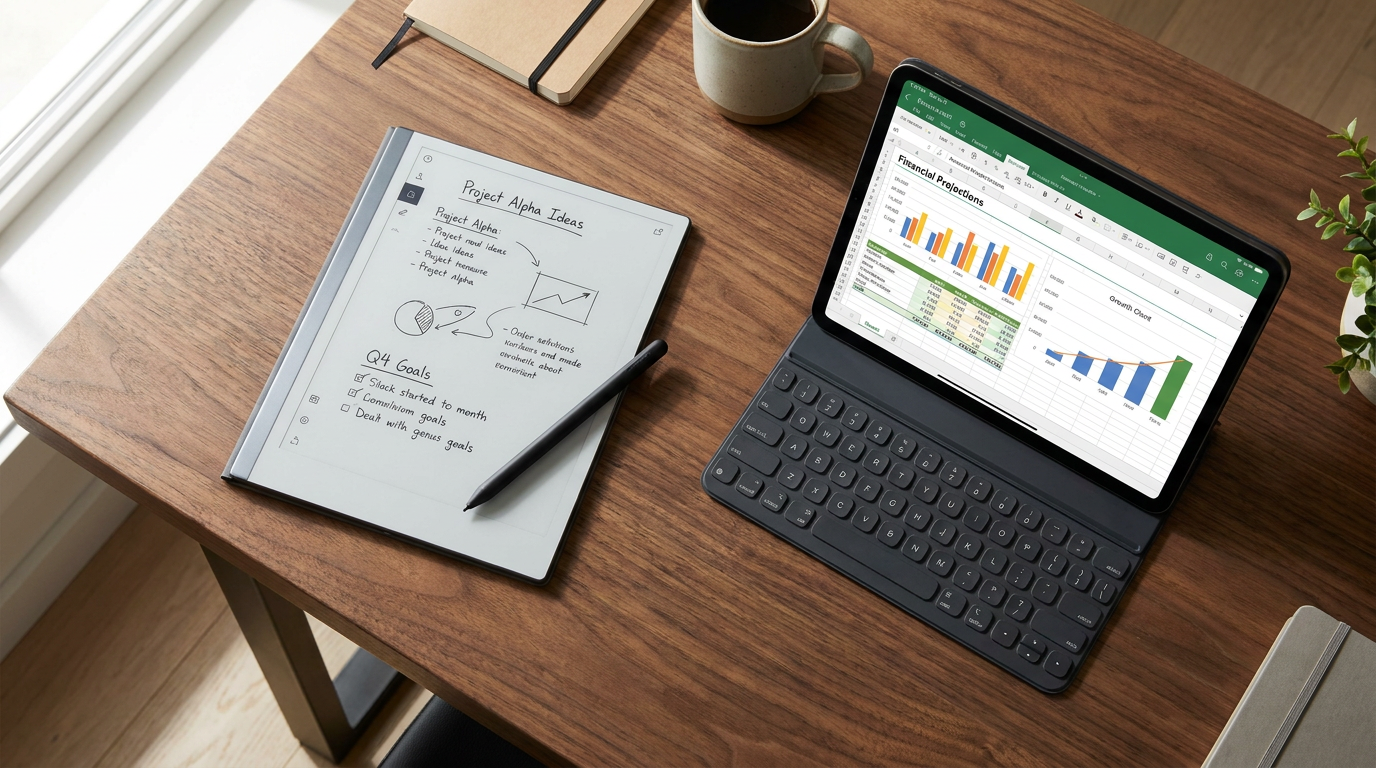
As digital fatigue reaches an all-time high in 2026, professionals are increasingly rethinking their desktop technology. The tablet market has bifurcated into two distinct philosophies for office productivity: the do-everything multipurpose tablet, championed by the Apple iPad, and the do-one-thing-perfectly E-Ink smart notebook, led by devices like the reMarkable 2, Kindle Scribe, and Boox Note Air. This choice is no longer about which piece of hardware is objectively superior. Instead, it is a deliberate decision about what kind of attention a user is trying to protect. Buyers are weighing the distraction-free focus of electronic paper against the boundless, vibrant versatility of traditional glass screens.[1][2]
The case for E-Ink smart notebooks centers entirely on cognitive fidelity and intentional friction. By stripping away the App Store, push notifications, and background syncing, devices like the reMarkable 2 force the user into a single-task mindset. Proponents argue that this limitation is actually the device's greatest feature. Without the constant temptation to check a Slack message or refresh an email inbox, users can maintain unbroken attention during meetings or deep-work sessions. The tactile experience also plays a massive role; these devices feature micro-etched matte screens that provide the physical friction of pen on real paper, combined with ultra-low latency that makes digital handwriting feel entirely natural.[1][2][6]
However, the case against E-Ink is rooted in workflow bottlenecks. The intentional limitations that protect focus can quickly become frustrating roadblocks in a fast-paced office environment. E-Ink displays suffer from slow refresh rates, making rapid scrolling, web browsing, or zooming into complex documents feel sluggish and jarring. Furthermore, while some premium models now offer muted color displays, the vast majority of E-Ink tablets remain strictly monochrome. If a professional's workflow requires reviewing color-coded financial dashboards, dropping a chart into a presentation, or rapidly switching between multiple reference applications, an E-Ink device will feel severely underpowered and isolating.[2][6][8]

The evidence supporting E-Ink technology heavily favors physiological health and endurance. Because E-Ink displays reflect ambient light rather than emitting a backlight, they virtually eliminate blue light exposure and screen glare. Studies comparing LCD screens to E-Ink have shown that backlit displays reduce blink rates and increase visual fatigue, whereas E-Ink mimics the optical properties of physical paper. This makes electronic paper vastly superior for marathon reading sessions and outdoor use in direct sunlight. Additionally, this passive display technology yields massive battery dividends: E-Ink tablets measure their battery life in weeks—often lasting 14 to 42 days on a single charge—compared to the daily charging requirements of traditional tablets.[4][7]
Conversely, the case for multipurpose tablets like the iPad is built on raw computing power and unmatched versatility. Equipped with desktop-class processors and vibrant Liquid Retina displays, traditional tablets are portable powerhouses. They excel at dynamic, multimedia-heavy tasks that E-Ink cannot touch. An iPad user can record a meeting's audio while simultaneously taking handwritten notes, mark up full-color PDFs, scan physical documents with a high-resolution camera, and seamlessly hand off files to a laptop via cloud ecosystems. For users heavily invested in Microsoft Office or Apple's ecosystem, the multipurpose tablet operates as a true laptop replacement.[3][5]
Conversely, the case for multipurpose tablets like the iPad is built on raw computing power and unmatched versatility.
The case against multipurpose tablets highlights the hidden costs of that exact versatility: constant distraction and accelerated fatigue. The iPad's greatest strength—its ability to do everything—means it is constantly fighting for the user's attention. Even with strict focus modes enabled, the underlying architecture of a multipurpose tablet encourages rapid context switching, which research shows severely degrades working memory retention. Furthermore, the emissive LCD or OLED screens require constant backlighting. Even with features like True Tone or Night Shift, staring at a glowing rectangle for eight hours accelerates digital eye strain and can disrupt circadian rhythms if used late in the evening.[1][4][7]

The evidence for multipurpose tablets lies in their software ecosystems and hardware integration. With access to millions of applications, an iPad can instantly transform from a digital canvas for graphic design into a video editing suite, and then into a teleconferencing hub. The Apple Pencil, while writing on smooth glass, offers industry-leading pressure sensitivity and tilt recognition that digital artists demand. While matte screen protectors can be applied to mimic the feel of paper, they inevitably degrade the screen's visual clarity. Ultimately, the iPad's hardware is designed to eliminate workflow friction, ensuring that any file format, communication platform, or creative tool is instantly accessible.[3][5]
An E-Ink smart notebook fits exceptionally well when the primary goal is sustained comprehension and capturing raw thought without interruption. It is the ideal investment for academics reading dense research papers, lawyers reviewing lengthy case files, authors drafting manuscripts, or executives who want to remain fully present in meetings without the glow of a screen signaling distraction. It thrives in environments where deep, reflective work is prioritized over rapid communication, and where eye comfort over long hours is a non-negotiable requirement.[2][7]
However, an E-Ink device does not fit well when a user's daily responsibilities demand constant connectivity and multimedia interaction. It is a poor choice for visual designers, project managers who rely on complex, color-coded spreadsheets, or professionals whose note-taking involves heavy web research and constant cross-app communication. If a user expects their digital notebook to double as an entertainment device for streaming video or playing games during a commute, the slow refresh rate and monochrome nature of standard E-Ink will be deeply disappointing.[1][8]

A multipurpose tablet fits perfectly when a professional needs a single, unified device to handle a highly dynamic workflow. It is the definitive winner for hybrid workers who need to transition seamlessly from typing an email to sketching a diagram, presenting a slide deck, and joining a video call. It is the ultimate Swiss Army knife for creatives, students who need to record lectures while referencing full-color textbooks, and anyone who values the convenience of having their entire digital life accessible from one vibrant pane of glass.[3][5]
Conversely, a multipurpose tablet does not fit well when the user is highly susceptible to digital eye strain or struggles with digital distractions. If the primary objective is to disconnect from the noise of the internet to focus purely on writing or reading, the iPad's notification infrastructure will actively work against that goal. Furthermore, for professionals who need a reliable device that can survive a two-week business trip without ever seeing a charging cable, the iPad's daily battery limitations make it a liability compared to the enduring stamina of electronic paper.[4][7]
How we got here
2010
Apple releases the first iPad, establishing the modern multipurpose tablet market and setting the standard for mobile computing.
2017
reMarkable launches its first paper tablet, carving out a niche for dedicated, distraction-free digital note-taking.
2020
The reMarkable 2 debuts, becoming the thinnest tablet on the market and popularizing the premium E-Ink notebook category.
2022
Amazon enters the space with the Kindle Scribe, bringing E-Ink note-taking and stylus support to the mainstream e-reader market.
2024-2026
Color E-Ink displays and advanced AI features begin appearing in premium smart notebooks, narrowing the feature gap with traditional tablets.
Viewpoints in depth
Digital Minimalists
Advocates for intentional friction and single-tasking in a distracted world.
This camp argues that the true value of an E-Ink device lies in what it cannot do. By physically removing the ability to check social media, browse the web, or receive push notifications, these devices enforce a state of deep work. They point to studies showing that even the presence of a multipurpose device reduces cognitive capacity, suggesting that true productivity requires isolating oneself from the broader digital ecosystem.
Productivity Maximizers
Professionals who prioritize workflow speed, app integration, and raw capability.
For this group, the limitations of E-Ink are unacceptable bottlenecks. They argue that modern work requires rapid context switching—pulling data from an email, dropping it into a spreadsheet, and presenting it on a video call. They view the iPad not as a distraction machine, but as a unified command center. To them, the solution to digital distraction is software-based focus modes and personal discipline, not hardware limitations.
Health & Ergonomics Advocates
Experts focused on the physiological impact of prolonged screen time.
This perspective centers entirely on the biological response to display technology. They highlight research showing that backlit LCD and OLED screens suppress melatonin production and significantly reduce blink rates, leading to chronic dry eye and visual fatigue. From this viewpoint, E-Ink is a necessary medical intervention for knowledge workers, providing a way to interact with digital text for eight hours a day without degrading ocular health or sleep hygiene.
What we don't know
- Whether upcoming hybrid display technologies will successfully merge the color vibrancy of OLED with the low-power, reflective benefits of E-Ink.
- How rapidly AI-powered handwriting recognition and summarization will advance on lower-power E-Ink processors compared to Apple's M-series chips.
Key terms
- E-Ink (Electronic Ink)
- A display technology that reflects ambient light like physical paper, rather than emitting a backlight, resulting in low power consumption and reduced eye strain.
- LCD / OLED
- Emissive display technologies used in traditional tablets that provide vibrant colors and fast refresh rates but can contribute to visual fatigue.
- Latency
- The slight delay between the movement of a stylus and the appearance of digital ink on the screen; lower latency feels more natural.
- Refresh Rate
- How quickly a screen updates its image. E-Ink has a low refresh rate, while iPads have high refresh rates for smooth motion and video.
Frequently asked
Can I check my email on an E-Ink tablet?
Some Android-based E-Ink tablets, like those from Boox, allow you to download email apps. However, devices like the reMarkable intentionally omit email to preserve a distraction-free environment.
Do E-Ink tablets require a monthly subscription?
It varies by brand. reMarkable offers an optional Connect subscription for extended cloud syncing, while Amazon's Kindle Scribe and Boox devices generally include core syncing features without ongoing fees.
Can I read Kindle books on an iPad?
Yes, the iPad supports the Kindle app and can display any e-book. However, reading on its backlit screen may cause more eye fatigue during long sessions compared to a dedicated E-Ink display.
Is writing on an iPad as good as writing on E-Ink?
The Apple Pencil is incredibly precise, but writing on an iPad's glass screen feels slippery. E-Ink tablets use textured screens to replicate the physical friction of pen on paper.
Sources
Source coverage
8 outlets
3 viewpoints surfaced








[1]MakeUseOfDigital Minimalists
5 reasons why e-ink tablets are better than iPads in 2026
Read on MakeUseOf →[2]FuturionDigital Minimalists
E-Ink Tablets vs iPads for Reading and Focus in 2026
Read on Futurion →[3]Radio TimesProductivity Maximizers
reMarkable 2 vs Apple iPad A16: Which tablet is right for you in 2025?
Read on Radio Times →[4]Popular ScienceHealth & Ergonomics Advocates
Why e-ink is better for reading than your phone or tablet
Read on Popular Science →[5]ZDNETProductivity Maximizers
iPad (2021) vs. reMarkable 2: Which productivity tablet should you buy?
Read on ZDNET →[6]EngadgetHealth & Ergonomics Advocates
The best E Ink tablets for 2026
Read on Engadget →[7]LifeTipsDigital Minimalists
e Ink vs iPad Mini for Digital Journaling
Read on LifeTips →[8]PCMagHealth & Ergonomics Advocates
The Best Ereaders We've Tested for 2026
Read on PCMag →

More in shopping
See all 7 stories →Sustainable Home
The End of Fast Furniture: How PFAS Bans and Biomaterials Are Reshaping the Living Room
8 sources

Laundry Tech
Heat Pump vs. Vented Dryers: The 2026 Efficiency and Cost Comparison
6 sources

Smart Home Protocols
Matter Over Thread vs. Wi-Fi: The 2026 Smart Home Shopping Guide
8 sources
Summer Sales
Amazon, Target, and Walmart Move Summer Sales Events to June in 2026 Retail Clash
8 sources

Every angle. Every day.
Get shopping stories with full source coverage and perspective breakdowns delivered to your inbox.