
E-Ink Tablets vs. iPads: The 2026 Guide to Office Productivity and Focus
As digital fatigue rises, professionals are forced to choose between the distraction-free focus of E-Ink tablets and the unmatched versatility of traditional iPads.
By Factlen Editorial Team
- Digital Minimalists
- Advocates for using technology to create boundaries and protect deep focus.
- Versatility Maximizers
- Proponents of all-in-one devices that seamlessly integrate into complex corporate ecosystems.
- Occupational Health Researchers
- Experts focused on the physiological impacts of prolonged screen exposure.
What's not represented
- · Environmental sustainability advocates
- · Budget-conscious consumers
Why this matters
As screen time averages 13 hours a day for modern professionals, choosing the right secondary device is no longer just about convenience—it is a critical decision that directly impacts cognitive focus, productivity, and long-term eye health.
Key points
- E-Ink tablets prioritize cognitive focus and distraction-free single-tasking over multimedia versatility.
- Traditional tablets like the iPad offer unmatched app integration and processing power for dynamic workflows.
- Peer-reviewed research shows E-Ink displays cause up to three times less retinal stress than backlit LCDs.
- E-Ink devices boast battery life measured in weeks, whereas traditional tablets require daily charging.
- The choice depends entirely on whether a user needs a tool for expansive multitasking or a boundary for deep reflection.
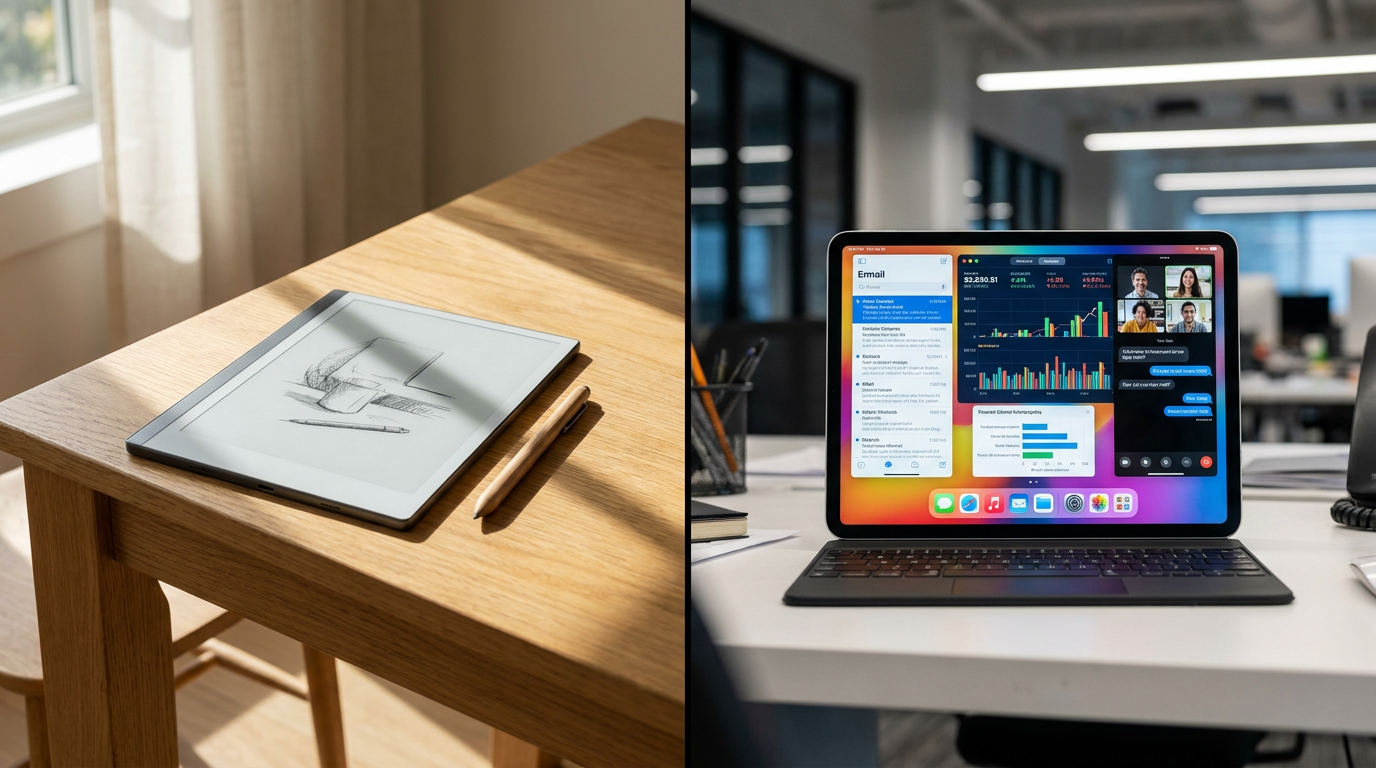
The modern office worker's dilemma in 2026 is defined by a constant battle against digital distraction. The fight for desk space is no longer just about laptops; it is about the secondary device used for note-taking, document review, and deep thinking. On one side sits the traditional LCD tablet, championed by the Apple iPad. On the other is the rapidly maturing E-Ink tablet category, led by devices like the reMarkable 2. Choosing between them is not merely a hardware decision, but a fundamental choice about how a professional manages cognitive load.[2][6]
The case for E-Ink devices centers entirely on cognitive fidelity and distraction-free single-tasking. These tablets are designed to mimic the physical constraints of paper, stripping away notifications, web browsers, and background apps. For professionals who suffer from screen fatigue or attention fragmentation, the E-Ink tablet acts as a sanctuary for deep work. The tactile friction of a stylus on a matte screen closely replicates the analog journaling experience, which many users find essential for memory retention and strategic planning.[3][8]
The evidence supporting E-Ink's health benefits is substantial and quantified. A peer-reviewed study commissioned through the Harvard T.H. Chan School of Public Health analyzed the effects of display spectra on human retinal cells. The research demonstrated that backlit LCD screens, which emit high-energy blue light, cause significantly higher levels of oxidative stress on the retina. In contrast, E-Ink devices equipped with front-light technology were found to be up to three times less stressful for retinal cells than their LCD counterparts.[1][4][7]

Further evidence for E-Ink lies in its physiological and logistical efficiency. Because E-Ink displays only draw power when actively refreshing the screen, battery life is measured in weeks rather than hours. A standard E-Ink tablet can sustain 28 to 35 days of active use per charge, compared to the 12 to 16 hours typical of a high-end iPad under similar note-taking conditions. This eliminates the mid-afternoon battery anxiety that plagues heavy digital users and ensures the device is always ready for a sudden meeting.[5][8]
However, the case against E-Ink is rooted in its severe functional limitations. These devices are unapologetically single-purpose by design. They lack the processing power for resource-intensive tasks, and their monochrome displays render them entirely useless for reviewing color-coded spreadsheets, presentation decks, or multimedia content. Furthermore, the absence of seamless cloud integration with enterprise applications like Microsoft Teams or Slack means that transferring handwritten notes into a corporate workflow often requires clunky workarounds or manual exporting via email, which slows down fast-paced collaboration.[2][3]
The case for the traditional tablet, exemplified by the iPad Pro or iPad Mini, is built on absolute versatility. An iPad is a fully-fledged portable computer capable of replacing a laptop for many office tasks. With access to millions of applications, users can seamlessly transition from handwriting notes in GoodNotes to joining a Zoom call, signing a PDF, and answering emails—all on the same glass pane. The Apple Pencil offers pixel-perfect precision with near-zero latency, making it a powerhouse for dynamic, multi-layered workflows.[2][6]
The case for the traditional tablet, exemplified by the iPad Pro or iPad Mini, is built on absolute versatility.
The evidence for the iPad's dominance in modern workflows is its frictionless integration into the broader digital ecosystem. Modern note-taking apps on iOS offer advanced features that E-Ink cannot match, such as real-time audio syncing with handwritten notes, instant optical character recognition (OCR) for searching messy handwriting, and the ability to embed high-resolution images directly into a notebook. For professionals who need to capture and organize complex, multimedia information rapidly, the iPad's utility is unmatched.[2][8]

The case against the iPad centers on the very versatility that makes it so powerful: it is a highly effective distraction engine. The constant presence of push notifications, the temptation to open a web browser, and the cognitive load of managing multiple overlapping windows actively work against sustained, reflective thought. Additionally, writing on a glossy glass screen feels slippery and unnatural compared to physical paper, forcing users to adapt their handwriting style to accommodate the lack of physical resistance.[3][8]
While matte screen protectors do add necessary friction to an iPad, evidence suggests they are an imperfect compromise for serious note-takers. These textured films inevitably degrade the visual clarity of the Retina display, introducing a subtle graininess that diminishes the tablet's primary advantage as a high-resolution media consumption device. Furthermore, even with a textured surface applied, the iPad's backlit display continues to emit the circadian-disrupting blue light that accelerates visual fatigue during long reading or writing sessions in the office.[4][8]
When evaluating the trade-offs, the E-Ink tablet fits well when a professional's primary need is sustained, linear focus. It is the optimal choice for executives who spend hours reading long-form documents, writers drafting complex proposals, or anyone who finds their attention constantly hijacked by digital noise. It thrives in environments where the ultimate goal is to disconnect from the immediate demands of the corporate inbox and engage in deep, uninterrupted strategic thinking without the temptation of a web browser.[3][6]

Conversely, the E-Ink tablet does not fit when a user's workflow is inherently dynamic, fast-paced, and highly collaborative. If a job requires constant toggling between complex spreadsheets, live video conferencing, and rapid-fire team messaging, an E-Ink device will quickly feel like a frustrating bottleneck. It is also a remarkably poor choice for creative professionals who rely on precise color accuracy, layered digital illustration, or dynamic presentation software to execute their daily deliverables. In these scenarios, the intentional friction of a single-tasking device becomes an active barrier to getting work done efficiently.[2][3]
The iPad fits well when a professional requires a versatile 'Swiss Army knife' device that can seamlessly adapt to any unpredictable situation. It is ideal for project managers, visual designers, and students who need a single piece of glass to serve as a digital notebook, a communication hub, a research terminal, and a media player. Its unparalleled ability to handle rich, multimedia note-taking makes it absolutely indispensable for those who process information visually and interactively throughout their demanding workdays.[2][6]
The iPad does not fit when the user struggles with screen fatigue or requires a dedicated space for distraction-free reflection. For individuals prone to eye strain, migraines, or sleep disruption from prolonged blue light exposure, relying on an iPad for evening reading or extended writing sessions is physiologically counterproductive. In the end, the choice is not about which device is technologically superior, but about whether a professional needs a tool to expand their capabilities or a boundary to protect their focus.[1][5][6]
How we got here
2010
Apple launches the first iPad, defining the modern tablet category and setting the standard for versatile digital workflows.
2017
reMarkable launches its first E-Ink paper tablet, targeting professionals seeking distraction-free writing.
2020
reMarkable 2 is released, setting a new hardware standard for digital paper and popularizing the E-Ink category.
2023
The Harvard T.H. Chan School of Public Health publishes a study confirming E-Ink displays cause significantly less retinal stress than LCDs.
2024
Apple introduces the M4 iPad Pro and Apple Pencil Pro, maximizing tablet versatility and multimedia note-taking capabilities.
Viewpoints in depth
Digital Minimalists
Advocates for using technology to create boundaries and protect deep focus.
This camp argues that the modern professional's greatest enemy is the notification tray. They view E-Ink tablets not as limited devices, but as intentional sanctuaries for cognitive fidelity. By stripping away web browsers, social media, and email clients, digital minimalists believe that single-purpose tools allow users to reclaim their attention spans and engage in the kind of deep, reflective strategic thinking that multi-functional devices actively disrupt.
Versatility Maximizers
Proponents of all-in-one devices that seamlessly integrate into complex corporate ecosystems.
Versatility maximizers argue that carrying a single-purpose device in 2026 is an inefficient luxury. They point out that modern workflows require constant toggling between communication apps, cloud storage, and multimedia presentations. For this group, the iPad's ability to instantly convert handwriting to text, sync audio recordings with notes, and share documents directly to enterprise platforms like Slack or Microsoft Teams makes it an indispensable 'Swiss Army knife' that justifies the trade-offs in battery life and screen glare.
Occupational Health Researchers
Experts focused on the physiological impacts of prolonged screen exposure.
Health researchers emphasize the biological toll of the modern digital workplace. They cite peer-reviewed data showing that backlit LCD screens emit high-energy blue light, which accelerates retinal oxidative stress and disrupts circadian rhythms. This camp advocates for reflective display technologies like E-Ink, arguing that mitigating digital eye strain and accommodative stress should be a primary factor in corporate hardware procurement, rather than an afterthought.
What we don't know
- Whether future iterations of color E-Ink technology will eventually bridge the gap in multimedia versatility without sacrificing battery life.
- How the long-term adoption of E-Ink devices will impact overall corporate productivity metrics compared to traditional tablet deployments.
Key terms
- E-Ink
- Electronic ink technology that reflects ambient light rather than emitting a backlight, mimicking the appearance of physical paper.
- Cognitive Fidelity
- The degree to which a digital tool preserves the natural, low-distraction mental state of an analog task.
- Retinal Oxidative Stress
- Cellular damage in the eye caused by prolonged exposure to high-energy blue light, leading to visual fatigue.
- Optical Character Recognition (OCR)
- Software that converts handwritten notes into searchable, typed digital text.
Frequently asked
Can an E-Ink tablet replace my laptop?
No. E-Ink tablets are specialized tools for reading, writing, and deep focus, lacking the processing power and app ecosystem for general computing.
Do matte screen protectors make an iPad feel exactly like paper?
While they add necessary friction for a better writing feel, they do not replicate the exact tactile sensation of E-Ink and can slightly degrade the iPad's display clarity.
Is E-Ink actually better for your eyes?
Yes. Peer-reviewed research indicates that reflective E-Ink displays cause up to three times less stress on retinal cells compared to backlit LCD screens.
Sources
Source coverage
8 outlets
3 viewpoints surfaced








[1]Harvard T.H. Chan School of Public HealthOccupational Health Researchers
Study on the effects of displays on human retinal cells
Read on Harvard T.H. Chan School of Public Health →[2]ZDNetVersatility Maximizers
iPad vs. reMarkable 2: Which productivity tablet should you buy?
Read on ZDNet →[3]iFLYTEKDigital Minimalists
Is an E-Ink Tablet Worth It for Business Professionals?
Read on iFLYTEK →[4]InvidisOccupational Health Researchers
Study finds ePaper displays beat LCD or LED for eye health
Read on Invidis →[5]BOOXOccupational Health Researchers
Why ePaper Is a Healthier Alternative
Read on BOOX →[6]Factlen Editorial TeamVersatility Maximizers
Synthesis by Factlen editorial team
Read on Factlen Editorial Team →[7]Journal of the Society for Information DisplayOccupational Health Researchers
Effects of display spectra on human retinal cells
Read on Journal of the Society for Information Display →[8]BorednBooklessDigital Minimalists
Ipad Vs reMarkable 2: A Deep Dive
Read on BorednBookless →
Every angle. Every day.
Get shopping stories with full source coverage and perspective breakdowns delivered to your inbox.