
E-Ink vs. iPad: Choosing the Right Digital Note-Taking Tablet in 2026
As digital note-taking surges in popularity, buyers face a stark choice between the distraction-free, paper-like experience of E-Ink tablets and the versatile, full-color power of traditional iPads.
By Factlen Editorial Team
- Minimalist Productivity Advocates
- Argue that the lack of apps and notifications on E-Ink devices is a feature, not a bug, enabling deep focus.
- Versatility & Power Users
- Value the iPad's ability to handle multiple tasks, run complex software, and display full-color multimedia.
- Hybrid Compromise Seekers
- Prefer the power of the iPad but utilize matte screen protectors to simulate the tactile feel of E-Ink.
What's not represented
- · Digital artists who require both paper-like friction and full-color rendering.
- · Environmental advocates assessing the e-waste impact of owning multiple single-purpose devices.
Why this matters
Choosing the right tablet fundamentally alters how you work and study; the wrong choice can lead to digital fatigue and distraction, while the right one can unlock hours of deep, focused productivity.
Key points
- E-Ink tablets offer a distraction-free, paper-like writing experience with zero blue light.
- iPads provide unmatched versatility, full-color displays, and access to thousands of productivity apps.
- E-Ink devices boast battery life measured in weeks, while iPads require daily charging.
- Matte screen protectors can give iPads a paper-like feel, but slightly degrade display clarity.
- The choice depends entirely on whether a user values focused single-tasking or dynamic multitasking.
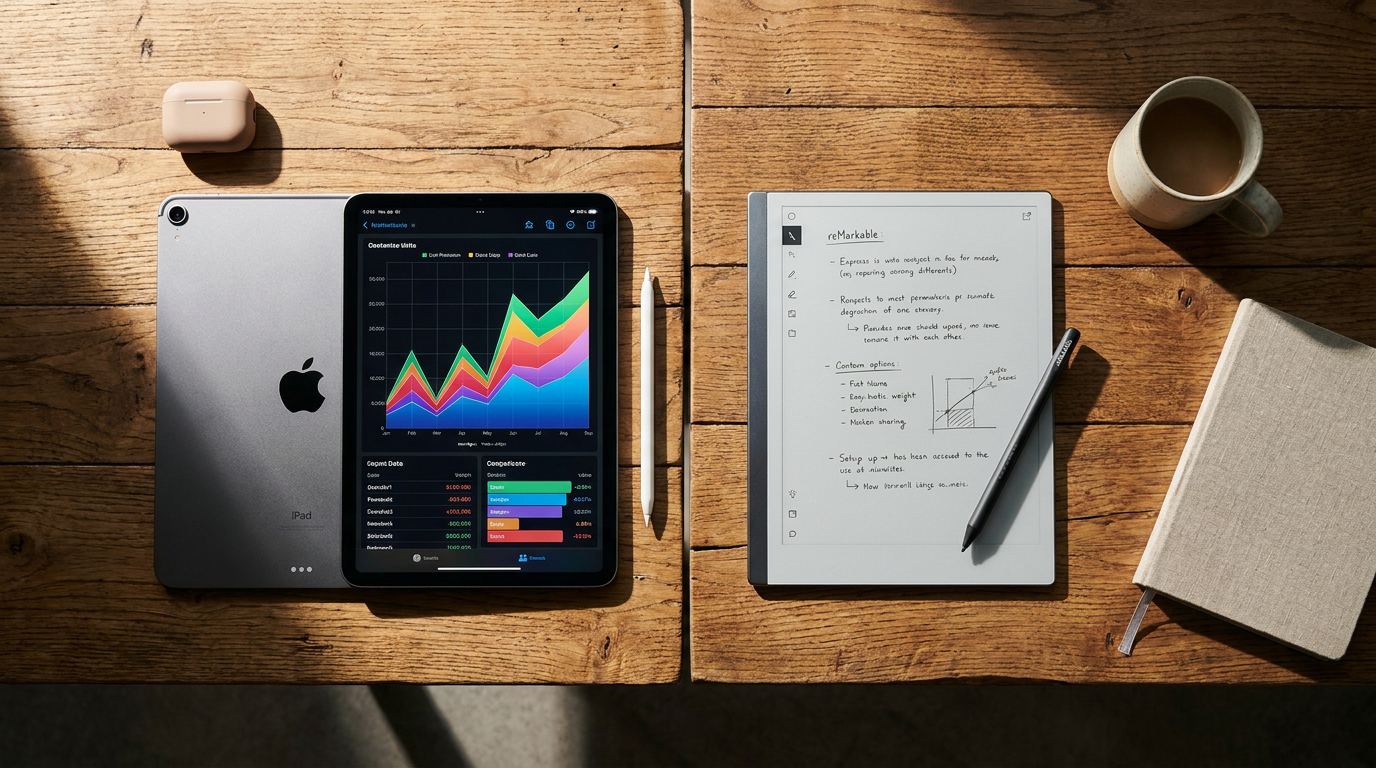
The transition from physical notebooks to digital canvases has revolutionized how students, professionals, and creatives organize their thoughts. Yet, as buyers look to upgrade their workflows in 2026, the market has fractured into two fundamentally opposed design philosophies. On one side sits the traditional tablet, championed by the ubiquitous Apple iPad, which promises a glowing, full-color window into a limitless ecosystem of apps. On the other side is the rapidly growing category of E-Ink tablets—led by devices like the reMarkable 2, Amazon Kindle Scribe, and Boox Note Air—which strip away the noise to offer a hyper-focused, paper-like experience. Choosing between them is no longer just a matter of budget; it is a decision about how a user wants their brain to interact with technology during deep work.[1][2][3]
At the heart of the debate is the display technology itself, which dictates the entire user experience. Apple's iPads utilize LED or OLED Liquid Retina displays that emit light directly into the user's eyes, offering vibrant colors, stark contrasts, and lightning-fast refresh rates. This makes the iPad an undisputed powerhouse for consuming multimedia, editing photos, or navigating complex software. Conversely, E-Ink screens rely on electrophoretic technology, physically moving microscopic ink particles to form text and images. Because these displays reflect ambient light rather than emitting their own, they look and behave remarkably like actual paper, remaining perfectly legible even in direct, blinding sunlight where an iPad would become a mirror of glare.[1][3][4][5][6]
For heavy readers and prolific note-takers, the physiological benefits of E-Ink are profound. Staring at a backlit LCD or OLED screen for hours can lead to digital eye strain, visual fatigue, and disrupted circadian rhythms due to blue light exposure. E-Ink tablets eliminate this photonic friction entirely. Users report being able to read dense technical documents, textbooks, or long-form PDFs for hours without the burning sensation commonly associated with traditional tablets. Furthermore, the lack of a backlight means that reading on an E-Ink device before bed will not trick the brain into suppressing melatonin, making it a far healthier option for late-night study sessions or journaling.[1][3]

The tactile experience of writing also sharply divides the two camps. Writing on an iPad with an Apple Pencil is highly responsive and precise, but the sensation is undeniably one of tapping hard plastic against smooth, slippery glass. E-Ink tablets, by contrast, are engineered with textured, matte surfaces that provide physical resistance. When a stylus drags across a reMarkable 2 or a Kindle Scribe, it generates a satisfying micro-friction—and even a subtle scratching sound—that closely mimics the tactile feedback of a graphite pencil on a fresh sheet of paper. For many users, this physical grounding offers more control over their handwriting and makes the transition from analog to digital feel entirely natural.[2][4][6][7]
Battery life represents another massive divergence in daily utility. Because iPads are constantly powering a bright display, running background processes, and pinging Wi-Fi networks, heavy note-taking and multitasking will drain the battery in roughly ten hours, necessitating a daily charging routine. E-Ink displays, however, only consume power when the screen actively refreshes to change the image. Once a page of text is rendered, it requires zero electricity to remain visible. As a result, devices like the reMarkable 2 boast battery life measured not in hours, but in weeks. A user can toss an E-Ink tablet into their bag, use it daily for meetings or classes, and easily go half a month before needing to hunt for a charging cable.[1][2][3][4][5]

Battery life represents another massive divergence in daily utility.
However, the E-Ink philosophy of minimalism comes with severe functional limitations that can frustrate users expecting a traditional tablet experience. The screens are overwhelmingly monochrome, rendering everything in shades of gray, which is useless for highlighting notes in different colors, reviewing slide decks, or viewing photographs. Furthermore, the refresh rate of E-Ink is inherently slow. While modern devices have improved, actions like pinching to zoom, scrolling through a web page, or navigating menus can feel sluggish and ghosted compared to the buttery-smooth 120Hz ProMotion displays found on iPad Pro models. Watching video or playing games on an E-Ink tablet is practically impossible.[2][3][4][7]
This is where the iPad asserts its dominance as the ultimate "jack of all trades." While an E-Ink tablet is a digital notebook, an iPad is a fully functional computer. The Apple App Store provides access to industry-leading note-taking software like GoodNotes and Notability, which offer infinite canvas scrolling, audio recording synced to handwriting, and seamless cloud backups. If a student needs to snap a photo of a whiteboard, drop it into their notes, and annotate over it in bright red ink, the iPad handles the task effortlessly thanks to its built-in cameras and powerful A-series or M-series processors. The iPad also supports external keyboards, transforming into a laptop replacement for typing essays or answering emails.[1][4][5]
The iPad's versatility, however, is a double-edged sword when it comes to cognitive load and focus. Traditional tablets are designed as attention-harvesting machines, constantly interrupting the user with iMessages, social media notifications, and the ever-present temptation to switch over to YouTube or a web browser. E-Ink tablets are intentionally "dumb" by comparison. Devices like the reMarkable 2 lack an app store, a web browser, and email notifications entirely. This enforced isolation creates a distraction-free sanctuary, allowing users to enter a state of deep work and sustained concentration that is incredibly difficult to achieve on a device capable of streaming high-definition video.[1][3][5][6][7]

For users torn between the two extremes, a popular compromise has emerged in the form of matte screen protectors for the iPad. Products like Paperlike adhere to the iPad's glass display, adding a gritty texture that significantly improves the friction and feel of the Apple Pencil. While this solves the slippery writing experience, it introduces its own trade-offs. The matte coating diffuses the iPad's backlight, slightly degrading the crispness and color accuracy of the Retina display, and it does nothing to solve the underlying issues of eye strain, battery life, or digital distractions. It is a band-aid solution for those who absolutely need iPadOS but crave a better writing surface.[4][7]
Ultimately, the decision comes down to matching the hardware to the specific conditions of the user's workflow. An E-Ink tablet fits perfectly when the primary goals are single-tasking, reading long documents, and taking endless handwritten notes without eye fatigue. It is the definitive choice for writers, academics, and professionals who want to replace a stack of legal pads with a single, elegant slate that stays out of their way. It is a tool for slowing down, thinking deeply, and escaping the relentless pace of the modern internet.[2][3][6]

Conversely, the iPad fits best when versatility is non-negotiable. It is the right choice for users who need a single device to handle colorful multimedia, complex app ecosystems, and dynamic multitasking. If your note-taking involves importing colorful charts, recording lectures, or switching rapidly between a textbook app and a word processor, the iPad's processing power and vibrant display are indispensable. While it may lack the romantic, paper-like purity of E-Ink, the iPad remains the undisputed king of doing everything, everywhere, all at once.[1][4][5][7]
How we got here
2010
Apple releases the first iPad, establishing the modern tablet market.
2015
Apple introduces the Apple Pencil, making the iPad a viable digital canvas.
2017
reMarkable launches its first digital paper tablet, pioneering the dedicated E-Ink notebook space.
2020
The reMarkable 2 is released, earning praise as the world's thinnest tablet.
2022
Amazon enters the E-Ink note-taking market with the launch of the Kindle Scribe.
Viewpoints in depth
Minimalist Productivity Advocates
Argue that the lack of apps and notifications on E-Ink devices is a feature, not a bug, enabling deep focus.
This camp, often composed of writers, academics, and deep-work enthusiasts, views the iPad's versatility as a liability. They argue that a device capable of checking email, browsing social media, and streaming video will inevitably distract the user from the task at hand. By stripping away these features, E-Ink tablets force the user into a state of single-tasking. Furthermore, they emphasize the physiological benefits of E-Ink, pointing to reduced eye strain and better sleep hygiene as critical advantages for anyone who spends hours staring at screens.
Versatility & Power Users
Value the iPad's ability to handle multiple tasks, run complex software, and display full-color multimedia.
For this group, spending hundreds of dollars on a device that only does one thing is an inefficient use of resources. They point out that the iPad can serve as a digital notebook, a laptop replacement, a portable movie theater, and a professional art studio all at once. They rely heavily on the Apple App Store ecosystem, utilizing features like audio recording in Notability, layered drawing in Procreate, and seamless iCloud syncing. To them, the iPad's high-resolution color display and powerful processors easily justify the need for daily charging and the occasional notification distraction.
Hybrid Compromise Seekers
Prefer the power of the iPad but utilize matte screen protectors to simulate the tactile feel of E-Ink.
This perspective attempts to bridge the gap between the two philosophies. These users acknowledge that writing on the iPad's bare glass screen is a subpar, slippery experience compared to the satisfying friction of an E-Ink tablet. However, they refuse to give up the iPad's software capabilities. Their solution is to apply textured, matte screen protectors—like Paperlike—which add physical resistance to the Apple Pencil's strokes. While they accept that this slightly degrades the visual clarity of the iPad's Retina display, they view it as a worthwhile trade-off to achieve a paper-like feel without sacrificing versatility.
What we don't know
- Whether future iPad models will incorporate hybrid display technology to reduce eye strain during reading sessions.
- How the rapid advancement of color E-Ink screens will impact the battery life and price of dedicated note-taking devices.
Key terms
- E-Ink (Electrophoretic Ink)
- A display technology that physically moves microscopic black and white particles to form text, requiring no backlight and mimicking the look of real paper.
- Liquid Retina Display
- Apple's proprietary term for its high-resolution LCD and OLED screens, which emit bright, full-color light and offer high refresh rates.
- Refresh Rate
- The speed at which a screen updates its image. iPads have high refresh rates for smooth video, while E-Ink has low refresh rates suited for static text.
- Cognitive Load
- The amount of mental effort required to process information. iPads often increase cognitive load due to notifications and multitasking options.
Frequently asked
Can I watch videos or browse the web on an E-Ink tablet?
Generally, no. While some E-Ink tablets have basic web browsers, the slow refresh rate makes scrolling frustrating, and watching video is practically impossible due to severe ghosting.
Does the Apple Pencil feel like a real pen?
The Apple Pencil is highly precise, but writing on the iPad's glass screen feels slippery compared to paper. Many users buy matte screen protectors to add friction.
Do E-Ink tablets require a subscription?
It depends on the brand. The reMarkable 2 offers an optional 'Connect' subscription for unlimited cloud syncing, while devices like the Kindle Scribe do not require ongoing fees for basic use.
Does E-Ink really prevent eye strain?
Yes. Because E-Ink displays reflect ambient light rather than shining a backlight directly into your eyes, they significantly reduce visual fatigue and blue light exposure.
Sources
Source coverage
7 outlets
3 viewpoints surfaced







[1]ZDNetVersatility & Power Users
Apple iPad vs reMarkable 2: Which is better for note-taking?
Read on ZDNet →[2]Trusted ReviewsHybrid Compromise Seekers
Remarkable 2 vs iPad Pro
Read on Trusted Reviews →[3]MakeUseOfMinimalist Productivity Advocates
5 reasons why e-ink tablets are better than iPads in 2026
Read on MakeUseOf →[4]MyNextTabletHybrid Compromise Seekers
reMarkable 2 vs Apple iPad Comparison
Read on MyNextTablet →[5]RadioTimesVersatility & Power Users
reMarkable 2 vs Apple iPad (2025)
Read on RadioTimes →[6]AstropadMinimalist Productivity Advocates
iPad vs reMarkable 2: Which is Better?
Read on Astropad →[7]ChesonaMinimalist Productivity Advocates
Remarkable vs iPad: Core Differences
Read on Chesona →
Every angle. Every day.
Get shopping stories with full source coverage and perspective breakdowns delivered to your inbox.