
The Rise of Local AI: How to Run Powerful Language Models Offline in 2026
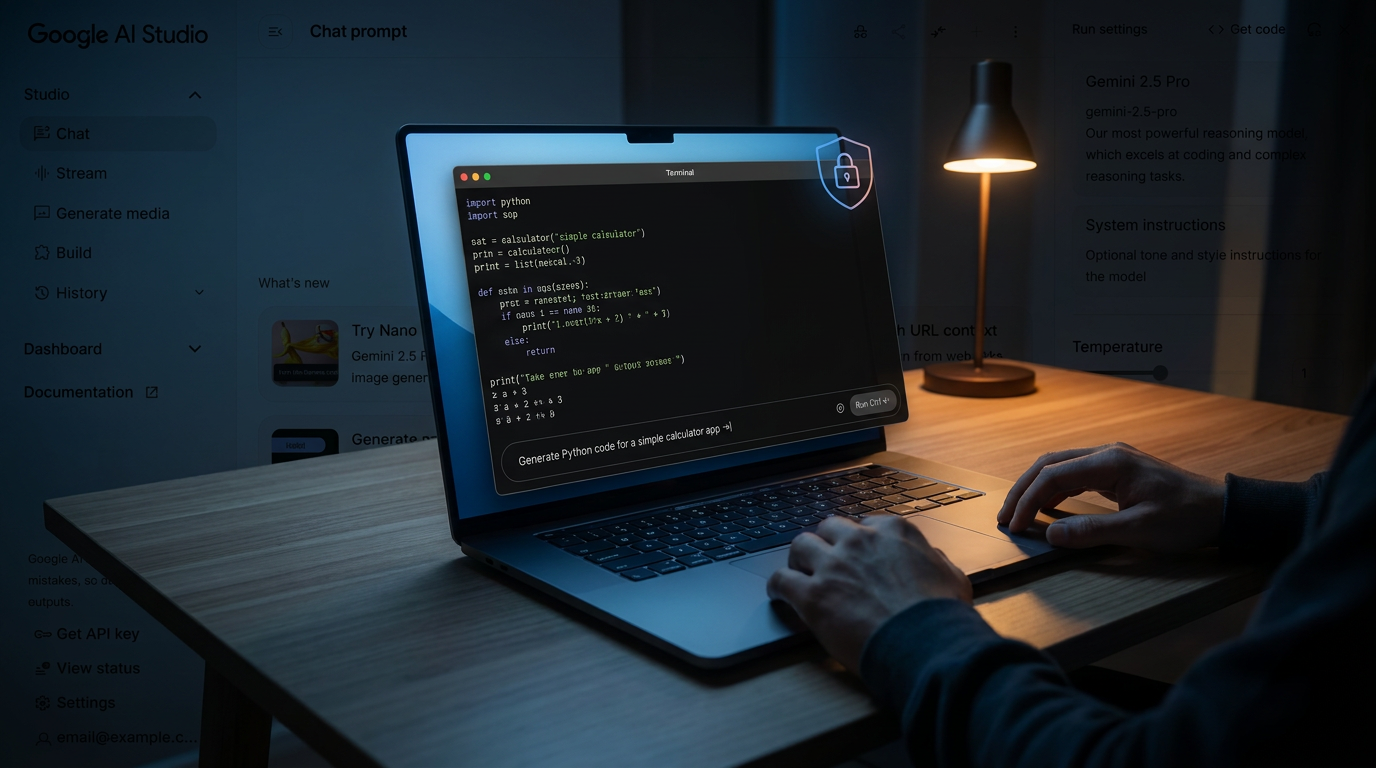
Advances in hardware and model compression now allow users to run powerful AI tools entirely on their own devices. This shift offers absolute privacy, zero subscription fees, and offline capabilities without relying on cloud servers.
By Factlen Editorial Team
- Privacy & Data Sovereignty Advocates
- Argue that all sensitive AI processing must happen locally to prevent corporate surveillance and data leaks.
- Hardware & Performance Enthusiasts
- Focus on maximizing tokens-per-second and pushing the limits of consumer silicon.
- Editorial Synthesis
- Provides a neutral overview of the technological shift and its broader implications.
What's not represented
- · Mobile app developers optimizing for battery life
- · Regulators drafting AI data sovereignty laws
Why this matters
As AI becomes deeply integrated into daily workflows, relying on cloud services means exposing personal and corporate data to third parties. Local AI tools put the power back in the user's hands, ensuring that sensitive information, proprietary code, and private thoughts never leave the physical device.
Key points
- Local AI allows users to run language models entirely offline, ensuring absolute data privacy.
- Tools like Ollama and LM Studio have made installing and running models accessible to non-developers.
- Quantization techniques compress massive models so they can run on laptops with just 8 to 16 GB of RAM.
- While local models are highly capable, cloud AI is still required for the most complex reasoning tasks.
For the past three years, interacting with artificial intelligence meant making a trade. In exchange for drafting emails, writing code, or summarizing documents, users had to send their private data to servers owned by tech giants. Every prompt, every typo, and every sensitive corporate strategy was beamed to the cloud. But in 2026, a quiet revolution has flipped that dynamic. AI is moving out of the data center and directly onto your laptop, phone, and tablet.[1][6]
This shift is known as "local AI" or "on-device AI," and it represents one of the most empowering technological transitions of the decade. Instead of renting intelligence by the API call, users can now download a model and run it entirely offline. The appeal is immediate: zero subscription fees, absolute data privacy, and the ability to generate complex text or code while sitting on an airplane without Wi-Fi.[1][2]
The catalyst for this movement wasn't just convenience; it was security. When major corporations like Samsung banned the internal use of cloud-based AI after engineers inadvertently leaked proprietary source code, the industry realized that cloud AI carried inherent risks. Furthermore, high-profile outages of cloud services—like the prolonged ChatGPT downtime in late 2024—left professionals stranded without their primary brainstorming tools. Local AI solves both problems by ensuring that data never leaves the physical machine.[2][4][6]

To understand how this works, it is crucial to separate the "tool" from the "model." In the cloud era, the interface and the brain were bundled together into a single product, like ChatGPT or Claude. In the local AI ecosystem, these components are decoupled. Users first install a tool—the software that acts as the player—and then download a model, which acts as the record.[2]
The tools have evolved from complex command-line scripts into polished, user-friendly applications. Ollama has emerged as the developer's favorite, allowing users to pull and run models with a single terminal command. For those who prefer a graphical interface, LM Studio offers a ChatGPT-style window that requires zero coding knowledge. Users simply search for a model, click download, and start chatting. Other tools, like GPT4All, specialize in reading local documents, turning a folder of PDFs into a private, searchable knowledge base.[1][2][6]
The models themselves have also undergone a radical transformation. In 2026, the open-weights ecosystem is dominated by highly optimized "small language models" (SLMs). Heavyweights like Meta's Llama 4, Google's Gemma 4, Microsoft's Phi-4-mini, and DeepSeek R1 are freely available to download. While they may not possess the encyclopedic breadth of a trillion-parameter cloud model, they are exceptionally capable at reasoning, coding, and writing.[1][2]

But how can a model that cost millions of dollars to train fit onto a standard consumer laptop? The answer lies in a mathematical technique called quantization, specifically using formats like GGUF. Quantization compresses the model's neural weights by reducing their precision—turning high-resolution numbers into lower-resolution approximations. This process shrinks the file size by 60 to 75 percent with only a negligible drop in intelligence.[2]
But how can a model that cost millions of dollars to train fit onto a standard consumer laptop?
Because of quantization, the hardware requirements for local AI have plummeted. A massive 20-billion parameter model, which once required a server rack, can now run comfortably on a laptop with just 16GB of RAM. Even smaller models, like Phi-4-mini, can operate on older machines with a mere 4GB of RAM.[2][6]
The hardware industry has also pivoted to support this local-first future. The defining feature of a 2026 PC is the Neural Processing Unit (NPU). Unlike a CPU (which handles general tasks) or a GPU (which renders graphics), an NPU is a dedicated chip designed specifically for the matrix multiplication required by neural networks.[5]

Microsoft's Copilot+ PCs mandate an NPU capable of at least 40 Tera Operations Per Second (TOPS) to run background AI tasks like live captioning and semantic search. However, for heavy-duty local AI generation, the GPU remains king. A modern Apple Silicon Mac or a PC with a dedicated NVIDIA graphics card can generate text at blistering speeds—often exceeding 25 tokens per second, which is faster than most humans can read.[2][5]
The practical applications of local AI are vast. Software developers use local models to write and debug code without exposing proprietary algorithms to third-party servers. Lawyers and medical professionals use them to summarize sensitive case files and patient records, remaining fully compliant with strict data privacy regulations.[3][6]
Everyday consumers are also finding value in offline AI. Writers use local models as private sounding boards for their journals or novels, free from the content moderation filters and corporate oversight that govern cloud platforms. Because the processing happens locally, there is no risk of a company using personal prompts to train future versions of their software.[6]

Despite these breakthroughs, local AI is not without its trade-offs. Running a neural network at full tilt requires significant computational power, which can rapidly drain a laptop's battery. Furthermore, because local models are entirely offline, they cannot search the live internet for real-time news, stock prices, or weather updates. They know only what was included in their training data up to the point they were released.[1][4]
For the most complex reasoning tasks—such as solving advanced mathematical proofs or generating photorealistic video—cloud AI remains unmatched. The sheer scale of data centers cannot be replicated on a desk. As a result, the future of AI is likely hybrid: local models will handle daily, privacy-sensitive tasks, while cloud models will be reserved for heavy lifting.[1]
Ultimately, the rise of local AI in 2026 represents a democratization of intelligence. By putting powerful language models directly into the hands of users, the technology shifts control away from a handful of centralized tech giants. It ensures that as artificial intelligence becomes an integral part of daily life, the fundamental rights to privacy, ownership, and offline access remain intact.[1][6]
How we got here
Early 2023
Llama.cpp is released, allowing developers to run Meta's leaked Llama model on standard MacBook CPUs.
Late 2023
The GGUF format is introduced, standardizing how massive models are compressed for consumer hardware.
Mid 2024
Microsoft announces Copilot+ PCs, mandating dedicated NPUs for on-device AI processing.
Late 2024
A major ChatGPT outage leaves millions without AI access, sparking a surge in local AI adoption.
Early 2026
Highly capable small language models like Gemma 4 and Phi-4-mini make local AI viable for everyday consumers.
Viewpoints in depth
Privacy & Data Sovereignty Advocates
Argue that all sensitive AI processing must happen locally to prevent corporate surveillance and data leaks.
This camp, which includes cybersecurity professionals and compliance officers in healthcare and finance, views cloud AI as an inherent security risk. They argue that once data leaves a device, it is vulnerable to breaches, unauthorized training, or government subpoenas. For them, local AI is not just a technical preference but a fundamental requirement for maintaining client confidentiality and adhering to frameworks like the GDPR.
Hardware & Performance Enthusiasts
Focus on maximizing tokens-per-second and pushing the limits of consumer silicon.
This community is deeply invested in the technical mechanics of running AI locally. They track the evolution of Neural Processing Units (NPUs) and debate the merits of Apple Silicon versus dedicated NVIDIA GPUs. For these enthusiasts, the goal is efficiency—using techniques like GGUF quantization to squeeze massive 20-billion parameter models into 16GB of RAM without sacrificing reasoning quality. They view local AI as the ultimate benchmark for modern PC performance.
Cloud-First AI Providers
Maintain that the most capable and accurate AI requires the massive compute power of centralized data centers.
While acknowledging the privacy benefits of local models, cloud providers argue that on-device AI will always lag behind the frontier. They point out that local models cannot access real-time web data, struggle with massive context windows, and drain laptop batteries quickly. This camp advocates for a hybrid approach: using local AI for simple, private tasks, but relying on cloud infrastructure for complex reasoning, agentic workflows, and heavy data analysis.
What we don't know
- How quickly battery technology will evolve to support continuous on-device AI generation without rapid draining.
- Whether future regulations will mandate local processing for specific industries like healthcare and finance.
- How cloud providers will adapt their pricing models as more users shift to free, local alternatives.
Key terms
- Inference
- The process of an AI model generating a response or prediction based on a user's prompt.
- Quantization
- A compression technique that reduces the precision of an AI model's numbers, allowing it to run on less powerful hardware.
- Neural Processing Unit (NPU)
- A specialized computer chip designed specifically to handle the complex math required by artificial intelligence.
- Open Weights
- AI models where the underlying neural network architecture is made publicly available for anyone to download and use.
Frequently asked
Can I run local AI without an internet connection?
Yes. Once you download the tool and the model file, the entire generation process happens on your device's hardware, requiring zero internet access.
Do I need an expensive graphics card?
Not necessarily. While a dedicated GPU speeds up response times, modern quantization techniques allow capable models to run on standard CPUs with 8 to 16 GB of RAM.
Is local AI as smart as ChatGPT?
For everyday tasks like drafting emails, summarizing documents, and writing code, local models are highly capable. However, they lack the massive reasoning power and real-time web search of premium cloud models.
Are local AI tools free to use?
Yes. The most popular tools like Ollama and LM Studio, as well as models like Llama 4 and Gemma 4, are completely free to download and use with no subscription fees.
Sources
Source coverage
7 outlets
3 viewpoints surfaced







[1]AI MagicxHardware & Performance Enthusiasts
On-Device AI in 2026: Running LLMs Locally on Your Phone, Laptop, and IoT Devices
Read on AI Magicx →[2]AI Thinker LabHardware & Performance Enthusiasts
Run AI models locally and offline on a laptop with no internet connection
Read on AI Thinker Lab →[3]Boston Institute of AnalyticsPrivacy & Data Sovereignty Advocates
Local LLMs: A Guide to Running AI Locally
Read on Boston Institute of Analytics →[4]Marketing Data SciencePrivacy & Data Sovereignty Advocates
Running the llama-3.2b LLM locally on my MacBook Air
Read on Marketing Data Science →[5]Vision ComputersHardware & Performance Enthusiasts
NPU Explained: The AI Chip Inside Your Processor
Read on Vision Computers →[6]SentiSightPrivacy & Data Sovereignty Advocates
Local-First AI: How to Run Powerful Models on Your Laptop and Phone
Read on SentiSight →[7]Factlen Editorial TeamEditorial Synthesis
Synthesis by Factlen editorial team
Read on Factlen Editorial Team →
More in ai
See all 5 stories →On-Device AI
How Local AI Replaced the Cloud: Running Frontier Models on Your Laptop
0 sources

Enterprise AI
The Rise of Small Language Models: How Enterprises Are Running AI Locally in 2026
0 sources
Drug Discovery
New AI Model Accelerates Molecular Simulations 10,000-Fold, Slashing Drug Discovery Timelines
0 sources

Every angle. Every day.
Get ai stories with full source coverage and perspective breakdowns delivered to your inbox.