
The 2026 Laptop Buyer's Guide: What an NPU Is and Why You Need One
Neural Processing Units (NPUs) have become the defining feature of modern laptops, offering massive battery savings and offline AI capabilities. Here is how to navigate the shift between ARM and x86 architectures.

If you are shopping for a new laptop in 2026, the specification sheets look fundamentally different than they did just two years ago. Alongside the familiar CPU and GPU, a new acronym has taken center stage: the NPU.[1]
The Neural Processing Unit is the defining hardware component of the "AI PC" era. While artificial intelligence features have been creeping into software for years, they previously relied on cloud servers or heavily taxed a laptop's main processors, draining the battery and spinning up loud fans.[2]
To understand why the NPU matters, it helps to look at how a computer divides its labor. The Central Processing Unit (CPU) is the generalist, handling everything from opening web browsers to running the operating system. The Graphics Processing Unit (GPU) is the visual specialist, rendering high-resolution games and video edits.[1]
The NPU is the AI specialist. Unlike CPUs, which process calculations sequentially, NPUs are designed to handle the complex matrix arithmetic required by neural networks in parallel. They process thousands of data points simultaneously with remarkable energy efficiency.[1]
When a laptop lacks an NPU, AI tasks are forced onto the CPU or GPU. This brute-force approach works, but it consumes massive amounts of power. By offloading these specific workloads to a dedicated chip, an NPU can improve battery life by 15 to 20 percent during AI-heavy tasks.[1]
But what exactly counts as an "AI task" for the average user? The benefits are highly practical. NPUs silently power background blur and noise cancellation during video calls, generate real-time live captions for any audio playing on the device, and manage smart battery optimization.[1][2]
For power users and developers, the stakes are even higher. A robust NPU allows users to run Large Language Models (LLMs) and image generators locally on the device. This "local inference" means sensitive data never leaves the laptop, ensuring total privacy, zero cloud subscription fees, and instant response times without an internet connection.[1]
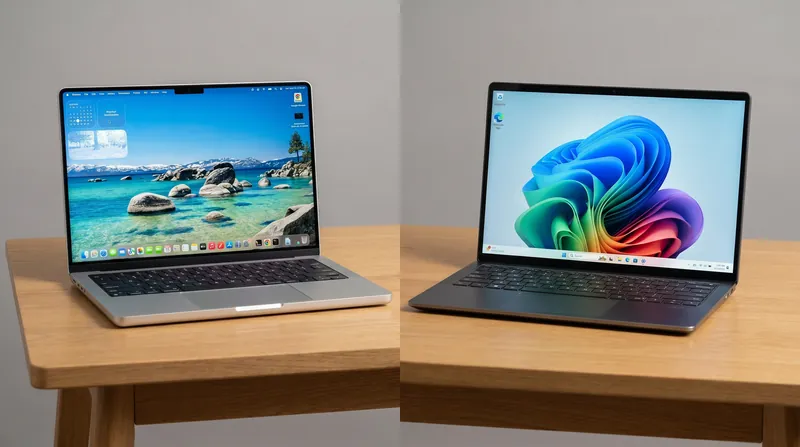
The rise of the NPU has coincided with a massive architectural war in the Windows laptop market. For decades, Intel and AMD's "x86" architecture dominated the PC industry. But the push for better battery life opened the door for ARM-based processors, the same highly efficient technology that powers smartphones and Apple's M-series MacBooks.
Qualcomm's Snapdragon X Elite processors brought ARM architecture to Windows in a major way, delivering laptops that can routinely cross 14 to 20 hours of real-world battery life. These chips run cool, wake instantly, and feature powerful integrated NPUs capable of 45 Trillion Operations Per Second (TOPS).
Microsoft capitalized on this hardware leap by introducing the "Copilot+ PC" standard. To earn this label, a Windows laptop must feature an NPU capable of at least 40 TOPS. This baseline ensures the device can handle advanced, on-device Windows AI features without stuttering.[2]
Intel and AMD did not sit idle. Intel's Core Ultra series and AMD's Ryzen AI processors have closed much of the efficiency gap, offering their own 48 to 50 TOPS NPUs while maintaining the traditional x86 architecture. While they may not quite match the multi-day battery endurance of ARM chips, they offer unmatched compatibility.
This architectural divide is the most critical decision for laptop buyers in 2026. If your daily workflow lives in web browsers, Microsoft Office, and cloud applications, an ARM-based Snapdragon laptop offers a near-silent, ultra-mobile experience with battery life that easily survives a cross-country flight.
However, if you rely on legacy enterprise software, niche hardware drivers, or heavy PC gaming, the traditional x86 route remains the safer bet. Intel and AMD's latest chips still provide the raw multi-core horsepower and software compatibility required by complex engineering tools and modern games.
Memory is another crucial factor that buyers often overlook in the AI era. Because NPUs share system memory to load large AI models, 8GB of RAM is no longer sufficient. Industry experts now recommend 16GB as the absolute minimum for a smooth experience, while developers and creators running local LLMs should target 32GB.[2]
Ultimately, the NPU is not just a marketing buzzword; it is a fundamental restructuring of how personal computers operate. By dedicating a specific lane for machine learning, laptops have become smarter without sacrificing endurance.[1]
Whether you choose the battery-sipping efficiency of ARM or the robust compatibility of x86, buying an AI PC in 2026 ensures your hardware is ready for the next decade of software evolution.[2]
Viewpoints in depth
Mobile Professionals
Prioritize ARM/Snapdragon for 20+ hour battery life and cool operation.
For users whose workflow lives entirely in web browsers, Microsoft Office, and cloud applications, raw multi-core performance takes a backseat to endurance. This camp argues that the ARM architecture, championed by Qualcomm's Snapdragon X Elite and Apple's M-series, fundamentally changes how a laptop is used. By delivering 15 to 20 hours of real-world battery life and instant-wake capabilities, these devices eliminate the need to carry a charger, making them the ultimate tool for frequent travelers and remote workers.
Legacy & Enterprise Users
Stick to x86 to ensure compatibility with older software, kernel-level drivers, and PC gaming.
Despite the impressive battery life of ARM chips, enterprise IT departments and gamers remain loyal to the x86 architecture provided by Intel and AMD. This perspective highlights that while emulation has improved, running specialized engineering software, legacy financial tools, or kernel-level security drivers on ARM can lead to crashes or performance hits. For these users, the slight trade-off in battery life is a necessary price to pay for the guarantee that every application and game will run flawlessly out of the box.
AI Developers
Focus on high TOPS counts and massive RAM to run local LLMs without cloud costs.
Software engineers and AI researchers view the laptop not just as a consumption device, but as a local server for machine learning. This camp prioritizes NPUs with the highest TOPS ratings (45+) and insists on configuring machines with 32GB to 64GB of high-bandwidth RAM. By running Large Language Models and image generation pipelines locally, developers can experiment freely without paying expensive cloud API fees, while also ensuring that proprietary code and sensitive data never leave the physical machine.
Key points
- Neural Processing Units (NPUs) are dedicated chips that handle AI tasks, saving 15-20% battery life compared to using a CPU or GPU.
- Microsoft's Copilot+ PC standard requires laptops to have an NPU capable of at least 40 Trillions of Operations Per Second (TOPS).
- ARM-based laptops offer up to 20 hours of battery life, making them ideal for mobile professionals.
- Traditional x86 laptops have closed the efficiency gap while maintaining crucial compatibility for legacy software and gaming.
What we don’t know
- How quickly third-party software developers will natively optimize their legacy applications for ARM-based Windows laptops.
- Whether future NPU requirements for advanced local LLMs will quickly outpace the current 40 TOPS standard.
How we got here
Nov 2020
Apple introduces the M1 chip, proving ARM's efficiency in laptops and setting a new standard for battery life.
May 2024
Microsoft announces the Copilot+ PC standard, requiring 40 TOPS NPUs for next-generation Windows AI features.
Mid 2024
Qualcomm launches Snapdragon X Elite, bringing 20-hour battery life and powerful NPUs to Windows.
Late 2025
Intel and AMD release Core Ultra Series 2 and Ryzen AI 300, closing the efficiency gap while maintaining x86 compatibility.
- Efficiency Advocates
- Prioritize ARM-based processors for their 20-hour battery life, cool operation, and mobile-first design.
- Compatibility Traditionalists
- Favor x86 processors to ensure seamless performance with legacy software, enterprise drivers, and PC gaming.
- Developer & Creator Focus
- Focus on high TOPS counts and massive RAM capacities to run local AI models without cloud dependencies.
Perspectives this story doesn't cover
- Cloud Computing Providers
- Budget Laptop Shoppers
Sources
Source coverage
2 outlets
3 viewpoints surfaced


- [1]HP Tech TakesDeveloper & Creator Focus
What Is an NPU? Why Neural Processing Units Matter
Read on HP Tech Takes → - [2]Innova RetailDeveloper & Creator Focus
What Is an AI PC in 2026? AI Laptop Meaning & Buying Guide
Read on Innova Retail →
More in Shopping & Reviews
See all →Laptop Silicon
The RTX Spark Explainer: How Nvidia's New Processor Turns the Windows Laptop Market Into a Four-Way Race
2 sources
Hardware Standards
The End of the Barrel Plug: How the EU's April 2026 USB-C Mandate Will Reshape the Laptop Market
3 sources
Memory Market
Laptop Price Shock: How AI Memory Demand is Driving Up PC Costs Until 2030
3 sources
Laptop Ecosystems
Choosing Between Mac and Windows in 2026: A Definitive Guide for Everyday and Pro Work
3 sources
Comments
Every angle. Every day.
Get Shopping & Reviews stories with full source coverage and perspective breakdowns, free every day.