
The 2026 Guide to Buying an AI PC: What NPUs and TOPS Actually Mean
As the 'AI PC' label dominates laptop shopping in 2026, understanding Neural Processing Units (NPUs) and TOPS ratings is essential to avoid overpaying. This guide breaks down the hardware you actually need for local AI.
By Factlen Editorial Team
- Mainstream Buyers
- Prioritize battery life, offline capabilities, and avoiding the 'AI tax' for features they don't use.
- Industry Ecosystem
- Pushing the AI PC label to drive an industry-wide upgrade cycle and establish new baseline hardware specs.
- Power Users & Creators
- Demand raw compute power, prioritizing discrete GPUs over low-power NPUs for heavy generative tasks.
Why this matters
Laptop marketing is currently flooded with confusing acronyms designed to trigger an upgrade cycle. Understanding the actual hardware requirements for local AI ensures you buy a machine that fits your workflow without overspending on unnecessary specs.
If you have browsed for a new laptop at any point in 2026, you have undoubtedly been bombarded by a new wave of marketing terminology. The "AI PC" sticker is seemingly plastered on every device, accompanied by a dizzying alphabet soup of specifications: NPU, TOPS, and Copilot+. For everyday shoppers, separating the genuine technological leaps from the aggressive marketing hype has become a significant challenge.[2][7]
The marketing push is immense, driven by an industry eager to trigger a massive, global hardware upgrade cycle. However, beneath the flashy advertisements and holographic branding, there is a very real and highly beneficial architectural shift happening in consumer electronics. The way computers process information is fundamentally changing to accommodate the demands of artificial intelligence.[2][8]
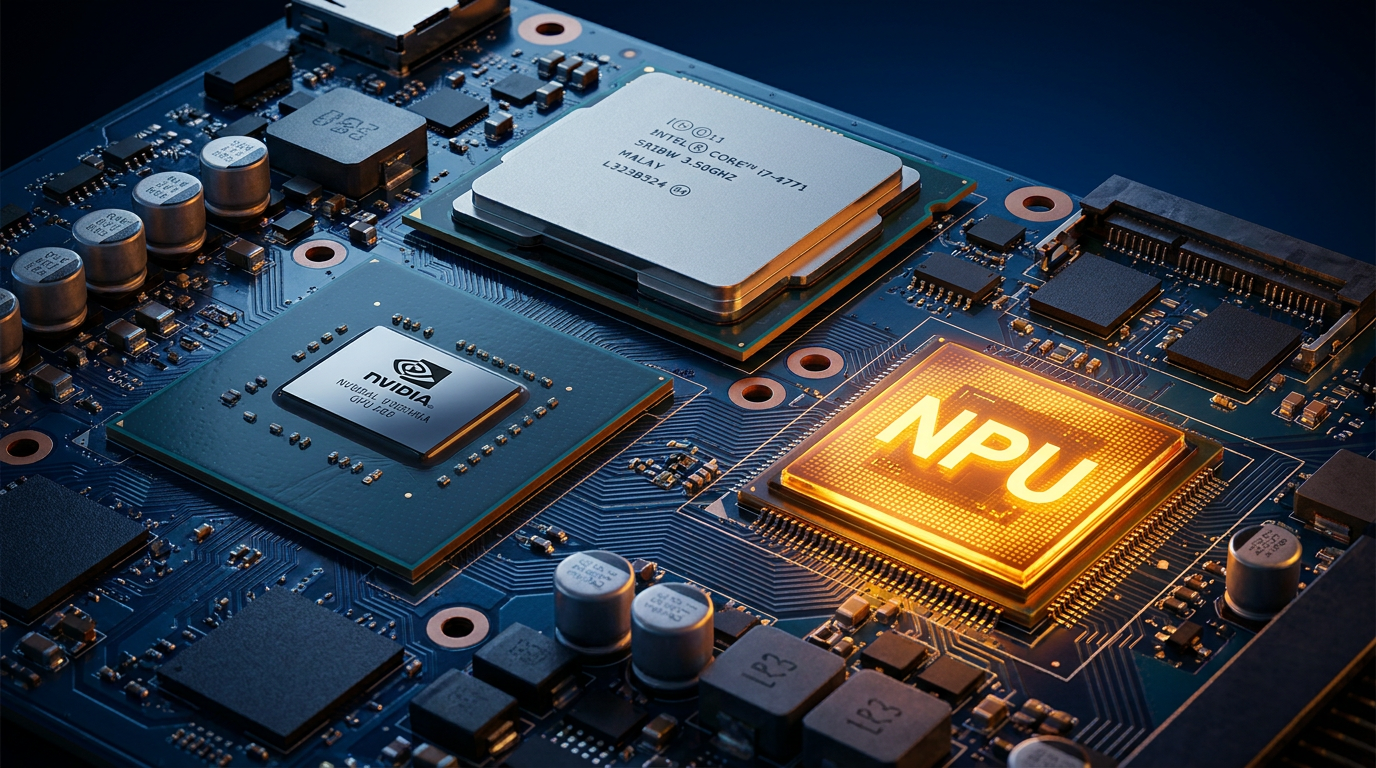
To understand the value of an AI PC, you have to look directly at the silicon. For decades, personal computers have relied on a standard two-processor paradigm. The CPU, or Central Processing Unit, acts as the general manager, handling everyday tasks and system operations. The GPU, or Graphics Processing Unit, acts as the specialist, rendering complex images and handling parallel processing for gaming and video editing.[3][4]
The problem the industry faced is that artificial intelligence workloads—specifically the dense matrix mathematics required to run neural networks—are highly inefficient on standard CPUs. While powerful GPUs can handle this math brilliantly, they consume massive amounts of power and generate significant heat, which can drain a thin-and-light laptop's battery in a matter of minutes.[3][4]

Enter the NPU, or Neural Processing Unit. This third processor is specifically designed from the ground up to run AI inference tasks locally on the device with extreme power efficiency. It is the defining hardware component that separates a true AI PC from a traditional computer.[2][3]
By offloading tasks like real-time audio transcription, video background blurring, and local language model processing to the NPU, the system frees up the CPU and GPU to do what they do best. This architectural division of labor results in cooler laptops, quieter fans, and significantly longer battery life during complex workflows.[1][3]
However, not all NPUs are created equal, which brings us to the most important acronym of 2026: TOPS. Standing for Tera Operations Per Second, TOPS has become the defining benchmark for AI PCs, serving as a theoretical speed limit for how fast a chip can handle local AI tasks.[5][6]
TOPS measures how many trillion mathematical operations an NPU can perform in a single second. While it is a generalized metric that does not account for every nuance of software optimization, it provides a reliable, standardized baseline for consumers to compare the raw AI horsepower of different laptops.[5][6]
Microsoft has drawn a hard line in the sand regarding this metric with its "Copilot+ PC" certification program. To earn this premium badge and unlock the most advanced, deeply integrated Windows 11 AI features, a laptop's NPU must be capable of delivering at least 40 TOPS.[1][2]

Microsoft has drawn a hard line in the sand regarding this metric with its "Copilot+ PC" certification program.
The 2026 hardware landscape has fully adapted to meet and exceed this standard. Qualcomm's Snapdragon X series consistently hits around 45 TOPS, Intel's Core Ultra 200V series reaches up to 48 TOPS, and AMD's Ryzen AI 300 and 400 series push the boundary between 50 and 60 TOPS, giving consumers plenty of high-performance options.[2][5]
Yet, focusing solely on the NPU's TOPS rating ignores the hidden bottleneck in the AI PC revolution: system memory. Running AI models locally requires loading massive datasets directly into the computer's RAM, making memory capacity and bandwidth absolutely critical for performance.[2][4]
Because of this heavy memory requirement, the era of the 8GB laptop is officially over. Microsoft mandates a strict minimum of 16GB of RAM for all Copilot+ PCs, and many developers and power users strongly advise upgrading to 32GB if you plan to run local Large Language Models or complex creative software.[1][2]

So, the ultimate question remains: do you actually need an AI PC right now? The answer depends entirely on your daily workflow. If your AI usage consists solely of typing prompts into cloud-based services like ChatGPT or Claude in a web browser, a traditional PC is perfectly fine, as the heavy lifting is done on remote servers.[2][8]
But if you are a productivity power user who relies on real-time meeting transcription, live translation across languages, or intelligent local file searching, an NPU is transformative. It allows these features to run instantly, completely offline, and without ever sending your private data to a corporate cloud server.[1][2]
Software developers are also reaping massive benefits from this hardware shift. Local inference allows coders to run AI assistants, test models, and compile code directly on their machines with zero latency, enhanced privacy, and no recurring API costs.[4][8]
For creative professionals, however, the NPU marketing can sometimes be misleading. If your primary goal is to generate high-resolution images using local models like Stable Diffusion, or to render AI-upscaled 4K video, a low-power NPU will not provide the necessary horsepower.[2][4]

Heavy creative workloads still require the brute computational force of a discrete GPU, such as an Nvidia RTX 4070. In these high-end scenarios, the NPU serves as a nice bonus for handling background tasks, but the discrete graphics card remains the primary engine for creative generation.[2][4]
Gamers find themselves in a similar position. While an NPU can efficiently handle background streaming software, voice isolation, and system management, the heavy lifting of AI frame generation and advanced upscaling still happens directly on the graphics card.[3][8]
Ultimately, buying an AI PC in 2026 is about investing in local capability and future-proofing your workflow. As software developers increasingly integrate AI features directly into everyday applications, having dedicated hardware ensures your machine will remain fast and responsive.[1][8]
The "AI PC" label might be overused in retail stores, but the underlying technology is a permanent evolution of the personal computer. By focusing on the TOPS rating, ensuring adequate RAM, and matching the hardware to your specific needs, you can cut through the marketing noise and find a machine that genuinely empowers your daily work.[2][8]
Viewpoints in depth
Everyday Consumers
Focusing on practical benefits like battery life and offline capabilities.
For the average buyer, the appeal of an AI PC lies less in generating complex code and more in quality-of-life improvements. Consumers are looking for laptops that run cooler, last longer on a single charge, and can handle background tasks like video call blurring or live transcription without stuttering. However, there is a growing wariness among buyers about paying an 'AI tax' for premium hardware if their daily workflow only requires basic web browsing and cloud-based applications.
Creative Professionals
Prioritizing raw graphical compute power over low-power efficiency.
The creative community views the NPU hype with a degree of skepticism. While an NPU is excellent for low-power background tasks, it lacks the brute force required for heavy generative AI workloads, such as rendering 4K video or generating high-resolution images via Stable Diffusion. For these users, a traditional discrete GPU remains the non-negotiable centerpiece of their hardware setup, making the NPU a secondary, albeit welcome, addition.
Software Developers
Valuing the privacy and latency benefits of local model inference.
Developers are among the most enthusiastic adopters of the AI PC architecture. The ability to run Large Language Models (LLMs) and code assistants locally on an NPU drastically reduces latency and eliminates the recurring costs associated with cloud API calls. Furthermore, local inference ensures that proprietary code and sensitive data never leave the device, solving one of the biggest security hurdles in enterprise AI adoption.
What we don't know
- Whether software developers will universally optimize their applications to utilize the NPU, or continue relying on the CPU and GPU.
- How quickly the 40 TOPS standard will become obsolete as local AI models grow in size and complexity.
- If the aggressive push for AI PCs will successfully trigger the massive consumer upgrade cycle manufacturers are hoping for.
Sources
Source coverage
8 outlets
3 viewpoints surfaced








[1]MicrosoftIndustry Ecosystem
Best AI PC features to look for in 2026: A beginner's guide
Read on Microsoft →[2]Newegg InsiderMainstream Buyers
AI PC Buying Guide: What to Look for in 2026
Read on Newegg Insider →[3]HP Tech TakesMainstream Buyers
What is an AI PC? Everything You Need to Know in 2026
Read on HP Tech Takes →[4]Dev.toPower Users & Creators
The 2026 AI PC and NPU laptop landscape for developers
Read on Dev.to →[5]Skywork AIPower Users & Creators
What AI TOPS actually means for Windows Copilot+ PCs
Read on Skywork AI →[6]GeekomIndustry Ecosystem
What AI TOPS do you need in an AI PC?
Read on Geekom →[7]Windows ForumIndustry Ecosystem
Microsoft's 2026 primer on the 'AI PC'
Read on Windows Forum →[8]Factlen Editorial TeamIndustry Ecosystem
Synthesis by Factlen editorial team
Read on Factlen Editorial Team →

More in shopping
See all 7 stories →Summer Sales
Amazon and Target Shift Massive Summer Deal Events to June 23-26
0 sources

Auto Tech
EV vs. PHEV in 2026: The Complete Cost, Range, and Lifestyle Comparison
0 sources
TV Tech
OLED vs. Mini-LED in 2026: The Definitive TV Technology Comparison
0 sources

Sustainable Tech
The End of Disposable Tech: How Modular Laptops and New Laws Are Changing Electronics
0 sources
Every angle. Every day.
Get shopping stories with full source coverage and perspective breakdowns delivered to your inbox.