
E-Ink vs. OLED Tablets: The 2026 Guide to Choosing Your Deep Work Device
As color e-ink technology matures and iPads become more powerful, the choice between a dedicated digital notebook and a do-everything tablet comes down to how you manage your attention.
By Factlen Editorial Team
- Focus Maximalists
- Argue that the limitations of e-ink are its greatest features, enforcing deep work by physically preventing digital distractions.
- Versatility Seekers
- Argue that single-purpose devices are inefficient, prioritizing the high refresh rates and app ecosystems of OLED tablets.
- Hybrid Adopters
- Advocate for using both devices—e-ink for reading and drafting, and OLED for communication and color-critical tasks.
What's not represented
- · Environmental advocates analyzing the e-waste impact of owning multiple devices
- · Budget-conscious students who cannot afford premium single-purpose hardware
Why this matters
The screen you choose dictates how you work. Selecting the right device can drastically reduce eye strain, eliminate digital distractions, and help you reclaim hours of focused, deep work.
Key points
- E-ink tablets have evolved to include color displays and highly responsive styluses.
- Testing shows e-ink screens can reduce reported eye fatigue by up to 73% compared to OLED displays.
- The iPad Pro remains superior for video, fast-paced web browsing, and high-fidelity color tasks.
- Many professionals are adopting a hybrid approach, using e-ink for focused drafting and iPads for communication.
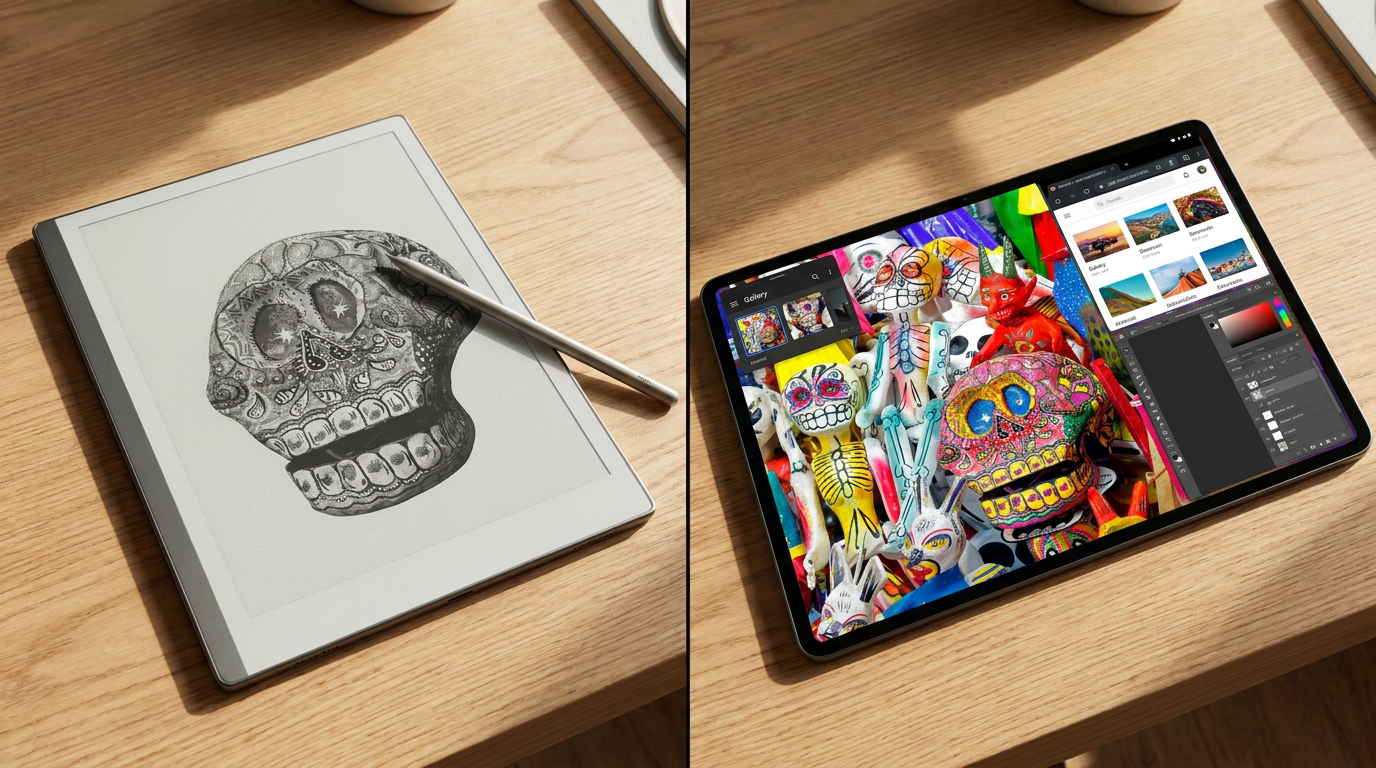
In the era of constant connectivity, the device in your hands matters more than any productivity hack. For professionals, students, and creatives trying to read deeply or take long notes, the 2026 tablet market has bifurcated into two distinct philosophies. On one side is the e-ink tablet, a device that feels like paper and actively refuses to dazzle you. On the other is the premium OLED tablet, like the iPad Pro, which can do absolutely everything—including distract you with everything.[1][5]
This comparison is no longer about which piece of hardware is objectively superior. It is about matching the hardware to the kind of attention you are trying to protect. Reading, markup, research, and “thinking work” each stress the screen differently. E-ink tablets trade flexibility for frictionless focus, while iPads trade focus risk for boundless capability.[1]
Modern e-ink tablets are no longer the glorified, sluggish e-readers of the past. Devices like the reMarkable Paper Pro, Boox Note Air 4 Pro, and the Kindle Scribe Colorsoft now ship with responsive styluses, cloud sync, and handwriting recognition that is finally usable for everyday notes. More importantly, the "black and white only" excuse is dead. With the integration of Kaleido 3 technology, color e-ink has become accessible, allowing for color-coded notes and highlighted PDFs without the harsh glare of a backlight.[1][2][3][5]

The 2026 hardware landscape offers highly specialized tools for different buyer types. The reMarkable 3 and Paper Pro set the standard for a pure, minimalist writing experience with incredibly low 15-millisecond latency. Meanwhile, the Boox Note Air 4 Pro runs a full Android 14 operating system, offering unparalleled versatility for professionals who need specific apps but still want an e-ink screen. For those deeply embedded in the Amazon ecosystem, the Kindle Scribe Colorsoft dominates with its 300ppi micro-etched display and seamless library integration.[2][4][5]
The physiological benefits of e-ink remain its strongest selling point. Because the display is reflective like paper rather than emitting light, it drastically reduces eye fatigue over long sessions. Recent testing showed a 73% reduction in reported eye fatigue when using e-ink compared to backlit LCD or OLED displays. Furthermore, the battery life is measured in weeks, not hours. A standard e-ink device can last four to six weeks on a single charge, whereas an iPad Pro will tap out after roughly 10 hours of heavy use.[2][3]
The physiological benefits of e-ink remain its strongest selling point.
Beyond the hardware, e-ink offers a psychological cue: the device is strictly for work. Most e-ink tablets are single-purpose devices, eliminating the temptation to check a bright app drawer, scroll through social media, or answer a Slack message. For reading-heavy workflows—academic PDFs, long reports, technical manuals—this static, paper-like presentation is a massive feature that protects cognitive bandwidth.[1][3]

However, e-ink still fights physics. Despite improvements, including experimental open-source displays hitting 75Hz, ghosting and latency still matter. If your workflow involves rapid scrolling through dense web apps, hopping between browser tabs, or reviewing color-coded dashboards, an e-ink tablet will feel like the wrong tool. Video playback, smooth animation, and fast-paced UI interactions remain the exclusive domain of traditional displays.[1][3]
This is where the iPad Pro and its OLED competitors shine. Apple's M-series chips and 120Hz ProMotion displays offer an unparalleled, fluid experience. If your notes must become searchable documents with rich interoperability, or if you need precise vector erasing and collaborative review, the iPad's app ecosystem is vastly superior. Product teams, designers, and those who need to quickly screenshot and share color markups will find the iPad indispensable.[1][4][6]
But that versatility comes with a severe "distraction tax." The iPad is designed to capture and hold your attention. The vibrant, glossy display that makes movies look incredible is the same screen that punishes your eyes during a four-hour reading session. If you tell yourself you will “mostly read” but actually spend half your day bouncing between Slack, Notion, and YouTube, you will fight the hardware more than you will benefit from it.[1][3]

For many professionals in 2026, the ideal setup is not a strict binary, but a hybrid approach. They utilize an e-ink tablet for focused, deep work—reading, drafting, and brainstorming—and rely on an iPad or laptop for communication, color-critical tasks, and final formatting. Devices like the Pen Star eNote Pro are even being designed to collaborate seamlessly with the iPad, bridging the gap between the two ecosystems.[2][4]
Ultimately, an e-ink tablet fits perfectly into workflows where the primary use is reading and writing for extended periods. It is the ideal choice for users who suffer from screen-induced eye strain or those who desperately need a distraction-free environment to process complex information, review long PDFs, or draft documents without the temptation of the internet.[2][4]
Conversely, e-ink does not fit well if you need to rapidly switch between multiple apps, watch video content, or work with high-fidelity color graphics. In those cases, the iPad Pro remains the undisputed champion. The OLED tablet fits best when you need a versatile, all-in-one device that occasionally serves as a notebook, but primarily functions as a lightweight computer for communication, design, and media consumption.[1][2][4]
How we got here
2020
The reMarkable 2 launches, popularizing the premium e-ink digital notebook category.
2022
Amazon enters the productivity space with the first-generation Kindle Scribe.
2024
Kaleido 3 color e-ink technology begins appearing in mainstream consumer tablets.
2025
Startups debut experimental open-source e-paper displays capable of hitting 75Hz refresh rates.
2026
The tablet market fully bifurcates, with premium color e-ink devices competing directly against OLED iPads for professional deep work.
Viewpoints in depth
Focus Maximalists
Advocates who believe the limitations of e-ink are its greatest strength.
This camp argues that in an attention economy, hardware that actively prevents distraction is invaluable. By physically limiting the ability to watch videos, scroll social media, or rapidly switch between web apps, e-ink tablets enforce deep work. They view the lack of a backlight and the muted colors not as technological shortcomings, but as essential features that protect cognitive bandwidth and long-term eye health.
Versatility Seekers
Users who prioritize having a single, powerful device that can handle any task.
For versatility seekers, spending upwards of $500 on a single-purpose device is inefficient. They argue that the iPad Pro's OLED screen, 120Hz refresh rate, and robust app ecosystem make it the ultimate productivity tool. This camp values the ability to pivot seamlessly from taking handwritten notes to editing a 4K video or joining a collaborative Zoom call on a single pane of glass, accepting the risk of distraction as a fair trade for boundless capability.
Hybrid Adopters
Professionals who utilize both technologies for their respective strengths.
Hybrid adopters argue that professionals shouldn't have to choose between focus and versatility. They view e-ink as a specialized tool for reading, drafting, and brainstorming, while treating the iPad or laptop as a communication and finishing tool. By separating the "thinking work" from the "execution work" onto different devices, they maximize the benefits of both ecosystems without suffering the drawbacks of either.
What we don't know
- Whether experimental 75Hz e-ink displays will reach mass-market consumer devices before 2027.
- How Apple might respond to the growing e-ink market, as rumors of an Apple-branded e-paper device remain unconfirmed.
Key terms
- E-ink (Electronic Ink)
- A display technology that uses charged microcapsules to create text and images by reflecting ambient light, mimicking the appearance of physical paper.
- OLED (Organic Light-Emitting Diode)
- A display technology where each pixel emits its own light, allowing for perfect blacks, infinite contrast, and vibrant colors.
- Kaleido 3
- The latest generation of color e-ink technology, offering improved color saturation and resolution compared to previous iterations.
- Ghosting
- A visual artifact on e-ink screens where a faint trace of the previous image remains visible after the screen refreshes.
- Refresh Rate
- The speed at which a display updates its image, measured in Hertz (Hz). Higher rates result in smoother motion, which e-ink traditionally struggles with.
Frequently asked
Can I watch videos on a color e-ink tablet?
Technically yes on some Android-based models, but the refresh rate is too slow for a good experience. Video playback will look like a choppy, muted slideshow.
Do e-ink tablets support Microsoft Office or Google Docs?
Android-based e-ink tablets like the Boox series support these apps natively. Minimalist devices like the reMarkable rely on their own proprietary software and cloud sync for document management.
Is color e-ink as vibrant as an iPad screen?
No. Color e-ink uses a color filter over black-and-white capsules, resulting in muted, pastel-like colors rather than the bright, glowing hues of an OLED screen.
How long does an e-ink tablet battery really last?
Depending on usage and Wi-Fi connectivity, most premium e-ink tablets last between three to six weeks on a single charge, far exceeding traditional tablets.
Sources
Source coverage
6 outlets
3 viewpoints surfaced






[1]Futurion BlogFocus Maximalists
E-ink vs iPad for Deep Work: The 2026 Guide
Read on Futurion Blog →[2]RoipadHybrid Adopters
The Ultimate Guide to E-Ink Tablets for Note-Taking and Reading (2026 Edition)
Read on Roipad →[3]MakeUseOfFocus Maximalists
5 reasons why e-ink tablets are better than iPads in 2026
Read on MakeUseOf →[4]MagicaVersatility Seekers
The E-Ink Tablet Landscape in 2026
Read on Magica →[5]Trusted ReviewsHybrid Adopters
Best E-Ink Tablets 2026
Read on Trusted Reviews →[6]Apple NewsroomVersatility Seekers
Apple introduces the new iPad Pro with OLED display
Read on Apple Newsroom →


Every angle. Every day.
Get meta stories with full source coverage and perspective breakdowns delivered to your inbox.