
E-Ink vs. OLED Tablets: The 2026 Buying Guide for Productivity and Focus
As digital fatigue peaks in 2026, dedicated E-Ink tablets are challenging the iPad's dominance by trading multimedia versatility for weeks of battery life, zero eye strain, and distraction-free focus.
By Factlen Editorial Team
- Multimedia Generalists
- Believe tablets should be versatile, powerful computers capable of replacing a laptop for diverse tasks.
- Distraction-Free Minimalists
- Argue that the primary value of a tablet is providing a quiet, disconnected space for deep thought and writing.
- Hybrid Power Users
- Seek the eye comfort of E-Ink but demand access to cloud syncing and third-party productivity apps.
What's not represented
- · Digital Artists
- · K-12 Educators
Why this matters
Choosing the right tablet architecture fundamentally alters how you work and process information. While an OLED tablet maximizes your ability to multitask, an E-Ink device protects your visual health and forces deep, uninterrupted focus.
Key points
- E-Ink tablets use reflective technology that eliminates blue light and drastically reduces eye strain during long reading sessions.
- Traditional OLED tablets offer unmatched versatility and speed, but their emissive screens and app ecosystems can cause digital fatigue and distraction.
- E-Ink devices can last weeks on a single charge and remain perfectly legible in direct sunlight.
- Color E-Ink models offer a middle ground, but their muted colors and slower refresh rates cannot match traditional screens for multimedia.
- Once styluses and protective folios are factored in, premium E-Ink setups cost roughly the same as an iPad Air or Mini.
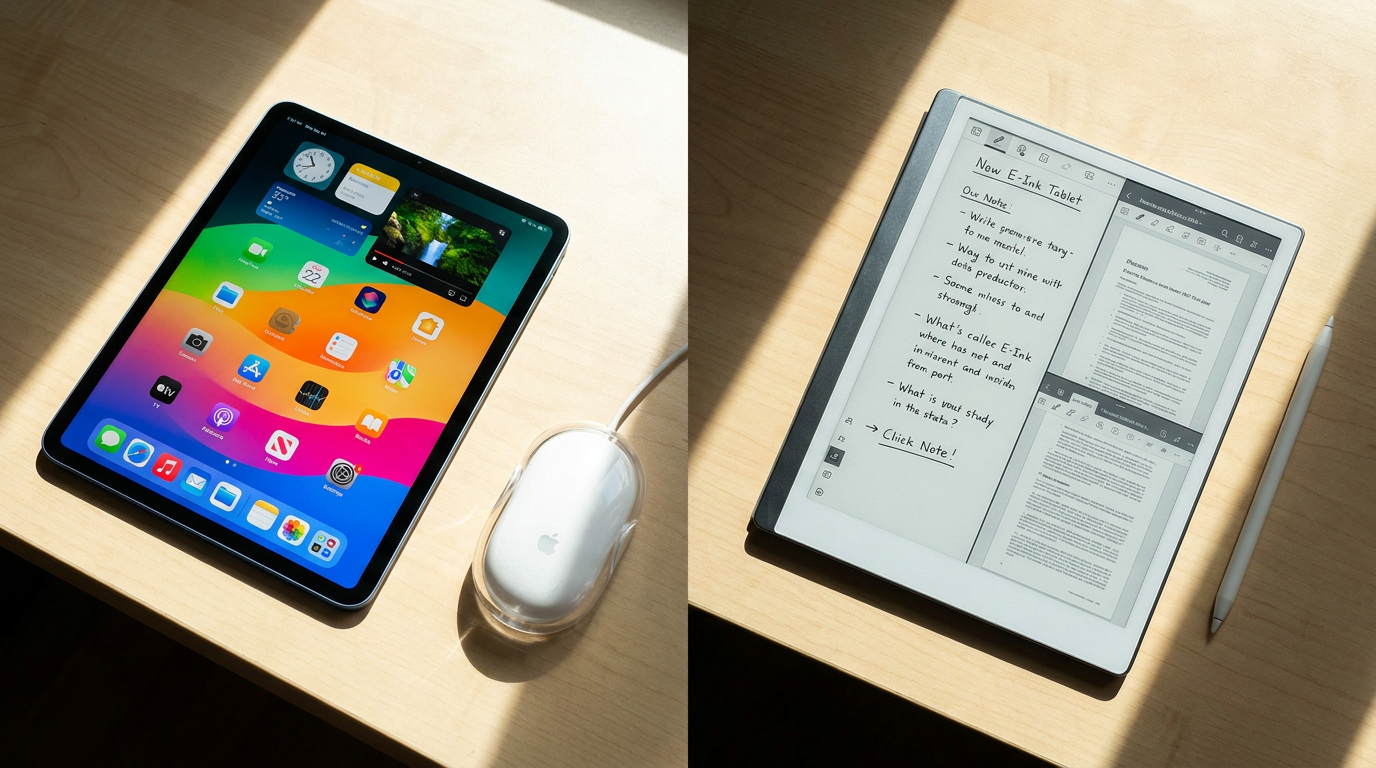
The 2026 tablet market has fractured into two distinct philosophies. On one side sits the traditional OLED or LCD tablet, epitomized by the Apple iPad and Samsung Galaxy Tab, which function as versatile, glowing supercomputers. On the other side is the rapidly maturing E-Ink tablet market, led by devices like the reMarkable 2, Kindle Scribe, and Boox Note Air5 C. Rather than competing on processing power, these digital notebooks compete on cognitive clarity, offering a deliberate escape from the notification-heavy ecosystems of modern computing.[1][2]
The fundamental trade-off between these devices begins at the hardware level with display technology. Traditional tablets utilize emissive displays, meaning they project light directly into the user's eyes to create vibrant, high-refresh-rate images. E-Ink tablets, conversely, use reflective technology. Millions of microscopic microcapsules containing positively and negatively charged particles rise to the surface to form text and images, relying on ambient room light to be visible, exactly like physical paper.[5][7]
The argument for E-Ink rests heavily on this reflective architecture, which provides significant physiological benefits. Evidence shows that prolonged exposure to the short-wavelength blue light emitted by traditional tablets can suppress melatonin, disrupt saccadic eye control, and trigger ciliary muscle spasms. E-Ink displays emit zero blue light natively. Users frequently report a drastic reduction in ocular dryness and mental fatigue during long reading sessions, making E-Ink the medically sound choice for those who spend hours reviewing documents or textbooks.[1][5]

However, the argument against E-Ink is rooted in the very physics that make it comfortable: it is inherently slow. While traditional tablets refresh their screens 60 to 120 times per second, allowing for buttery-smooth video playback and rapid scrolling, E-Ink screens require a fraction of a second to physically rearrange their ink particles. This results in a lower refresh rate that makes watching video or playing games practically impossible, and fast typing can sometimes feel laggy compared to the instant feedback of an iPad.[2][7]
Beyond hardware, the software philosophies of these devices present another major trade-off. The argument for the iPad is its unmatched versatility; it is a "do-it-all" device. With features like Stage Manager and Split View, users can seamlessly juggle a Zoom call, a web browser, and a note-taking app simultaneously. The evidence for its supremacy lies in its massive App Store ecosystem, which allows the device to morph from a video editing bay into a digital synthesizer or a gaming console at a moment's notice.[2][6]
Yet, for a growing segment of professionals, this versatility is exactly the problem. The argument against traditional tablets is the "cost of just one more app." The constant temptation to switch tabs, check emails, or respond to messages creates cognitive friction that undermines deep, reflective work. Devices like the reMarkable intentionally strip away web browsers, social media, and email clients. The evidence supporting this minimalist approach is found in user retention: buyers consistently report higher levels of focus and greater output when their device physically prevents them from multitasking.[1][6]
Yet, for a growing segment of professionals, this versatility is exactly the problem.
The tactile writing experience also sharply divides the two camps. Writing on an iPad with an Apple Pencil feels like gliding hard plastic over smooth glass—it is fast and precise, but lacks physical resistance. E-Ink tablets are engineered to replicate the friction of a pen on paper. The screens feature a textured, matte finish that provides acoustic and tactile feedback, which many users find essential for memory retention and satisfying handwriting.[3][5]
Battery life presents one of the most quantifiable trade-offs. The argument for E-Ink's efficiency is staggering: because the display only draws power when the screen changes state—not while a static image is displayed—devices like the Kindle Scribe or reMarkable can last two to four weeks on a single charge. In contrast, even the most advanced iPad Pro or iPad Air will typically deplete its battery in about 10 hours of active use, tethering the user to a wall outlet for daily charging.[2][6]

Outdoor usability further highlights these differences. If you attempt to use an iPad in direct sunlight, the glass screen acts as a mirror, and the device must push its brightness to maximum, often leading to thermal throttling or rapid battery drain. E-Ink tablets thrive in direct sunlight. Because they rely on ambient light, the brighter the environment, the crisper and more legible the digital ink becomes, making them the undisputed choice for outdoor reading and fieldwork.[1][5]

For users who want the eye comfort of E-Ink but the versatility of apps, the 2026 market offers a middle ground: Android-based color E-Ink tablets like the Boox Note Air5 C. These devices utilize Kaleido 3 technology to display up to 4,096 colors and run a full Android operating system, allowing users to download apps like OneNote or Google Drive. However, the trade-off is that colors appear muted and pastel-like compared to an OLED screen, and third-party apps are rarely optimized for the slower refresh rates of electronic ink, leading to occasional ghosting.[4][7]
Cost is often a misunderstood factor in this comparison. While a base-model E-Ink tablet might appear cheaper than an iPad Pro, the prices quickly align once accessories are factored in. By the time a user purchases a premium stylus with a built-in eraser and a protective folio cover, a high-end E-Ink setup can easily exceed $500, placing it squarely in the same price bracket as an iPad Air or iPad Mini. The investment in E-Ink is not about saving money; it is about paying for a specialized, premium tool.[2][4]
Ultimately, choosing between these ecosystems requires an honest assessment of daily habits. An E-Ink tablet fits well when your primary tasks involve deep reading, drafting, journaling, and reviewing long-form PDFs. It is the ideal companion for users who suffer from screen fatigue or who need a dedicated space to think without digital interruptions. It does not fit when your workflow demands video conferencing, rapid app switching, colorful multimedia presentations, or complex graphic design.[3][6]
Conversely, a traditional OLED tablet fits well when you need a single, powerful device that can handle everything from answering emails and editing spreadsheets to streaming movies and sketching in full color. It is the ultimate hybrid machine for dynamic, fast-paced workflows. It does not fit when you struggle with digital distractions, experience headaches from backlit screens, or require a device that can survive a week off the grid without a charger.[2][6]

Viewpoints in depth
The Minimalist View
Why stripping away features is a feature, not a bug.
For the distraction-free minimalist, the iPad's greatest strength—its ability to do everything—is its fatal flaw. This camp argues that human cognition is not designed for constant context-switching. By physically removing the ability to check email or browse the web, devices like the reMarkable force the user to confront the blank page. They cite the rising epidemic of digital fatigue as evidence that we need specialized tools for thinking, rather than generalized tools for consuming.
The Generalist View
Why processing power and versatility remain king.
Multimedia generalists view E-Ink tablets as overpriced, single-purpose accessories. They argue that for $500, a device should be able to join a video call, edit a spreadsheet, and play a movie. From this perspective, the iPad is the ultimate productivity multi-tool. If distraction is an issue, they argue the solution is software discipline—using Focus Modes and app timers—rather than buying hardware that is intentionally crippled by slow refresh rates and monochrome screens.
The Hybrid View
Bridging the gap with Android-powered E-Ink.
The hybrid camp refuses to choose between eye comfort and app access. Users of devices like the Boox Note Air5 C argue that E-Ink is the superior display technology for health and battery life, but they still need to sync notes to Notion or download PDFs from Google Drive. They are willing to accept the compromises of color E-Ink—such as muted tones and occasional screen ghosting—in exchange for a device that protects their eyes without completely disconnecting them from their digital workflows.
What we don't know
- Whether future iterations of color E-Ink will ever achieve the saturation levels required to make them viable for professional photo editing.
- How quickly refresh-rate innovations, like those seen in experimental 60Hz E-Ink monitors, will become standard in portable tablets.
Key terms
- E-Ink (Electronic Ink)
- A display technology that uses charged microcapsules to physically form text and images, reflecting ambient light rather than emitting it.
- Emissive Display
- A screen technology, such as OLED or LCD, that creates images by projecting light directly outward toward the user's eyes.
- Refresh Rate
- The speed at which a screen updates its image. Traditional tablets refresh 60-120 times per second, while E-Ink takes a fraction of a second per frame.
- Kaleido 3
- The latest generation of color E-Ink technology, capable of displaying up to 4,096 distinct colors over a high-resolution black-and-white base layer.
- Ghosting
- A visual artifact common on E-Ink screens where faint traces of the previous page remain visible until the screen performs a full refresh.
Frequently asked
Can an E-Ink tablet replace my laptop?
No. E-Ink tablets are designed as companion devices for reading, writing, and reviewing documents. They lack the processing speed, refresh rate, and software ecosystem to handle full laptop workflows.
Does color E-Ink look like an iPad screen?
No. Color E-Ink (like Kaleido 3) displays muted, pastel-like colors that are excellent for highlighting text or viewing charts, but they cannot replicate the vibrant, glowing saturation of an OLED display.
Can I read an E-Ink tablet in the dark?
Yes, most modern E-Ink tablets include a front-light. Unlike a backlight that shines directly into your eyes, a front-light illuminates the screen from the edges, maintaining eye comfort in low light.
Do I have to pay a subscription to use an E-Ink tablet?
It depends on the brand. Devices like the reMarkable offer optional subscriptions for advanced cloud syncing and extended warranties, while brands like Boox and Kindle Scribe do not require ongoing fees for core features.
Sources
Source coverage
7 outlets
3 viewpoints surfaced







[1]MakeUseOfDistraction-Free Minimalists
Why E-Ink Tablets Are Replacing iPads for Productivity in 2026
Read on MakeUseOf →[2]Trusted ReviewsMultimedia Generalists
Remarkable 2 vs iPad Pro: Which tablet is best for you?
Read on Trusted Reviews →[3]ZDNETMultimedia Generalists
Yes, you need a note-taking tablet - and these 5 I've tested are on sale
Read on ZDNET →[4]eReadersForumHybrid Power Users
The Best 10-Inch E-Ink Tablets of 2026: A Comprehensive Guide
Read on eReadersForum →[5]RoipadHybrid Power Users
Why E-Ink Tablets Matter in 2026
Read on Roipad →[6]ChesonaDistraction-Free Minimalists
iPad vs. reMarkable: Device Purpose and Philosophy
Read on Chesona →[7]BooxHybrid Power Users
Traditional display VS. E Ink display
Read on Boox →
Every angle. Every day.
Get guides stories with full source coverage and perspective breakdowns delivered to your inbox.