
Copilot+ PCs and the Rise of the NPU: How to Buy an AI Laptop in 2026
The integration of Neural Processing Units (NPUs) has fundamentally changed the laptop market, delivering multi-day battery life and on-device AI capabilities. Here is how to navigate the three-way silicon race between Qualcomm, Intel, and AMD.
By Tiago Sousa

In short
- Neural Processing Units (NPUs) offload AI tasks from the CPU, drastically improving battery life.
- Microsoft's Copilot+ standard requires an NPU capable of at least 40 Trillion Operations Per Second (TOPS).
- Qualcomm's ARM-based Snapdragon chips currently lead the market in raw battery endurance.
Buying a laptop in 2026 feels fundamentally different than it did just two years ago. For the past decade, the decision tree was simple: pick a screen size, decide how much you wanted to spend, and buy the fastest Central Processing Unit (CPU) you could afford. But a quiet hardware revolution has upended that formula, shifting the focus away from raw clock speeds and toward specialized efficiency.
The sticker on the palm rest now advertises a third brain inside the machine: the Neural Processing Unit, or NPU. This dedicated silicon has transformed the Windows laptop ecosystem, effectively ending the era of hot, loud, and short-lived portable computers by changing how the system delegates its workload.[2]
Driven by Microsoft’s "Copilot+ PC" standard, the integration of NPUs has triggered a fierce three-way silicon war between Qualcomm, Intel, and AMD. The result is a massive win for consumers: laptops that can genuinely last multiple days on a single charge while running complex tasks locally.
To understand why the NPU matters, you have to look at how laptops traditionally handled artificial intelligence. Previously, tasks like blurring your background on a video call, transcribing a lecture, or generating text were brute-forced by the CPU or the Graphics Processing Unit (GPU).[2]
While CPUs and GPUs are incredibly powerful, they are generalists. Forcing them to perform the specific, repetitive math required by machine learning algorithms is akin to using a sports car to tow a tractor—it works, but it burns through fuel rapidly and generates massive amounts of heat, spinning up the laptop's fans in the process.[2]
The NPU is a specialized efficiency engine designed to do exactly one thing: matrix multiplication. By offloading AI tasks to the NPU, the laptop frees up the CPU for general computing and the GPU for rendering, all while drawing a fraction of the wattage.[2]
The performance of these chips is measured in TOPS, or Trillions of Operations Per Second. To qualify for Microsoft’s Copilot+ PC designation in 2026, a laptop must feature an NPU capable of at least 40 TOPS, a bar that ensures the hardware can handle sustained workloads without buckling.
This 40-TOPS threshold is not just a marketing gimmick; it is the baseline required to run "local inference." Local inference means the AI models live directly on your laptop's solid-state drive, rather than relying on a distant cloud server to process your prompts and return an answer.
Running AI locally provides three immediate benefits: zero latency, offline capability, and total privacy. Features like real-time translation, live meeting transcription, and semantic file search happen instantly on the device, ensuring your sensitive data never leaves your hard drive.
The race to dominate this new Copilot+ era has split the Windows market into two distinct architectural camps. On one side is Qualcomm, which brought smartphone-style ARM architecture to laptops with the Snapdragon X Elite and X Plus processors, prioritizing extreme efficiency.[2]
Qualcomm’s ARM chips have completely rewritten the rules of battery life. Independent testing of the HP OmniBook 5 14, powered by a Snapdragon chip, yielded an astonishing 32 hours of continuous video playback. Because they run so cool, many of these machines are entirely fanless, operating in total silence.
On the other side of the aisle are Intel and AMD, defending the traditional x86 architecture. Intel’s Core Ultra series and AMD’s Ryzen AI 300 series have aggressively closed the efficiency gap, proving that legacy architecture can still compete in the AI era.[2]
Intel’s latest chips utilize a highly efficient manufacturing process, allowing laptops like the MSI Prestige 14 Flip AI+ to push past the 30-hour battery mark in real-world testing. AMD, meanwhile, pairs its 50-TOPS NPU with robust Radeon integrated graphics, making it the preferred choice for users who want to mix AI productivity with light gaming.[1][3]
The choice between ARM (Qualcomm) and x86 (Intel/AMD) ultimately comes down to software compatibility. While Windows 11's "Prism" emulator seamlessly translates most legacy applications to run on ARM, specialized engineering software, niche plugins, and heavy PC games still run best on native x86 silicon.[2]
Regardless of the processor you choose, the Copilot+ era has introduced a new hard rule for laptop shoppers: 16 gigabytes of RAM is the absolute minimum. The days of buying an 8GB laptop for basic web browsing are officially over.
Because local AI models must be loaded into the system's memory to function quickly, an idle Copilot+ PC uses significantly more RAM than a traditional laptop. For developers, video editors, or heavy multitaskers, 32GB is rapidly becoming the recommended standard to prevent the system from slowing down under load.
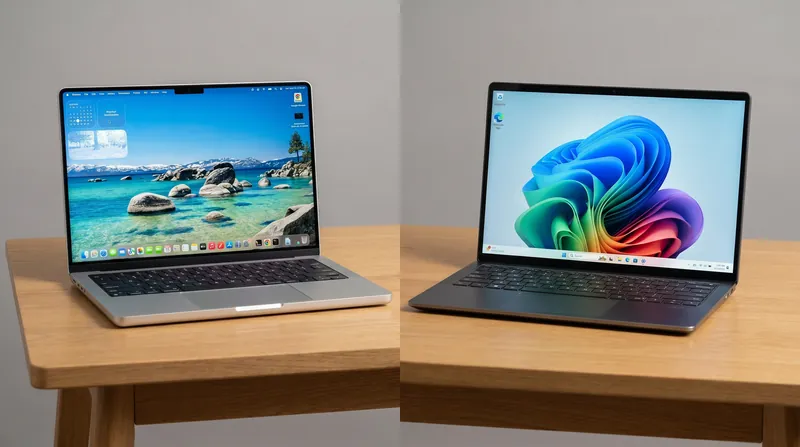
Apple, while not part of the Copilot+ program, remains a formidable parallel option. The 2026 MacBook Pro models, powered by the M5 Pro chip, feature Apple's highly mature Neural Engine, offering comparable local AI acceleration and roughly 18 to 24 hours of battery life, depending on the workload.[3]
Ultimately, the rise of the NPU means that the "AI laptop" is no longer a futuristic concept—it is the baseline. Whether you care about artificial intelligence or simply want a computer that will not die during a cross-country flight, the Copilot+ generation represents the most significant leap in laptop usability in over a decade.[4]
Terms to know
- NPU (Neural Processing Unit)
- A specialized hardware chip designed specifically to execute the complex math required by artificial intelligence algorithms efficiently.
- TOPS (Trillion Operations Per Second)
- The standard metric used to measure the performance of an NPU. Microsoft requires 40 TOPS for Copilot+ certification.
- Local Inference
- The process of running an artificial intelligence model directly on a device's hardware, rather than sending data to a cloud server.
- ARM Architecture
- A highly efficient processor design, originally popularized by smartphones, now used in Apple Silicon and Qualcomm Snapdragon laptop chips.
- x86 Architecture
- The traditional processor design used by Intel and AMD, which offers maximum compatibility with decades of legacy PC software and games.
Questions readers ask
Do I really need an AI laptop if I don't use AI?
Yes, but not for the AI features. The chips designed for these laptops are so efficient that they offer dramatically better battery life and cooler operation for everyday tasks like web browsing and video streaming.
Can I play games on a Copilot+ PC?
It depends on the processor. AMD Ryzen AI 300 and Intel Core Ultra laptops handle light-to-medium gaming well. Snapdragon (ARM) laptops can run some games via emulation, but they are not recommended for serious gamers.
Is 8GB of RAM enough in 2026?
No. The integration of local AI features and modern operating system demands means 16GB is the new absolute minimum, with 32GB strongly recommended for power users.
Different angles
Battery-First Mobile Workers
Users who prioritize multi-day endurance and silent operation above all else.
For traveling professionals, students, and remote workers, the raw benchmark scores of a processor matter far less than its efficiency. This camp heavily favors ARM-based Snapdragon laptops, viewing the 30-plus hours of battery life and fanless designs as a quality-of-life upgrade that fundamentally changes how they work. They are willing to trade niche software compatibility for the freedom of leaving their charger at home.
x86 Traditionalists
Power users and gamers who demand guaranteed compatibility with decades of Windows software.
This perspective, often held by engineers, legacy enterprise workers, and gamers, remains skeptical of the transition to ARM architecture. They argue that while emulators like Windows Prism are impressive, they introduce performance penalties and occasional bugs. For this camp, Intel's Core Ultra and AMD's Ryzen AI 300 series offer the perfect compromise: significant battery life improvements and NPU acceleration without abandoning the native x86 instruction set that underpins the PC gaming and enterprise software ecosystems.
Local AI Developers
Programmers and creators focused on running large language models directly on their hardware.
For developers building the next generation of AI tools, the laptop is a portable server. This camp evaluates machines strictly by their NPU TOPS ratings and unified memory capacity. They view the 40-TOPS Copilot+ baseline as merely a starting point, often pushing for 64GB of RAM to run local coding assistants and image generators simultaneously. To them, the NPU is not just a battery-saver; it is a critical development environment that eliminates costly cloud computing fees and data privacy risks.
- Battery-First Mobile Workers
- Users who prioritize multi-day endurance and silent operation above all else.
- x86 Traditionalists
- Power users and gamers who demand guaranteed compatibility with decades of Windows software.
- Local AI Developers
- Programmers and creators focused on running large language models directly on their hardware.
Perspectives this story doesn't cover
- Budget-conscious buyers who cannot afford the $1,000+ entry price of Copilot+ PCs.
- Linux users navigating driver support for the new NPU hardware.
Sources
Source coverage
4 outlets
3 viewpoints surfaced




- [1]PCMagx86 Traditionalists
Buying Guide: The Best Copilot+ Laptops for 2026
Read on PCMag → - [2]AIHardware.aiLocal AI Developers
Snapdragon X Elite vs Intel Lunar Lake vs AMD Ryzen AI 300
Read on AIHardware.ai → - [3]NotebookcheckBattery-First Mobile Workers
Intel Panther Lake and Apple M5 Pro battery life tested
Read on Notebookcheck → - [4]Factlen Editorial TeamLocal AI Developers
Synthesis by Factlen editorial team
Read on Factlen Editorial Team →
More in Shopping & Reviews
See all →Laptop Silicon
The RTX Spark Explainer: How Nvidia's New Processor Turns the Windows Laptop Market Into a Four-Way Race
2 sources
Hardware Standards
The End of the Barrel Plug: How the EU's April 2026 USB-C Mandate Will Reshape the Laptop Market
3 sources
Memory Market
Laptop Price Shock: How AI Memory Demand is Driving Up PC Costs Until 2030
3 sources
Laptop Ecosystems
Choosing Between Mac and Windows in 2026: A Definitive Guide for Everyday and Pro Work
3 sources
Comments
Every angle. Every day.
Get Shopping & Reviews stories with full source coverage and perspective breakdowns, free every day.